
Server rendering and hydration
Open the network tab on a server-rendered product page and there is one request, for the document, and none for the product.
Submit the Add to cart form and there is one POST, after which the cart in the header is already up to date.
Turn JavaScript off and the same form still adds to the cart.
None of that needs a change to the earlier pages.
The same Router from src/router.ts renders on both sides; there is no server variant to import.
This page explains what the server side does to make those three things true, and where the switches are when you need to change them.
The fullstack project shape wires all of this up.
If you started there, read this page to understand what it does; if you are adding server rendering to a project by hand, it tells you what to add.
Where the URL comes from
In the browser the router reads window.location.
On the server there is no window, so it reads the request: under start mode, the request event's request.url.
Only the pathname and search string take part in matching.
When there is no request, such as a test or a prerender script, pass the URL in:
import { renderToStream } from "@solidjs/web";import { Router } from "./router";
const html = await renderToStream(() => (  <Router url="https://example.com/products/mug" />));
A request event wins over the url prop when both are present.
Lazy route subtrees, the children: () => import(...) form, are asynchronous work during matching.
renderToStream waits for them; the synchronous renderToString cannot, so use the streaming entry for any route tree that has one.
Queries render once
The product page from the introduction rendered product().name on the server, and the browser did not fetch the product again.
During an async server render, each query result is serialized into the page along with its key.
When the client runs the same query with the same name and arguments, it finds the serialized value and adopts it instead of starting a request.
Two things follow:
- Keep the name and arguments stable across server and client.
A key built from
Date.now()or a random id never matches, and the page fetches twice. - Adoption has no age limit for a read outside a navigation, so a lazy route module that first reads a query well after load still adopts the server value. During a navigation the serialized value is accepted only while a preload of the same age would be, five seconds, or three minutes for back and forward; anything older runs fresh rather than presenting an old server value as new.
Adoption also works for reads that happen after hydration finishes, so a lazy chunk that loads later still finds its server data.
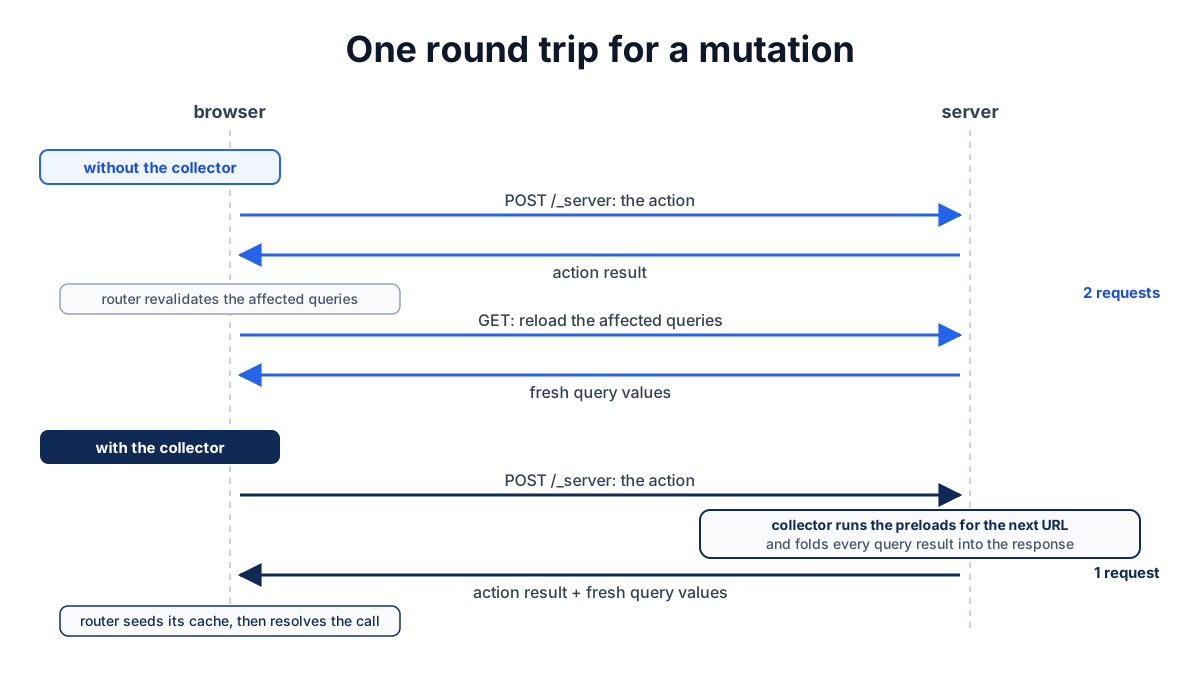
One round trip for a mutation
Submit a form backed by an action on a page that also reads a query.
Without the server-side collector, the browser makes two requests: the mutation, then the revalidation fetch when the router reloads the affected queries.
With it, the browser makes one: the mutation response carries the fresh query values, and the router seeds its cache from them before the action's caller even receives the return value.
The fullstack template enables this in two files.
The first registers the router as the collector:
import { configureServerFunctionsServer } from "@solidjs/web/server-functions/server";import { createFlightDataCollector } from "@solidjs/router/server";import { Router } from "./router";
configureServerFunctionsServer({  collectFlightData: createFlightDataCollector(Router),});
The second makes sure that module runs before any server function is dispatched:
solid({ start: true, serverFunctions: { configure: "./src/server-config.ts" },});Submit Add to cart with both in place and the network tab shows one POST /_server whose response carries the cart, and no request after it.
Deep diveWhat the collector does on each mutation
When a mutation finishes, the collector works out which URL the client will show next, whether that is the current page or a redirect target.
It resolves any lazy subtrees on that path, runs the root preload and the matched route preloads in data-only mode, and folds every query result they produced into the response.
On the client, the router applies the response's revalidation and redirect metadata, seeds the delivered values, and only then resolves the action call.
That is why the Data page recommends putting the reads a page needs in its preload: the collector can only refresh what the preloads touch.
Integrate a router describes the transport hooks the collector is built on.
To turn the protocol off, set singleFlight: false in createRouter.
Without a client consumer the transport does not send the single-flight header and the server does not run collection.
An app with its own server-function handler passes collectFlightData to handleServerFunctionRequest per request instead of using the configure module.
If the default server-function endpoint /_server is changed in the Vite plugin, set the router's actionBase to match so action URLs still reach it.
Forms without JavaScript
Disable JavaScript and submit the cart form from the Data page. It still works.
The action's URL points at the server-function handler.
The handler sees a plain form POST with no client runtime behind it, runs the server function, and instead of returning a payload the browser could not use, redirects back to the page with the outcome stored in a one-shot flash cookie.
When the router renders that page on the server, it clears and decodes the cookie into the same submission records that useSubmissions exposes, so a validation error from a no-JavaScript submit shows up in the same <p role="alert"> as a scripted one.
The router also covers the gap between the page loading and the action's module arriving. If a form is submitted before the code that defines its action has been loaded, the router recognizes the server-action URL, loads the submit path on demand, and sends the form through the server-function transport as usual.
A client-only action has no URL the server can run, so it needs its module loaded before the form is submitted. Progressive enhancement describes what the core runtime owns in this exchange and what the router adds.
Common problems
The first load shows nothing until every query has finished
There is no Loading boundary around props.children in App.
An async read with no boundary above it blocks the shell until it settles, so the server sends nothing until the slowest query returns.
Wrap props.children in <Loading fallback={...}> as the setup page shows; the shell then streams with the fallback and the page follows.
Hydration tag mismatch or Hydration structure mismatch in the console on a routed page
The server and the client rendered different trees for the same URL.
The usual causes are a component that branches on isServer or typeof window, which reports a tag mismatch when the branches are different elements, a value such as Date.now() in the render, or a url prop on the server that does not match what the browser loaded.
Render the same structure on both sides and fill in browser-only values after hydration; Hydrating server HTML covers the general case.
The page fetches data the server already rendered
The query key differs between server and client, or the read happened during a navigation more than five seconds after load. Check that the name and arguments are the same on both sides and contain nothing time-dependent or random.
The mutation still makes two requests
The serverFunctions.configure module is not set in vite.config.ts, so the collector never registered, or singleFlight: false is set on the router.
With a custom server-function handler, pass collectFlightData to handleServerFunctionRequest yourself.
Recap
- The same
Routerrenders on both sides; on the server it reads the request URL from the request event, or from theurlprop when there is no request. - Use
renderToStreamfor any route tree with a lazy subtree. - Keep
querynames and arguments stable across server and client so the browser adopts the serialized result instead of fetching again. - Register
createFlightDataCollector(Router)from aserverFunctions.configuremodule to fold fresh query results into each mutation response. - Put the reads a page needs in its
preload; the collector refreshes only what the preloads touch. - Set
actionBasewhen the server-function endpoint moves off/_server. - Wrap
props.childreninLoadingso the shell streams before the queries settle.
Next steps
- Choose a rendering mode: static shell, streaming SSR, or prerendering, and what each asks of your route code.
- Server functions: the runtime under
queryandactionin afullstackproject. - Deployment: where the server handler runs.
@solidjs/router/serverreference:createFlightDataCollectoroptions.