
Nested routes and layouts
Most apps have sections: an account area with its own sidebar, an admin area behind a sign-in check, a product catalog with a filter bar. Nested routes let you write the section's frame once and swap the page inside it.
This page adds an account section to the store from the Solid Router introduction.
A layout and its pages
A route with children renders its component around whichever child matched.
The child arrives as props.children, the same way any Solid component receives children:
export const Router = createRouter({ routes: [ { path: "/", component: Home }, { path: "/sign-in", component: SignIn }, { path: "/account", component: AccountLayout, children: [ { path: "/", component: Profile }, { path: "/orders", component: Orders }, { path: "/orders/:id", component: Order }, ], }, { path: "*404", component: NotFound }, ],});import type { RouteProps } from "@solidjs/router";import { paths } from "../../router";
export default function AccountLayout(props: RouteProps<typeof paths.account>) { return ( <div class="account"> <nav> <a href={paths.account}>Profile</a> <a href={paths.account.orders}>Orders</a> </nav> <section>{props.children}</section> </div> );}Visit /account/orders and the page shows the account <nav> with the orders list in the <section> below it.
Child paths are relative to the parent: /account renders AccountLayout with Profile inside, and /account/orders/42 renders AccountLayout with Order inside.
paths follows the same nesting, so paths.account.orders(42) is /account/orders/42.
Every level of the match receives the same four props: params, location, data, and children.
A leaf page has no children.
The habit from component libraries is to import the frame into each page and wrap the page in it:
// Avoid: each page wraps itself, so every page change builds a new layoutexport default function Orders() {  return (    <AccountLayout>      <OrderList />    </AccountLayout>  );}
// Prefer: the layout is a route with children, and the page renders only its own contentexport default function Orders() {  return <OrderList />;}
Run the Avoid version and click from Profile to Orders: the account <nav> is torn down and rebuilt, a search box in it loses its text, and two pages that both render <AccountLayout> are two separate layouts with nothing shared between them.
With the layout as a route, the next section describes what happens instead.
A layout route whose component leaves out props.children renders its own frame and nothing else, without an error:
// Avoid: the frame renders, the matched page does notexport default function AccountLayout(props: RouteProps<typeof paths.account>) { return ( <div class="account"> <nav>…</nav> <section /> </div> );}The <section> stays empty on every URL under /account.
When a nested page does not appear, check that the layout renders props.children before looking anywhere else.
What stays mounted
Click from Profile to Orders and watch what happens.
AccountLayout does not re-run.
Its <nav> keeps its DOM, a search box in it keeps its text, a signal created in it keeps its value.
Only the <section> contents change.
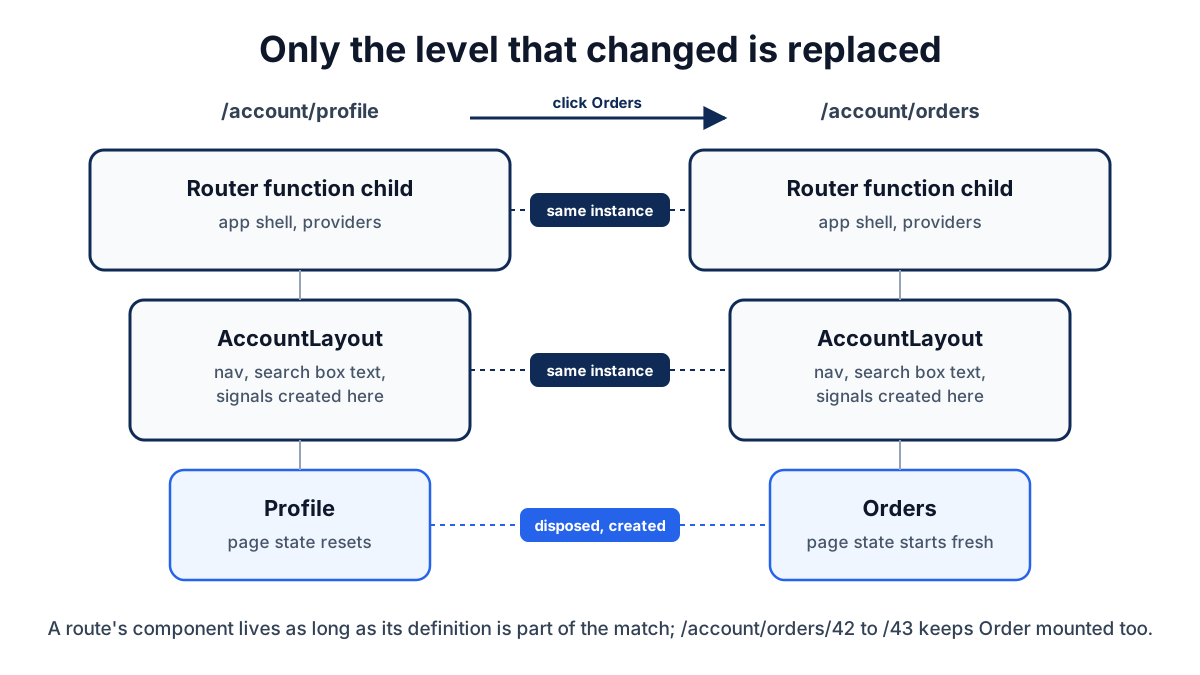
The router keeps a route's component alive as long as that route definition is still part of the match. It creates and disposes only the levels that changed. The consequences are the ones you would want:
- State that belongs to the section lives in the layout and survives page changes.
- State that belongs to a page lives in the page and resets when the user leaves it.
- Moving from
/account/orders/42to/account/orders/43keepsOrdermounted too, since the route definition did not change;props.params.idupdates and anything that reads it updates with it.
The function child of <Router> is one level above all of this.
It is never part of a match, so it stays mounted for the life of the app.
Put the app shell and app-wide providers there; put section chrome in a layout route.
Layouts without a URL segment
Sometimes the frame is not a place the user visits.
A sign-in check around a set of pages is the common case.
Leave path off and the route adds a component to the match without adding to the URL:
{ component: RequireSignIn, children: [ { path: "/account", component: AccountLayout, children: accountRoutes }, { path: "/checkout", component: Checkout }, ],}import { Show, createMemo } from "solid-js";import type { RouteSectionProps } from "@solidjs/router";import { getSession } from "../data/session";import { paths } from "../router";
export default function RequireSignIn(props: RouteSectionProps) { const session = createMemo(() => getSession());
return ( <Show when={session().user} fallback={<a href={paths["sign-in"]}>Sign in to continue</a>} > {props.children} </Show> );}Visit /checkout signed out and the page shows "Sign in to continue"; sign in and the same URL shows the checkout.
/account and /checkout are still the URLs; RequireSignIn sits in front of both.
A pathless route has no paths node to give RouteProps as a witness, so its component takes the untyped RouteSectionProps, whose params is the open Params type.
A pathless route can also carry a preload without a component, when you want to start a request for a group of pages without wrapping them in anything.
RequireSignIn decides what to render; it does not stop a request.
The server functions behind /account and /checkout must check the session themselves, as Sessions and auth shows, or anyone can call them directly.
Protected routes turns this check into a redirect that runs on the server and in the browser, and sends the visitor back afterwards.
Parameters flow down
A child sees its own parameters and every parameter above it. Add collections to the store:
{ path: "/collections/:collection", component: CollectionLayout, children: [ { path: "/", component: CollectionHome }, { path: "/products/:id", component: CollectionProduct }, ],}At /collections/mugs/products/blue, CollectionLayout reads params.collection, and CollectionProduct reads both params.collection and params.id.
Type the leaf from its path in paths so both names are checked:
import type { RouteProps } from "@solidjs/router";import type { Router } from "../../router";
export default function CollectionProduct(  props: RouteProps<typeof Router.paths.collections.products>) {  return (    <h1>      {props.params.collection} / {props.params.id}    </h1>  );}
Outside a route component, useParams(Router.paths.collections.products) returns the same typed object.
Parameters are always strings at runtime, even when a match filter such as int changes what paths accepts.
Load data at every level
Each level can have its own preload, and the router starts all of them when the match is created.
The child's preload does not wait for the parent's:
{ path: "/collections/:collection", preload: ({ params }) => void getCollection(params.collection), component: CollectionLayout, children: [ { path: "/products/:id", preload: ({ params }) => void getProduct(params.id), component: CollectionProduct, }, ],}Navigating to /collections/mugs/products/blue sends both requests at once.
Each component then reads its own query through a memo, as on the Data loading and mutations page, and the Loading boundary above them decides what to show while they are pending.
The parallel start is the point of nesting the preloads rather than fetching the product from inside CollectionLayout after the collection arrives, which would be a waterfall.
Async reactivity covers the general principle.
When a layout has data every page under it needs, load it in the layout and hand it down through context:
import { createContext, createMemo, useContext } from "solid-js";import type { RouteProps } from "@solidjs/router";import type { Router } from "../../router";import { getCollection, type Collection } from "../../data/collections";
const CollectionContext = createContext<() => Collection>();export const useCollection = () => useContext(CollectionContext);
export default function CollectionLayout(  props: RouteProps<typeof Router.paths.collections>) {  const collection = createMemo(() => getCollection(props.params.collection));  return (    <CollectionContext value={collection}>      <h1>{collection().title}</h1>      {props.children}    </CollectionContext>  );}
A page under it calls useCollection()() and never fetches the collection itself.
Because getCollection is a query, a page that did call it would get the cached result anyway; the context saves the page from knowing the parameter.
Split a section into its own module
A large section can live in its own file and its own chunk.
Pass a thunk as children and the router loads the subtree the first time a URL under it is matched or preloaded:
{ path: "/admin", component: AdminLayout, children: () => import("./pages/admin/routes"),}The imported module exports the route array as default or routes.
Typed paths still work through the import, so paths.admin.users(7) is checked at build time.
Route definitions has the details.
Common problems
The nested page renders nothing
The layout is not rendering props.children.
Add {props.children} where the page should appear; there is no error when it is missing.
The layout re-runs on every page change
The layout is a component each page imports and wraps itself in, not a route with children.
Two pages that each render <AccountLayout> create two separate layouts.
Move the layout into the route tree and have each page render only its own content.
Two sections need different app shells
The shell lives in the <Router> function child, which is shared by every route.
Move it into a layout route for each section; the function child then renders only props.children.
A pathless route needs a parameter from below
It cannot have one; parameters flow down, not up.
Read the location with useLocation(), or move the check into the child that owns the parameter.
Recap
- Give a section its frame with a route that has
children; the frame renders the matched page throughprops.children. - A route's component stays mounted as long as that route is still part of the match; only the levels that changed are created and disposed.
- Put section state in the layout and page state in the page; the first survives page changes and the second resets.
- Leave
pathoff a route to add a component such as a sign-in check to the match without adding to the URL. - A child reads its own parameters and every parameter above it; type the leaf from its
pathsnode so all of them are checked. - Give each level its own
preload; the router starts them together, so the child does not wait for the parent. - Load a large section with
children: () => import(...)and typedpathsstill work through the import.
Next steps
- Navigation and typed paths: typed
paths, active and pending link styling, and navigation guards for sections such asRequireSignIn. - Data loading and mutations: what the preloads above start, and how the cache shares results between a layout and its pages.
- Route definitions: path patterns, match filters, metadata, and the file-system adapter, which produces the same nested structure from directories.