
Avoid unnecessary effects
The cart on the Stores page shows a subtotal under the line items.
The first version many people write keeps the subtotal in its own signal and adds an effect that recalculates it whenever an item changes.
It works, and it is wrong in a way that is hard to see: change a quantity and the row updates in one flush while the subtotal updates in the next, so for one frame the page shows the new quantity next to the old total.
With attribution on, development names the pattern [EFFECT_RELAY_TEAR].
Signals, stores, props, memos, and async computations already form a graph of derived values. An effect belongs at the end of that graph, where a settled result has to leave Solid and drive something Solid does not own:
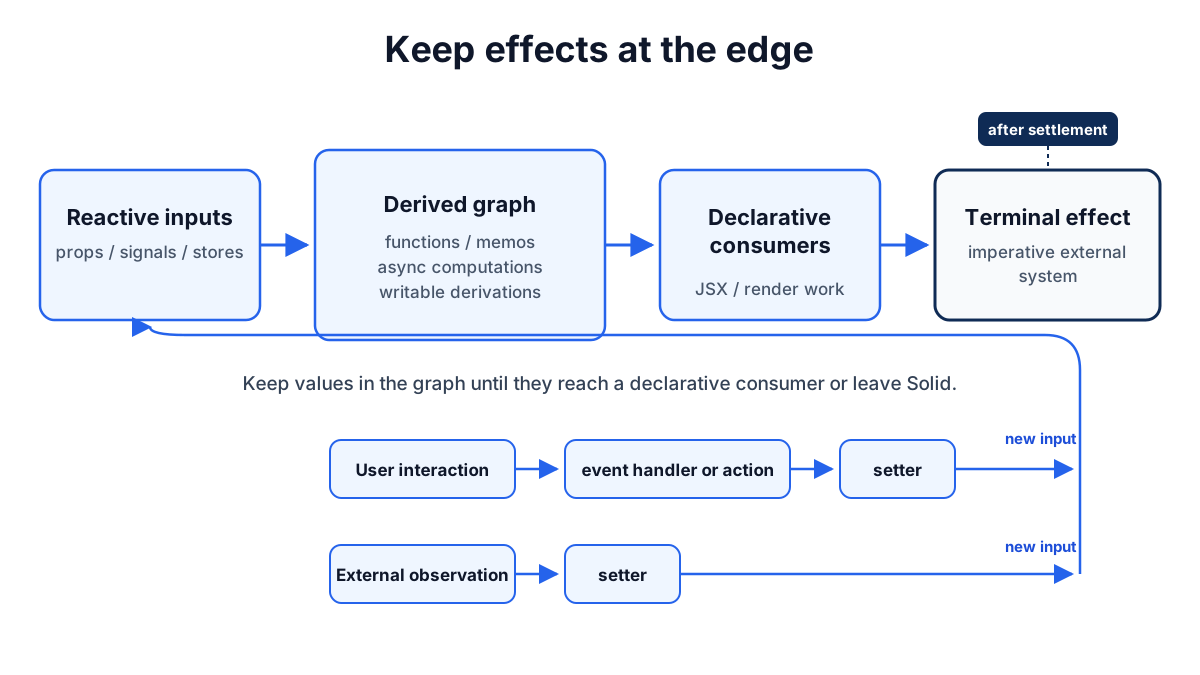
This guide goes through the places an effect gets written where a derivation belongs, shows what each one does when it runs, and ends with the two cases where createEffect is the right tool.
The Reactivity page explains tracking, memos, effect phases, scheduling, and ownership.
Calculate values when they are read
A value that can be calculated from existing reactive state does not need a signal of its own:
import { createEffect, createSignal, createStore } from "solid-js";
const [cart, setCart] = createStore({ items: [] as CartItem[] });
// Avoid: subtotal duplicates data already in the store, one flush lateconst [subtotal, setSubtotal] = createSignal(0);createEffect(  () => cart.items.reduce((sum, item) => sum + item.price * item.quantity, 0),  (total) => setSubtotal(total));
// Prefer: derive it where it is readconst subtotal = () =>  cart.items.reduce((sum, item) => sum + item.price * item.quantity, 0);
Run the Avoid version and change a quantity.
The quantity input updates in the flush the keystroke caused; the effect runs after that flush and writes subtotal, which updates in a second flush, so the frame in between shows the new quantity with the old total.
With attribution enabled, development reports the copy on its second run:
[EFFECT_RELAY_TEAR] effect "effect" writes its compute output into "subtotal" on every run, and nothing else writes "subtotal" — it is derived state kept one flush late: everything reading it paints a frame behind everything reading the source. The written value is the effect's compute output — by contract a pure function of what it tracks: make "subtotal" a memo of that computation and delete the effect.The names come from the name option; an unnamed signal prints as signal.
Debugging reactivity covers the report and its variants.
The Prefer version is a plain function.
It runs in the tracking scope that reads it, so it cannot be stale independently of its inputs and it schedules no second write.
Keep the call inside JSX or another tracking scope; a component body runs untracked, so subtotal() at the top level of a component is a one-time value.
Use createMemo when several readers share the result or when the derivation should stop propagation when its result is unchanged.
A memo costs a node and a comparison; for a cheap expression with one reader, the function is smaller.
Keep memo computations free of side effects.
Deep diveWhy the copy is one flush behind
Solid applies writes in a batch. Within one batch it runs every tracked compute function that depends on the changed values, and only then runs the effect functions whose inputs changed. A write made inside an effect function cannot join the pass that is finishing; it starts a second pass inside the same flush. Readers of the copied signal therefore update one pass after readers of the source, and every effect and DOM write in the first pass saw the stale copy. A memo is a compute function, so it lands in the same pass as its inputs and there is no moment in which the two disagree.
Put asynchronous work in a derivation
A request started in an effect needs a second signal for its result and a third for its loading state, and the effect has to keep all three in step:
import {  Errored,  For,  Loading,  createEffect,  createMemo,  createSignal,} from "solid-js";
const [query, setQuery] = createSignal("");
// Avoid: the request, its result, and its status are three values the effect keeps in stepconst [results, setResults] = createSignal<Product[]>([]);const [loading, setLoading] = createSignal(false);createEffect(  () => query().trim(),  (text) => {    if (!text) {      setResults([]);      return;    }    setLoading(true);    api.search(text).then((found) => {      setResults(found);      setLoading(false);    });  });
// Prefer: the request is the valueconst results = createMemo(async () => {  const text = query().trim();  if (!text) return [];  return api.search(text);});
Run the Avoid version and type mug quickly.
Three requests start, and nothing in the effect discards the answers to m and mu; whichever response lands last is the one the list shows, and loading turns off after the first one.
Solid computations can return promises, so in the Prefer version the request and its result are one derived value.
Changing query() asks the memo for another answer; Solid keeps the settled results visible during the new request and drops the answer to a superseded run.
Read the memo inside boundaries so the first load and a failure have somewhere to go:
return ( <> <input type="search" value={query()} onInput={(event) => setQuery(event.currentTarget.value)} /> <Errored fallback={(error) => <p>{String(error())}</p>}> <Loading fallback={<p>Searching...</p>}> <ul> <For each={results()}>{(product) => <li>{product.name}</li>}</For> </ul> </Loading> </Errored> </>);Async reactivity covers pending indicators, latest, and refresh.
Use the function form of createStore when the response is a list or a tree whose items should keep their identity across refetches.
Use a writable derivation for a local override
An editable field often starts from a reactive source and needs a temporary local value. The habit is to copy the source into a signal and add an effect to reset the copy when the source changes:
import { createEffect, createSignal } from "solid-js";
function NameField(props: { value: string }) {  // Avoid: a copy plus an effect to keep it in step with the prop  const [draft, setDraft] = createSignal(props.value);  createEffect(    () => props.value,    (value) => {      setDraft(value);    }  );
  // Prefer: a writable derivation, which resets itself  const [draft, setDraft] = createSignal(() => props.value);
  return (    <input      value={draft()}      onInput={(event) => setDraft(event.currentTarget.value)}    />  );}
Run the Avoid version and change props.value from the parent.
The input shows the new value one flush after the rest of the page, and attribution records the same [EFFECT_RELAY_TEAR] finding for it.
In the Prefer version the derivation supplies props.value.
Calling setDraft places a local override over that result, and the override stays until a dependency of the derivation changes and the derivation produces a new value.
There is no second flush and no effect to delete later.
The same shape works for a nested form.
Pass a function and a seed to createStore to get a writable derived store:
import { createMemo, createStore } from "solid-js";
type Address = {  name: string;  street: string;  postalCode: string;};
function AddressForm(props: { address: Address }) {  const [draft, setDraft] = createStore(() => props.address, {    name: "",    street: "",    postalCode: "",  });  const postalCodeError = createMemo(() =>    /^[0-9]{5}$/.test(draft.postalCode)      ? undefined      : "Enter a five-digit postal code."  );
  return (    <form>      <input        value={draft.name}        onInput={(event) =>          setDraft((current) => {            current.name = event.currentTarget.value;          })        }      />      <input        value={draft.postalCode}        aria-invalid={postalCodeError() ? "true" : undefined}        onInput={(event) =>          setDraft((current) => {            current.postalCode = event.currentTarget.value;          })        }      />      <p aria-live="polite">{postalCodeError()}</p>    </form>  );}
Type in the postal code field and the message appears or clears on each keystroke.
When props.address changes, for example after a save and a refetch, the derivation runs again and reconciles the new source into the store, replacing the local edits.
Validation stays a derivation of the current draft.
Use this pattern when a new source value should replace the local edit. Use a plain signal or store when the local value has an independent lifetime. Use optimistic state when a tentative value belongs to an active mutation rather than a local editing session; Mutations covers that case.
Handle interactions where they happen
An event handler knows which interaction happened and has the current values in hand. Routing the interaction through a signal so an effect can react to it moves the work away from its cause:
import { action, createEffect, createSignal, snapshot } from "solid-js";
// Avoid: a flag the effect watchesconst [submitted, setSubmitted] = createSignal(false);createEffect(  () => submitted(),  (flag) => {    if (flag) api.saveAddress(snapshot(draft));  });<button type="button" onClick={() => setSubmitted(true)}>  Save</button>;
// Prefer: the handler does the work, through an actionconst save = action(function* () {  yield api.saveAddress(snapshot(draft));});<button type="button" onClick={() => void save()}>  Save</button>;
Run the Avoid version and click Save twice.
The first click saves one flush after the click; the second does nothing, because writing true to a signal that already holds true notifies no one, and the flag has to be reset somewhere before the button works again.
In the Prefer version each click runs the action, which runs the request as one transaction: ordinary writes made inside it are held until it settles, while an optimistic value shows at once and is discarded when it settles.
Use an effect at an imperative boundary
Use an effect when a settled reactive value must drive a system that Solid does not own: a third-party widget, a subscription, telemetry, or a browser API with no declarative JSX form.
The two-phase createEffect keeps that boundary explicit.
The first function tracks and returns a value; the second receives that value, does the imperative work, and may return a cleanup.
Integrate non-Solid code applies this shape to a charting library.
The rule to respect is that only the first function is tracked:
import { createEffect } from "solid-js";
// Avoid: currency() is read in the untracked phase, so a currency change does not re-run the effectcreateEffect(  () => subtotal(),  (amount) => {    const widget = payments.mount(element, { amount, currency: currency() });    return () => widget.unmount();  });
// Prefer: read every input in the compute phase and hand the values acrosscreateEffect(  () => ({ amount: subtotal(), currency: currency() }),  ({ amount, currency }) => {    const widget = payments.mount(element, { amount, currency });    return () => widget.unmount();  });
Run the Avoid version and switch the currency.
Nothing happens until the subtotal also changes, because the compute phase never read currency().
In the Prefer version either change re-runs the compute function, the cleanup unmounts the old widget, and the effect function mounts a new one with both values.
Solid runs the tracked compute functions for an update before it runs any effect functions. If a compute function reaches pending async work, its effect function waits for that work to settle, so the widget never receives a value from a half-applied update.
The effect function runs after the batch has landed. A setter called there starts a second pass, which is the copy pattern this guide opened with. If the write is needed, ask whether the value could be a memo instead; if it records something the browser produced, see the next section.
Let external observations become new inputs
Some information exists only after render work: an element's size, its scroll position, whether it is visible. A callback that reports it may write a signal, because the observation is a new input to the graph rather than a copy of an upstream value:
import { createSignal, onSettled } from "solid-js";
function measure(setWidth: (width: number) => void) {  let element: HTMLElement | undefined;
  // Avoid: one measurement, taken when the ref is assigned  return (next: HTMLElement) => {    element = next;    setWidth(next.offsetWidth);  };
  // Prefer: observe, and let each observation become a new input  onSettled(() => {    if (!element) return;
    const observer = new ResizeObserver(([entry]) => {      setWidth(entry.contentRect.width);    });    observer.observe(element);
    return () => observer.disconnect();  });
  return (next: HTMLElement) => {    element = next;  };}
function ProductGallery() {  const [width, setWidth] = createSignal(0);  return (    <section ref={measure(setWidth)}>      Thumbnails per row: {Math.floor(width() / 120)}    </section>  );}
Run the Avoid version and resize the window.
The count never changes, because nothing measures again.
In the Prefer version the observer fires on each size change and the write records what the browser reported; it does not copy a reactive value back into the graph.
onSettled runs its callback once, after the surrounding render has settled, and the returned cleanup runs when the owner is disposed, so the observer is disconnected with the component.
Refs and directives covers the owned DOM setup this builds on.
Check before adding an effect
Before calling createEffect, ask:
- Can the value be calculated directly in JSX or a derived function?
- Does the result need a memo for reuse or an equality boundary?
- Is it asynchronous data that belongs in an async memo or a store created from a function?
- Is it a temporary local override that belongs in a writable derived signal or store?
- Did a user interaction cause the work? Keep it in the event handler or an action.
- Is the work one-time owned setup?
Use
onSettledor a ref directive. - Does a settled reactive result need to leave Solid and drive an imperative system? Use an effect.
If the answer to the last question is no, the code belongs earlier in the reactive sequence.
Common problems
The copied value is one step behind the source
An effect writes a signal that a derivation could produce.
Readers of the copy update one flush after readers of the source, and attribution reports [EFFECT_RELAY_TEAR].
Delete the signal and the effect, and derive the value where it is read; Debugging reactivity walks through the report.
An effect runs twice for every change
The effect writes a signal or store property that feeds back into what it reads, directly or through a memo.
Attribution reports [EFFECT_WRITES_OWN_SOURCE]; the written value is a function of the effect's inputs and belongs in a memo, or the normalization belongs where the source is written.
Debugging reactivity covers it.
A signal changes and the effect does not re-run
The signal is read in the effect function, which is untracked. Move the read into the compute function and return the value alongside the others. Debugging reactivity shows the shape.
Recap
- Derive a value where it is read; a signal plus an effect that fills it is derived state kept one flush late.
- Use
createMemowhen several readers share a result or the chain needs an equality boundary, not by default. - Return the promise from a memo or a
createStorefunction instead of starting a request in an effect and copying the result out. - Pass a function to
createSignalorcreateStorefor an editable copy that resets when its source changes. - Do the work of an interaction in the event handler or an
action, not in an effect watching a flag. - Read every input in the effect's compute function; the effect function is untracked.
- Write a signal from an effect only to record something produced outside the graph, such as a measurement.
Next steps
- Debugging reactivity: the diagnostics that fire when an effect relays state,
[EFFECT_RELAY_TEAR]and[EFFECT_WRITES_OWN_SOURCE], and how to read them. - Async reactivity: what an async memo does while its promise is pending, which is the part an effect-and-flag pattern used to hand-roll.
- Data fetching patterns: the derivation shapes from this page applied to requests, pagination, and refresh.
- Thinking in Solid: the same rule inside one feature built end to end, for a reader coming from React or Vue.