
Middleware and API routes
Some work belongs in front of the app rather than inside it: reading the session cookie once instead of in every server function, turning an uncaught error into a 500 instead of a blank page, answering GET /api/products for a partner's script that is not a browser.
Start mode runs a chain of fetch-style middleware before its request handler, and the fullstack project shape puts an API-route dispatcher in that chain.
Most apps need one or two middleware of the first shape below and, if anything outside the app needs the data, an API route. This page builds on the chain the template ships, then covers API routes.
The chain the template ships
vite.config.ts names a server-only module:
solid({ start: { middleware: "./src/middleware.ts" }, ssr: true,});The module exports an array of middleware functions:
import { createAPIHandler } from "filesystem-routing/api";import routes from "virtual:file-routes";
export default [createAPIHandler(routes)];
Every request the server handles, whether a page render, a server-function call, or an API route, passes through this array in order before reaching the handler.
createAPIHandler answers requests that match a route module's method exports and passes everything else along.
virtual:file-routes has two exports.
The default export is the flat manifest of every route file, which is what the API handler needs.
The named pageRoutes export is the page tree with grouping segments stripped, which is what src/router.ts hands to Solid Router.
Add a middleware
A middleware is a function of the request and a next continuation:
type Middleware = ( request: Request, next: (request?: Request) => Promise<Response>) => Response | Promise<Response>;Three shapes cover most needs.
Do something, then continue
Read the session and put the customer where every later step can see it:
import { getRequestEvent } from "@solidjs/web";import { getSession } from "./server/session";
async function attachCustomer(  _request: Request,  next: () => Promise<Response>) {  const session = await getSession();  getRequestEvent()!.locals.userId = session?.userId;  return next();}
getRequestEvent() returns this request's event, which the page render sees directly and a server function sees as a derived copy with the same locals, so locals.userId set here is readable from a server function without being passed around.
Sessions and auth builds getSession(), which reads the signed cookie from that same event.
Continue, then change the response
Nothing is written to the network until the outermost middleware returns, so headers can be set after await next(), even on a streamed body:
// Avoid: headers on the request never reach the browserasync function securityHeaders(  request: Request,  next: () => Promise<Response>) {  request.headers.set("x-frame-options", "DENY");  return next();}
// Prefer: headers on the response that comes backasync function securityHeaders(  _request: Request,  next: () => Promise<Response>) {  const response = await next();  response.headers.set("x-frame-options", "DENY");  return response;}
With the Avoid version the header never reaches the browser: the request's headers describe what the browser sent, not what the server answers, and some runtimes make an incoming request's headers immutable so the write throws.
With the Prefer version, the header is on every response, page and API alike.
Stop the chain
Return a Response without calling next():
function requireHttps(request: Request, next: () => Promise<Response>) { const url = new URL(request.url); if (url.protocol === "http:" && !url.hostname.endsWith("localhost")) { url.protocol = "https:"; return Response.redirect(url, 308); } return next();}Add the functions to the array in the order they should run:
export default [ requireHttps, securityHeaders, attachCustomer, createAPIHandler(routes),];The request travels down the array and the response travels back up it.
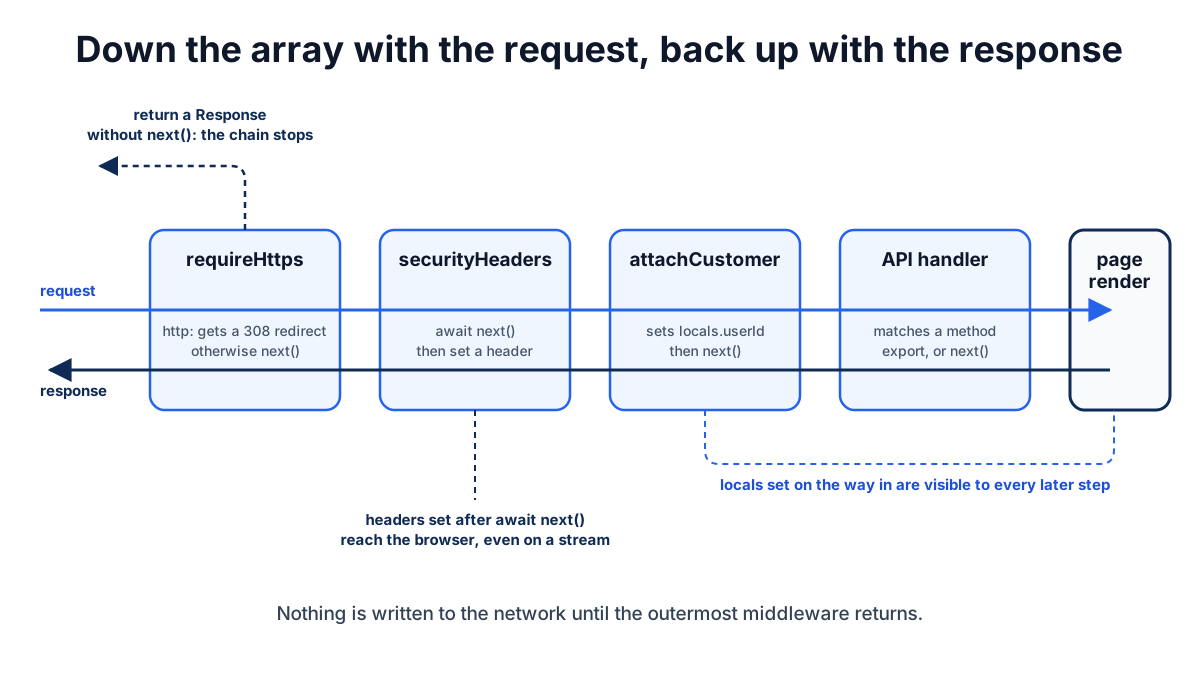
securityHeaders runs before attachCustomer on the way in and receives its response on the way out.
Put the session reader before anything that needs locals.userId, and put the API handler after it if API routes need the customer.
Pass a Request to next(request) to replace the request for the rest of the chain, for example after rewriting a URL.
Do not call next() twice from one invocation.
In vite dev, a request that is not an HTML-accepting GET and that no middleware answered goes to Vite's own pipeline rather than rendering the page at that URL.
Production has no Vite pipeline, so every request that reaches the end of the chain renders.
Catching errors
A middleware that wraps next() in try/catch sees anything the rest of the chain throws:
import { getRequestEvent, reportRequestFailure } from "@solidjs/web";
async function catchErrors(_request: Request, next: () => Promise<Response>) {  try {    return await next();  } catch (error) {    reportRequestFailure(error, getRequestEvent()!);    return Response.json({ error: "Internal Server Error" }, { status: 500 });  }}
Report the real error and return a generic body.
reportRequestFailure hands the error to the server error hook as kind: "request", the same hook that hears render and server-function failures, and logs it with console.error when no hook is registered; Observability sets that hook up.
An error the hook already heard, such as a failed render, is reported once.
Exception messages can carry database, filesystem, or token details; the only errors whose text belongs in a response are the ones the app marked safe, which Mutations and responses covers for server functions.
Production builds also wrap the generated page render in a default error boundary; set start.errorBoundary: false when this middleware owns errors, as App structure notes.
API routes
An API route is a route module that exports uppercase HTTP methods instead of, or as well as, a default component:
import type { APIHandler } from "filesystem-routing/api";import { listProducts, createProduct } from "../../server/db";
export const GET: APIHandler = () => Response.json(listProducts());
export const POST: APIHandler = async ({ request }) => {  const body = await request.json();  if (typeof body?.name !== "string" || body.name.length === 0) {    return Response.json({ error: "name is required" }, { status: 400 });  }  const product = createProduct({ name: body.name });  return Response.json(product, { status: 201 });};
Run curl http://localhost:3000/api/products and the JSON list comes back; POST with a body creates one.
src/routes/api/products/[id].ts answers /api/products/:id with params.id, the same convention that maps pages.
Enable method discovery in the plugin and the template's createAPIHandler picks the exports up:
fileRoutes({ httpMethods: true });The rule for what counts as a route module is the same for pages and API routes.
A .js, .jsx, .ts, or .tsx file under src/routes is a route when it has a default export (a page) or, with httpMethods on, an uppercase method export (an API route); a module with both serves HTML to browsers and JSON to fetch.
A .md or .mdx file is always a page.
A file with neither a default export nor a method export is not a route and does not appear in the manifest, so a helper module under src/routes is ignored rather than served.
Keep helpers and server functions in src/server or src/data anyway, so a default export added later does not turn one into a page by accident.
The handler receives the request event with the matched params, so it can read locals.userId set by middleware and append cookies to event.response.headers.
Authorization belongs in the handler:
// Avoid: the folder name is the only protectionexport const DELETE: APIHandler = async ({ params }) => {  await deleteProduct(params!.id);  return new Response(null, { status: 204 });};
// Prefer: check the caller in the handlerexport const DELETE: APIHandler = async ({ params }) => {  if (!getRequestEvent()?.locals.userId) {    return new Response(null, { status: 401 });  }  await deleteProduct(params!.id);  return new Response(null, { status: 204 });};
The Avoid version deletes a product for any HTTP client that sends DELETE /api/products/mug; a route file is not protected by its location.
A middleware that is guaranteed to run before the handler is the other place for the check.
Return values
- A
Responseis sent as-is; use it to control status and headers. - A string becomes a
text/plainresponse. - Any other value becomes a JSON response.
undefinedfrom aGETin a module that also has a page component lets the page render, which is how a route can serve HTML to browsers and JSON tofetch. From an API-onlyGET,undefinedis a404. From any other method,undefinedthrows, since the handler was expected to answer.
A request whose method has no export continues down the chain.
HEAD uses a HEAD export when present and otherwise falls back to GET.
Server functions, not API routes, are how the app's own components talk to the server; they are typed end to end and need no URL design. API routes are for everything else: webhooks, other services, scripts, and public endpoints.
Deep diveWhat is Solid's and what is the router's
The method-export convention, the route matching, and createAPIHandler come from filesystem-routing, the same package that scans src/routes for pages.
The contract Solid's server runtime exposes is the fetch-style (request, next) middleware shape and the request event it runs under; any dispatcher that fits that shape can sit in the chain, so a project on another router or another file convention swaps the dispatcher, not the chain.
Under the hood, the dispatcher matches the URL against the flat manifest with a radix tree, writes the matched params onto the request event, and imports the handler module on demand, so handler code and the server-only modules it imports never enter the client bundle.
Common problems
locals.userId is undefined in a server function
The middleware that sets it runs after the API handler in the array, or is not in the array at all. Middleware order is array order.
An API route returns HTML
The module has a default export and the GET handler returned undefined, so the page rendered.
Return a Response or remove the component.
API handler for POST "..." did not return a response
A non-GET handler returned undefined.
Only a GET may decline; return a Response, a string, or a JSON value.
Headers set in middleware are missing on a streamed page
They were set on the request before await next(), not on the returned response.
Set them on the Response after next() resolves.
Duplicate API routes for "/api/products"
Two route files map to the same path with method exports, for example api/products.ts and api/products/index.ts.
Keep one.
Recap
- Middleware is
(request, next) => Response; export an array and the request runs down it, the response back up. - Read the request and write
localsbeforenext(); change headers on the response after it. - Return without calling
next()to stop the chain, and never callnext()twice. - Catch errors in one middleware that logs the real error and returns a generic body.
- A file under
src/routesis a route when it has a default export or, withhttpMethods, an uppercase method export; anything else there is ignored. - Check the caller inside every API handler or in a middleware before it; a folder name protects nothing.
- Use server functions for the app's own components and API routes for callers that are not the app.
Next steps
- Sessions and auth: the most common middleware, reading a session cookie into
event.locals. - Server functions: they run under the same request event, so state set here is visible to them.
- Protected routes: a sign-in redirect for a whole section from middleware, and what the middleware does not see.
- Deployment: where the request handler this chain fronts runs, and how a host serves
dist/client.