
Data loading and mutations
The product page from the introduction fetches its product inside a memo.
That works, and three things about it are not quite right yet: the request does not start until the page component runs, a ProductCard in a list and the Product page fetch the same product twice, and the Add to cart form has no way to tell the cart it changed.
The router's data APIs add one thing for each: preload starts a request before the page's component exists, query gives two readers one request, and action wraps a mutation so it works as a form without JavaScript and revalidates the cache when it finishes.
This page continues the store: a product page and a cart.
A Solid Router app can load data with plain async memos and submit forms with plain server functions, and the Async reactivity page is all it needs. Each piece below earns its place on its own, so take the ones the page in front of you needs.
The three pieces
Here is the product page with each piece labeled:
import { query } from "@solidjs/router";
// 1. A cached read. Same name + same arguments = same request.export const getProduct = query(async (id: string) => {  const response = await fetch(`/api/products/${id}`);  return (await response.json()) as Product;}, "product");
In the routes array of src/router.ts:
{ path: "/products/:id", component: lazy(() => import("./pages/Product")), // 2. Start it as soon as the route matches, before the component runs. preload: ({ params }) => void getProduct(params.id),}import { createMemo } from "solid-js";import type { RouteProps } from "@solidjs/router";import { getProduct } from "../data/products";import type { Router } from "../router";
// 3. Read it where it is displayed.export default function Product( props: RouteProps<typeof Router.paths.products>) { const product = createMemo(() => getProduct(props.params.id)); return <h1>{product().name}</h1>;}With link preloading turned on, hover a product link and the request appears in the network tab before the click. Click, and the heading renders with the name already there.
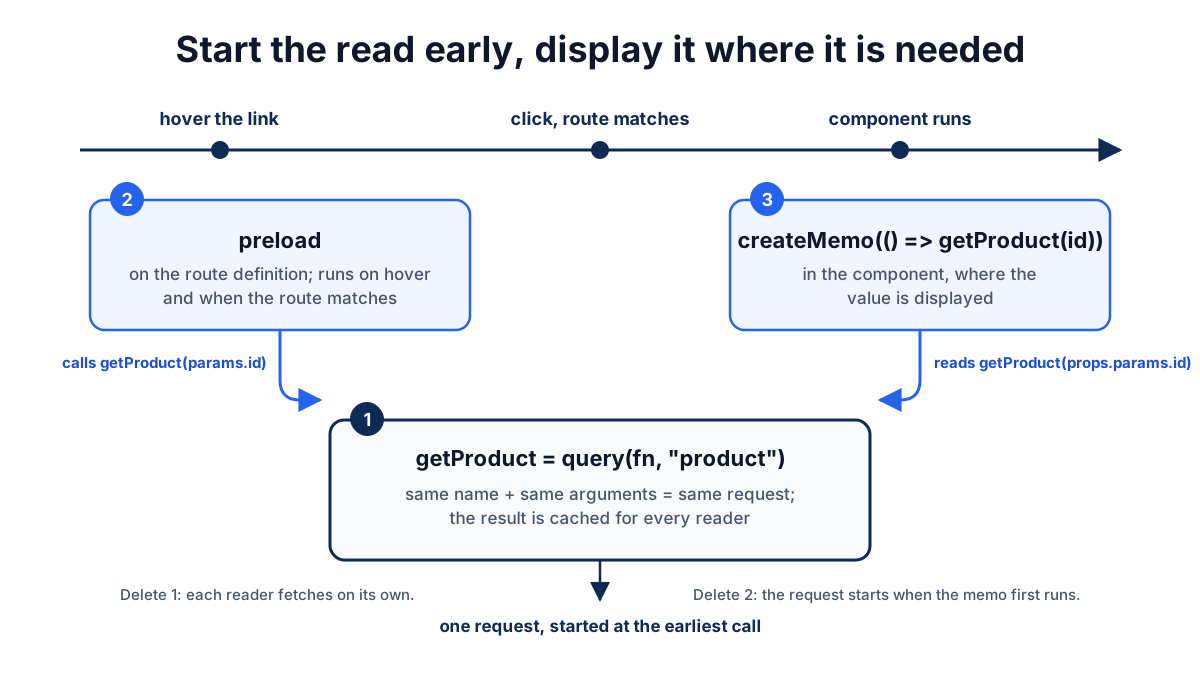
Delete piece 2 and the page still works; the request starts when the memo first runs, a few milliseconds later.
Delete piece 1 and the page still works; two components that both need the product would each fetch it.
With the file-system adapter, piece 2 moves into the route module's route export, as Convert a file-system manifest shows.
Start work before the component runs
A route's preload runs when the route is matched, with the matched params, the target location, and an intent:
preload: ({ params, intent }) => { void getProduct(params.id); if (intent !== "preload") void getReviews(params.id);},The intent tells you why the work started:
intent | When |
|---|---|
"initial" | First render, including the server render |
"navigate" | A link click or navigate() call |
"native" | Browser back or forward |
"preload" | A link preload strategy or usePreloadRoute |
Use it to skip work that is too expensive to run on a hover.
The tempting shape, from routers where the loader is the data, is to return what the page needs:
// Avoid: props.data is captured once, so a param change shows the old productpreload: async ({ params }) => getProduct(params.id),
// Prefer: start the request and let the page read it reactivelypreload: ({ params }) => void getProduct(params.id),
With the Avoid version, a page that renders props.data.name shows the mug after navigating from /products/mug to /products/bowl, because props.data is whatever preload returned when the route first matched.
The Prefer version reads the query in a memo that tracks props.params.id, so the bowl appears.
Return a value from preload only for something that should not change while the route stays matched.
Preloading from links
Links do not preload until you give the router a strategy with preloadLinks.
intentPreload() preloads when a user rests the pointer on a link, focuses it, or touches it:
import { createRouter, intentPreload } from "@solidjs/router";
export const Router = createRouter({ routes, preloadLinks: intentPreload() });
That warms the lazy component chunk and runs the route's preload.
The query cache keeps the result for a few seconds so the navigation that follows finds it ready.
The other strategies combine with it in an array:
| Strategy | Preloads | Runs route preload by default |
|---|---|---|
intentPreload() | On hover after a short delay, on focus, and on touch | Yes |
tapPreload() | On pointerdown, ahead of the click | Yes |
viewportPreload() | Links marked preload="viewport" once they have stayed in view | No |
eagerPreload() | Links marked preload="eager" once the page has loaded and the browser is idle | No |
Pass { data: false } or { data: true } to change the last column.
The router factory reference lists every option.
Opt one link out of preloading, chunk and data, when it is expensive or has side effects:
<a href={paths.account.orders} preload="false"> Orders</a>To warm a route from code, for example when a list scrolls into view:
const preloadRoute = usePreloadRoute();preloadRoute(paths.products("mug"), { preloadData: true });Cache reads with query
query wraps an async function and gives it a name.
The name plus the arguments form the cache key, and every call with the same key during the cache lifetime shares one request and one result:
export const getProduct = query(fetchProduct, "product");
getProduct.key; // "product"getProduct.keyFor("mug"); // 'product["mug"]'
That is what lets the preload and the component share a request, and what lets a ProductCard in a list and the Product page share one when they read the same id.
The cache has a different lifetime in each place it runs:
- On the server it lives for one request. Two components rendering the same product during one server render make one call; the next request starts empty.
- In the browser a fresh result is reused for a few seconds, so a preload and the navigation that follows share it. After that, an entry stays alive as long as something is reading it and is swept a few minutes after the last reader goes away. Browser back and forward can reuse a retained entry, which is why returning to a page is usually instant.
In a fullstack project the function inside query is normally a server function.
When that function has no declared method, query declares it as a GET so the read is cacheable by the browser and CDNs and never goes through the mutation path.
Read a query through a memo, as with any async value:
const product = createMemo(() => getProduct(props.params.id));When props.params.id changes, the memo calls getProduct with the new id, which is a cache miss and a new request.
The old product stays on screen while it loads; Async reactivity explains that behavior and the choices it gives you.
Revalidate
A cached value stays until something invalidates it.
Call revalidate with a key to mark matching entries stale and re-run the ones that are being read:
import { revalidate } from "@solidjs/router";
revalidate(getProduct.keyFor("mug")); // one productrevalidate(getProduct.key); // every productrevalidate(); // everything
Keys match by prefix, so the broad key reaches every argument combination. Calling this by hand is rare; the usual trigger is an action finishing, covered below.
Mutate with actions
An action wraps a mutation so it can be submitted as a form, tracked while it runs, and followed by revalidation.
Start with the server function:
import { query, action } from "@solidjs/router";import { markSafeError, reload } from "@solidjs/web";import { currentSessionId } from "./session";
export const getCart = query(async () => {  "use server";  return db.cart.forSession(currentSessionId());}, "cart");
export const addToCart = action(async (form: FormData) => {  "use server";  const productId = String(form.get("productId"));  const quantity = Number(form.get("quantity") ?? 1);  if (!Number.isInteger(quantity) || quantity < 1) {    throw markSafeError(new Error("Quantity must be a whole number"));  }  await db.cart.add(currentSessionId(), productId, quantity);  return reload({ revalidate: getCart.key });});
currentSessionId() stands for whatever your session layer provides; Sessions and auth shows one built on a signed cookie.
Then the form:
<form method="post" action={addToCart}> <input type="hidden" name="productId" value={props.params.id} /> <input type="number" name="quantity" value="1" min="1" /> <button>Add to cart</button></form>Click Add to cart and the form gets aria-busy="true" until the call and its revalidation settle; then every reader of getCart shows the new line.
Read that form as a browser would.
It is a POST to a URL with FormData, and it works with JavaScript disabled: the server runs addToCart, sees the reload, and sends the browser back to the page.
With JavaScript, the router intercepts the submit, calls the action over the server-function transport, and applies the response.
Two rules follow from the form being the contract:
- Actions accept
POSTforms only; aGETform throwsOnly POST forms are supported for Actions. AGETform describes a URL, not a mutation; for search and filters, use a route with typed search parameters. - Everything the action needs must be in the form or bound to the action.
Hidden inputs are the plain way;
.with()is the typed way.
The Forms guide builds a complete form on this shape, including validation messages and no-JavaScript outcomes.
Bind arguments with .with()
When the argument is known where the form is rendered, bind it instead of adding a hidden input:
export const removeFromCart = action(  async (productId: string, form: FormData) => {    "use server";    await db.cart.remove(currentSessionId(), productId);    return reload({ revalidate: getCart.key });  });
<For each={cart()}>  {(line) => (    <form method="post" action={removeFromCart.with(line.productId)}>      <button>Remove</button>    </form>  )}</For>;
.with(...) returns an action whose remaining parameters start after the bound ones.
The bound values travel in the action URL, so the no-JavaScript path receives them too.
Client-side actions
An action does not have to call a server function. A plain async function works, for a client-only mutation or a call to a third-party API:
const savePreference = action(async (form: FormData) => { localStorage.setItem("theme", String(form.get("theme")));}, "save-preference");A client action rendered on the server needs the explicit name so both sides agree on the form's URL; without it the server render throws Client Actions need explicit names if server rendered.
A server function already has a stable URL and does not need one.
Show what is happening
A mutation has three moments the UI may want to reflect: while it runs, when it fails, and before the server confirms it.
While it runs
The router sets aria-busy="true" on the submitting form until the action's result is on screen, including any revalidation or redirect it triggers.
Style it in CSS and no component code is needed:
form[aria-busy] button { opacity: 0.6; pointer-events: none;}When it fails
useSubmissions(action) returns a reactive list of the action's completed submissions that produced a result or an error:
import { Show } from "solid-js";import { useSubmissions } from "@solidjs/router";
function AddToCartForm(props: { productId: string }) {  const submissions = useSubmissions(addToCart);  const failure = () => submissions.at(-1)?.error as Error | undefined;
  return (    <form method="post" action={addToCart}>      <input type="hidden" name="productId" value={props.productId} />      <input type="number" name="quantity" value="1" min="1" />      <button>Add to cart</button>      <Show when={failure()}>        {(error) => <p role="alert">{error().message}</p>}      </Show>    </form>  );}
Submit a quantity of 0 and "Quantity must be a whole number" appears under the button.
Each submission carries the input that was sent, the result or error, and retry() and clear().
A submission that redirected or returned nothing does not stay in the list; use .onSettled when you need to observe those too.
The message reaches the browser because addToCart threw it through markSafeError.
A plain throw new Error(...) arrives in production as Internal Server Error, so database and infrastructure details do not leak; Mutations and responses covers markSafeError and the alternative of throwing validation issues with respond().
Before the server confirms
.onSubmit runs a callback with the action's arguments before the mutation is sent, inside the same transaction as the mutation.
Pair it with an optimistic store and the write reverts on its own when the action settles and the revalidated data lands:
import { For, createOptimisticStore } from "solid-js";import { getCart, addToCart } from "../data/cart";
function CartPanel() {  const [cart, setCart] = createOptimisticStore(    () => getCart(),    [] as CartLine[]  );
  addToCart.onSubmit((form) => {    setCart((draft) => {      draft.push({        productId: String(form.get("productId")),        quantity: Number(form.get("quantity") ?? 1),        pending: true,      });    });  });
  return (    <ul>      <For each={cart}>        {(line) => (          <li class={{ pending: !!line.pending }}>            {line.productId} × {line.quantity}          </li>        )}      </For>    </ul>  );}
The new line appears at once with the pending class.
When the action finishes, the reload revalidates getCart, the store reconciles the server's cart, and the optimistic line is replaced by the real one, or disappears if the server rejected it.
Registering .onSubmit inside a component ties the hook to that component's lifetime.
The form did not change to get this.
Before hydration it is the same POST as in Mutate with actions: the browser submits, the server runs addToCart, and the server renders the page again with the cart from the database.
After hydration the router intercepts the submit, runs the .onSubmit hooks as the first step of the action's transaction, sends the call, and reconciles the revalidated data over the prediction.
The optimistic layer is something the hydrated page adds on top of a form that already works; the server function and the HTML are the same in both cases.
Mutations explains the optimistic model in depth; this is the same model with the router providing the action.
Invoke an action from code
When there is no form, for example a keyboard shortcut or a drag-and-drop handler, bind the action to the router and call it:
import { useAction } from "@solidjs/router";
const remove = useAction(removeFromCart);
onKeyDown={(event) => {  if (event.key === "Delete") void remove(selectedId(), new FormData());}}
Everything else is the same: revalidation, submissions, .onSubmit.
The promise from remove() resolves when the action body finishes, which can be before the revalidated data renders and .onSettled runs.
What you give up is the no-JavaScript path, which only a form provides.
What revalidates after a mutation
When an action completes, the router revalidates the query cache. By default that means every entry: the safest assumption after a write is that anything might have changed.
Narrow it from the server function's response:
return reload({ revalidate: getCart.key }); // this query onlyreturn respond(cart, { revalidate: [getCart.key, getTotals.key] }); // a value plus keysreturn redirect(paths.cart, { revalidate: getCart.key }); // navigate, then revalidateA same-origin redirect becomes a router navigation; anything else leaves the app.
The revalidation runs in the same update as the navigation, so the destination page renders with fresh data rather than flashing stale data first.
Deep diveWhy the redirect and the data land together
The router applies the response's redirect and revalidation metadata inside one update.
Readers that survive the navigation, such as a cart count in the shared layout, refetch inside that update and hold the commit until they have a value, so the new page never paints with the old cart.
In a fullstack project with the router's single-flight collector installed, the server goes one step further and includes the fresh query results in the mutation response, so the client seeds its cache from the payload instead of making a second round trip.
Server rendering and hydration shows the setup.
Common problems
The list still shows the old data after a mutation
The mutation did not go through an action, so nothing revalidated: a server function called directly from an event handler updates the database and leaves the cache as it was.
Wrap it in action and submit it through a form or useAction.
If it is an action and one list is stale, the response narrowed revalidate to keys that do not include that list's query; add the key or return reload() without keys to revalidate everything.
'use' router primitives can be only used inside a Route when a query runs
A query read inside a reactive scope binds to the router, so a component that reads one outside the <Router>, for example next to it in App, throws this.
Move the reader inside the router's function child or a route component.
The action ran but useSubmissions shows nothing
The action returned nothing or redirected.
Only a submission that produced a result or an error enters the list; register .onSettled to observe every completion, including void ones.
The error message is Internal Server Error in production
The action threw a plain Error.
Wrap it in markSafeError to send the message to the browser, or throw the validation issues with respond(issues, { status: 400 }); a returned envelope is a successful result, not an error.
Recap
- Declare each read once with
query(fn, "name"); the name plus the arguments is the cache key two readers share. - Start reads in the route's
preloadwithvoid, and read them through a memo in the page;props.datais captured once. - Wrap a mutation in
actionand submit it with<form method="post" action={...}>, so it works before JavaScript loads. - Put everything the mutation needs in the form or bind it with
.with(). - Show progress with
form[aria-busy], failures withuseSubmissions, and optimistic state with.onSubmiton an optimistic store. - Throw
markSafeErroror throwrespond()for messages the user should see. - Narrow revalidation with
reload,respond, orredirectoptions; without keys, every query revalidates.
Next steps
- Forms: a complete form on router actions, from no-JavaScript through inline validation.
- Server rendering and hydration: hydrating query results and single-flight mutations.
- Data fetching patterns: search, pagination, sharing, polling, and failures, with or without the router.
- Protected routes: a
preloadand aquerythat redirect a signed-out visitor before the page paints. - Data API reference: signatures for
query,liveQuery,revalidate,action,useAction, anduseSubmissions.