
Async reactivity
Take one value your UI renders today: a product, a list, a setting.
Make it come from the server instead of a constant.
Written by hand, that change spreads: the type becomes Promise<Product>, every component between the fetch and the display learns about loading, and the place you fetch and the place you show a spinner become the same place whether you want that or not.
In Solid the change is one line. A computation that returns a promise is still a computation, and everything that reads it keeps reading a value.
That one line also changes how writes behave. Once a memo is async, a write to any input it depends on is held until the memo has its next answer, and everything else in the same update waits with it. The page never shows a mix of old and new data. If you come from Solid 1 or from a pattern where every panel fetched and showed its own spinner on its own schedule, this is the part that will surprise you; the in-flight work section shows it and the choices it gives you.
This page explains what async computations buy you and what you still have to decide. The examples continue the shopping cart from the Reactivity page.
A memo that returns a promise
import { Loading, createMemo } from "solid-js";
type Product = { id: string; name: string; price: number; description: string };
async function fetchProduct(id: string): Promise<Product> {  const response = await fetch(`/api/products/${id}`);  if (!response.ok) throw new Error(`Could not load product ${id}`);  return response.json();}
function ProductDetail(props: { id: string }) {  const product = createMemo(() => fetchProduct(props.id));
  return (    <Loading fallback={<p>Loading product…</p>}>      <article>        <h1>{product().name}</h1>        <p>{product().description}</p>      </article>    </Loading>  );}
product() has type Product, not Product | undefined and not Promise<Product>.
There is no loading flag to check and no optional chaining.
If the expression is running, the value is there.
Until the first result arrives, a read of product() reports that the value is not ready, and the nearest Loading boundary renders its fallback in place of the content.
When the promise resolves, the content renders.
When props.id changes later, the fallback does not come back.
The current product stays on screen while the next one loads.
Initial readiness and a later update are different situations, and Solid treats them differently by default; the in-flight work section explains the second one.
Passing is not reading
Components run once, so there is no component to suspend and re-run. Only expressions that read an async value wait for it. Passing the value along as a prop does not count as reading it, because a dynamic prop compiles to a getter that evaluates where the child uses it:
function ProductPage(props: { id: string }) {  const product = createMemo(() => fetchProduct(props.id));  return <ProductLayout product={product()} />;}
function ProductLayout(props: { product: Product }) {  return (    <div class="layout">      <CategoryNav />      <main>        <Loading fallback={<p>Loading product…</p>}>          <ProductDetail product={props.product} />        </Loading>      </main>    </div>  );}
product={product()} looks like it calls the accessor before the data exists.
It does not; the expression is evaluated when ProductDetail reads props.product.name.
So ProductLayout renders immediately, CategoryNav renders immediately, and only the detail pane waits.
Derived values behave the same way:
function ProductDetail(props: { product: Product }) { const priceLabel = createMemo(() => `$${props.product.price.toFixed(2)}`); return ( <> <h1>{props.product.name}</h1> <p>{priceLabel()}</p> </> );}priceLabel does not know that product was async.
It reads a not-ready value, so it becomes not-ready itself, and its readers wait in turn.
No await and no promise type appear anywhere between the fetch and the JSX.
Fetch high, block low
Because passing a value costs nothing, the two decisions that usually fight each other come apart:
- Where to create the async value is a performance decision. Higher in the tree means the request starts earlier and can run in parallel with other work.
- Where to block is a design decision. Lower in the tree means a smaller region shows a fallback.
Neither decision touches the components in between. Lift the fetch to the top of the app and push the boundary down to the one pane that should show a skeleton:
function App() {  const [selectedId, setSelectedId] = createSignal("mug");  const product = createMemo(() => fetchProduct(selectedId()));
  return <ProductPage product={product()} onSelect={setSelectedId} />;}
function ProductPage(props: {  product: Product;  onSelect: (id: string) => void;}) {  return (    <div class="layout">      <ProductList onSelect={props.onSelect} />      <main>        <Loading fallback={<DetailSkeleton />}>          <ProductDetail product={props.product} />        </Loading>      </main>    </div>  );}
Do the same refactor with a hard-coded product object and the code is identical.
The async version costs one Loading element placed where the design wants a skeleton.
Nesting is not a waterfall
A child component below JSX that reads an async value does not wait for that value unless it reads it too:
function ProductDetail(props: { id: string }) {  const product = createMemo(() => fetchProduct(props.id));
  return (    <article>      <h1>{product().name}</h1>      <p>{product().description}</p>      <Reviews productId={props.id} />    </article>  );}
function Reviews(props: { productId: string }) {  const reviews = createMemo(() => fetchReviews(props.productId));  return (    <For each={reviews()}>{(review) => <ReviewRow review={review} />}</For>  );}
Reviews sits under product().name in the JSX, but the component tree mounts up front and Reviews reads props.productId, which is available immediately.
Both requests start at the same time.
Requests are ordered by data dependency, not by where the components sit.
A waterfall happens when the second request depends on the first response:
const product = createMemo(() => fetchProduct(props.id));const brand = createMemo(() => fetchBrand(product().brandId));brand cannot start until product resolves, because the id comes from the response.
That is sequential because the data is sequential, and the dependency is visible in the code.
Development builds can flag long chains like this with the ASYNC_WATERFALL diagnostic when attribution is enabled; see Debugging reactivity.
Settled view and in-flight work
Once a value has settled, changing an input does not blank the screen. Solid separates the answer the user can see from the work that will produce the next answer:
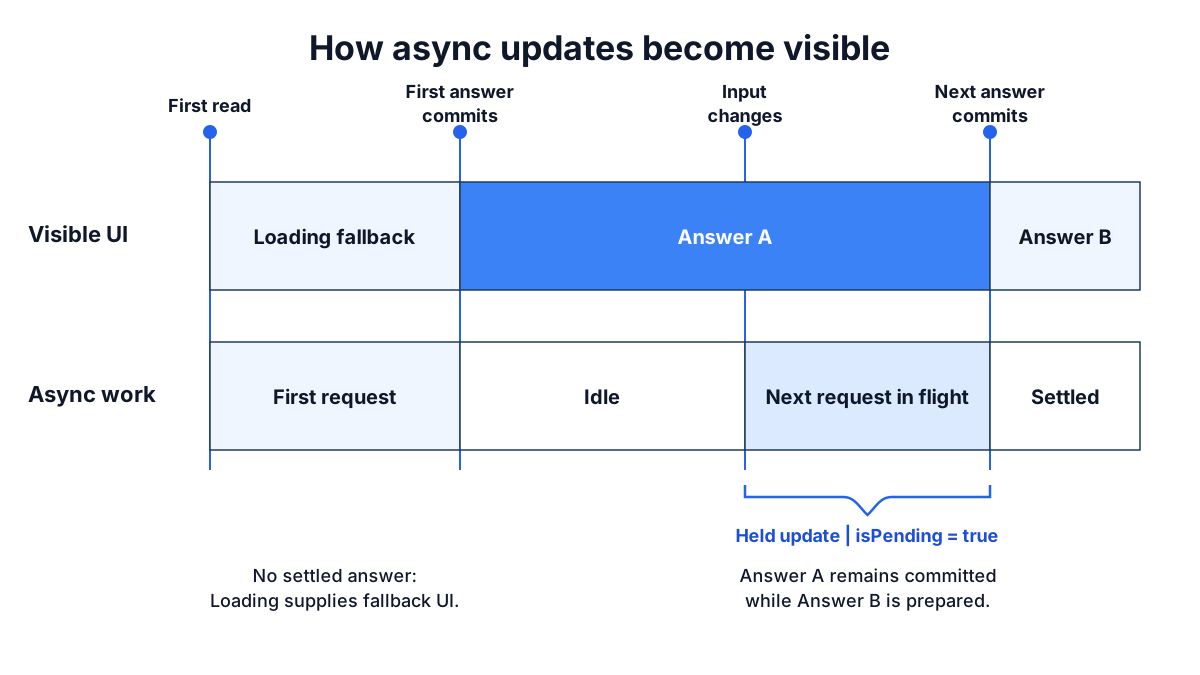
Before the first answer, there is nothing to show and the Loading boundary decides what renders.
After an answer, Solid holds the committed view while the next one is prepared.
Other writes in the same update wait with it, and everything commits together when the pending work settles, so the page never shows a mix of old and new.
This hold is automatic.
It does not need a Loading boundary and it has no API to opt in; if you have wrapped updates in a transition before, this is that behavior as the default.
The boundary controls what renders when no settled answer exists; it does not create the hold.
What the hold means for a shared input
The hold is simple to reason about for one memo and one view. It is worth seeing for several.
A dashboard has a period selector and three panels. Each panel fetches its own data from the selected period, and the fetches take 200 milliseconds, one second, and ten seconds:
function Dashboard() {  const [period, setPeriod] = createSignal("2026-Q2");
  return (    <>      <PeriodSelect value={period()} onChange={setPeriod} />      <Loading fallback={<DashboardSkeleton />}>        <SummaryPanel period={period()} />        <TrendPanel period={period()} />        <AuditPanel period={period()} />      </Loading>    </>  );}
function SummaryPanel(props: { period: string }) {  const summary = createMemo(() => fetchSummary(props.period));  return <p>{summary().total} orders</p>;}
If each panel managed its own loading flag, changing the period would make the selector flip at once and each panel replace its content when its own request landed: the summary at 200 milliseconds, the audit log ten seconds later. For those ten seconds the page shows the new period's summary beside the old period's audit log.
In Solid the write to period is held.
The selector keeps showing the old period, every panel keeps its old content, and at ten seconds the selector and all three panels change together.
Nothing on the page ever disagrees about which period it is showing.
The cost is that the fast panel waits for the slow one, and if nothing on the page reacts to the click, the page looks dead for ten seconds.
Neither behavior is right for every screen. A detail page, a form, or a set of totals that must add up should change together. A set of independent widgets should not have to. The question to ask is about the update, not about any one request, and it is one your designer can answer:
While this update is in flight, what should the user see?
| The user should see… | Use |
|---|---|
| Nothing change until everything that depends on the input is ready | The default. Add isPending to acknowledge the click. |
| The control they touched reflect their input now, and the content wait | latest on the control, isPending to dim the content. |
| A placeholder in place of the content for the changed subject | <Loading on={key}> around that content. |
The first two rows are the same screen: the tab highlight moves at once, the content stays and dims, the content swaps when it is ready. That is the standard interaction for a held update, and the rest of this section shows the pieces. The third row is for content that should not stay on screen when its subject changes, such as a panel for a different account.
The hold applies only to updates.
Each panel's first load still reaches the nearest Loading boundary, and nested boundaries let panels appear as their own first data arrives.
Another answer is coming: isPending
Because the old answer stays visible, the UI needs a way to say that a new one is on the way.
isPending(fn) answers that for one expression:
import { For, createMemo, createSignal, isPending } from "solid-js";
function Search() {  const [query, setQuery] = createSignal("");  const results = createMemo(() => searchProducts(query()));
  return (    <>      <input onInput={(event) => setQuery(event.currentTarget.value)} />      <ul class={{ stale: isPending(results) }}>        <For each={results()}>{(product) => <li>{product.name}</li>}</For>      </ul>    </>  );}
Typing changes query, results starts a new request, and the previous results stay on screen with the stale class until the new ones land.
isPending is a question, not a piece of state.
It can be asked about the async source, about a memo derived from it, about a prop several components down, or about the signal whose write started the update:
function App() {  const [selectedId, setSelectedId] = createSignal("mug");
  return (    <>      <ProductList selectedId={selectedId()} onSelect={setSelectedId} />      <main class={{ pending: isPending(selectedId) }}>        <ProductPage id={selectedId()} />      </main>    </>  );}
Here the fetch lives inside ProductPage.
App knows nothing about it, but isPending(selectedId) is true from the moment the write happens until everything downstream has settled, because the write is what is being held.
Notice that the list highlight does not move on click either.
selectedId() holds its old value like everything else, so the highlighted row always matches the content on screen.
When the design wants the highlight to move immediately, read the input with latest, covered next.
A held update that nothing acknowledges looks like a dead click for as long as the request takes.
With attribution enabled, development builds report that case as SILENT_HOLD and name the interaction, the write, and the source it waited on; Debugging reactivity covers the report and the fixes, which are the primitives on this page.
If the expression has no settled answer yet, the read inside isPending still follows the surrounding Loading path; isPending reports on updates to a value that exists, not on the first load.
Show the input now: latest
A held update keeps the input's old value visible along with the old content. For the content that is the right choice. For the control the user has touched, it usually is not: a tab that does not highlight when clicked reads as broken, even when the content below it is correctly waiting.
latest(fn) reads the value an update is moving toward instead of the value it has committed:
<ProductList selectedId={latest(selectedId)} onSelect={setSelectedId} /><main class={{ pending: isPending(selectedId) }}> <ProductPage id={selectedId()} /></main>If a new value is in flight, latest(selectedId) returns it before the held update commits it.
Otherwise it returns the committed value.
Before any value exists, the read still follows the normal Loading path.
Read the two sides together: latest on the control, the plain read on the content, isPending between them to dim the content.
The highlight moves at once, the old product stays visible and dims, and the new product replaces it when its data is ready.
This is the everyday shape of a held update, not a special case.
latest belongs on inputs.
Reading data through latest shows a result before the rest of the update has agreed on it, so a panel can show the new period's numbers while the selector still shows the old period.
When you want the control to lead, use latest on the control; when you want a panel to show a placeholder, use the next section.
Show a placeholder again: Loading on
Once a Loading boundary has shown content, a later update does not bring the fallback back; the content stays and the update is held.
Some content should not stay.
An account panel showing account 1 while account 2 loads is worse than a skeleton, and the same is true for any content whose subject changed rather than whose data refreshed.
The on prop is a dependency list: the boundary tracks the expression, and a change to anything it reads makes the boundary stop waiting on its current content and show the fallback again while the new content loads.
<Loading on={accountId()} fallback={<AccountSkeleton />}> <AccountPanel id={accountId()} /></Loading>A Loading boundary is the update's chance to finish without waiting for that content: the region shows its fallback and waits on its own.
Normally the update takes that chance only on the region's first load.
on extends the offer to later updates: when accountId() changes and the new account is not ready, the boundary gives up its old content and takes the wait back from the update.
If the panel was the only thing waiting, the update finishes at once.
Controls outside the boundary see the new id, the panel shows its skeleton, and the content arrives when the account does.
Pending work caused by anything on does not read, such as a refresh of the same account, leaves the content in place as usual.
The fallback lands in the same frame as the change that caused it. When nothing else is waiting on that change, that frame is immediate. When other content is waiting on the same change, say two sibling panels reading the new account's orders and activity, the frame lands when they are ready, and this boundary shows its skeleton from that swap if its own content is still loading; the skeleton never appears beside a page the change has not reached. When the very same data is also read outside the boundary, the frame waits on that read, which does not finish before the boundary's own content does, so the fallback can never appear:
// account is createMemo(() => fetchAccount(accountId()))
// Avoid: the heading reads the same account outside the boundary<h1>{account().name}</h1><Loading on={accountId()} fallback={<AccountSkeleton />}>  <AccountDetails account={account()} /></Loading>
// Prefer: everything that reads the new account is inside the boundary<Loading on={accountId()} fallback={<AccountSkeleton />}>  <h1>{account().name}</h1>  <AccountDetails account={account()} /></Loading>
In the Avoid version, picking another account looks like nothing happened until the account loads, then the heading and the details change together; the on had no visible effect because the heading kept the frame waiting on the data the boundary was about to show a skeleton for.
Development reports this as LOADING_ON_OUTSIDE_HOLD, naming the source, and the fix is structural: move the outside read under the boundary so one hold owns the data.
The Prefer version is that fix.
So the rule for on is that the boundary encloses every reader of the data it waits on.
Other content waiting on the same input through its own data is fine; the skeleton arrives with the frame that content lands in.
That leaves a design choice rather than a rule about where boundaries go:
- One boundary with
onaround every reader of the subject. The whole subject shows one skeleton and appears together. - A boundary with
onaround each region. Every region shows its own skeleton as soon as its frame lands, and each appears as its own data arrives.
When neither fits, because a breadcrumb, a title, or a sibling panel shows the same data and should stay, drop on and acknowledge the wait with isPending and latest instead.
on is tracked, so the expression has to read the signal: on={accountId()}, not on={accountId}.
Its value is irrelevant; several inputs go in as an array, on={[accountId(), tab()]}, and a change to any of them re-arms the boundary.
The same choice decides the dashboard above.
Give each panel its own boundary with on={period()} and the period write commits at once: the selector flips, every panel shows its skeleton, and each panel's content arrives as its own request lands.
Give on to one panel only and the other two, reading the shared input the normal way, still hold the write; the page swaps when both have answered, and the panel with on shows its skeleton from that swap until its own request lands, or shows nothing if it landed first.
Boundaries covers placement and how Reveal orders several boundaries.
Deep diveA skeleton on every refetch: on=
on reads a subject, so a refetch of the same subject leaves the content in place.
When a region should show its skeleton for every refetch as well, make the boundary depend on the data itself:
<Loading on={account()} fallback={<AccountSkeleton />}> <AccountDetails account={account()} /></Loading>A source going pending counts as a change to what on reads, so refresh(account) or a revalidation after an action brings the skeleton back, even when the same value lands.
The same-data rule applies: another reader of account() outside the boundary holds the frame on the data the boundary waits for, the skeleton never appears, and development warns.
This is a skeleton on every refresh; for most regions the default, old content with isPending, is the kinder treatment.
Deep diveA placeholder value instead of a fallback: loadingValue
Most first loads should reach a Loading boundary.
When the placeholder renders through the same UI as the real data, such as an empty result list, the loadingValue option declares a value that answers for the source until the first result arrives:
const results = createMemo(() => searchProducts(query()), { loadingValue: [] as Product[],});A source with a loadingValue never reaches Loading for its first flight, and isPending stays false until the first computed value lands.
Later updates follow the normal held behavior.
The store form is seedLoadingValue: true on createStore(async () => ..., seed), which makes the seed the placeholder.
The createMemo and createStore references list the option contracts.
Work rejects: Errored
If async work rejects, the error travels through the reactive graph like a value.
An Errored boundary turns an unhandled error into fallback UI:
import { Errored, Loading } from "solid-js";
<Errored  fallback={(error, reset) => (    <section>      <p>{String(error())}</p>      <button onClick={reset}>Retry</button>    </section>  )}>  <Loading fallback={<p>Loading product…</p>}>    <ProductDetail product={product()} />  </Loading></Errored>;
Loading and Errored handle separate states.
A loading boundary does not consume errors, and an error boundary does not replace loading UI.
An error is a status of that part of the graph, not a terminal state.
When the data underneath changes, because an input signal changed or a refresh landed, the boundary retries and the content returns.
reset retries the failed sources rather than showing the same error again.
Boundaries covers placement and recovery in detail.
Read every input before the first await
Dependency tracking is synchronous.
An async computation registers the reactive reads it makes before its first await; a read after the await happens outside the tracking window, so a later change to that source cannot re-run the computation.
// Avoid: permissions() is read after the await and is never trackedconst profile = createMemo(async () => {  const user = await fetchUser(id());  return { user, canEdit: permissions().includes("edit") };});
// Prefer: read every input first, then awaitconst profile = createMemo(async () => {  const userId = id();  const canEdit = permissions().includes("edit");  const user = await fetchUser(userId);  return { user, canEdit };});
Run the Avoid version and change permissions: the memo does not recompute and the page keeps the old canEdit.
The problem is worse when the late read is itself async and not ready yet.
No dependency edge exists, so the source cannot wake the computation when it settles, and the computation would stay pending with no retry.
Development builds turn that read into an error so it reaches Errored instead of hanging; production builds do not include the check.
Read every reactive input at the top of the function, before the first await.
Recap
- Return a promise from a memo and read the result as a plain value; the type is
Product, notPromise<Product>orProduct | undefined. - Only the expression that reads an async value waits for it; passing it as a prop costs nothing.
- Create the async value high in the tree so the request starts early, and place
Loadinglow so a small region shows the fallback. - Requests are ordered by data dependency, not by component nesting; a waterfall exists only when one request needs another's response.
- After a value has settled, a change to its input is held: the current screen stays visible and everything commits together when the new value lands.
- Acknowledge a held update with
isPendingon the content andlateston the control the user touched. - Put
on={key()}on aLoadingboundary whose subject changed and should show a placeholder instead of the old content;onis tracked, and the fallback never appears when the same data is also read outside the boundary. - Read every reactive input before the first
await.
Next steps
- Mutations: writes that cross a round trip, with
action,createOptimisticStore, andrefresh, built up from the client-only cart. - Boundaries: where to place
LoadingandErrored, howRevealorders sibling regions, and how an errored region recovers. - Data fetching patterns: search as you type, several requests per page, pagination, sharing a request, polling, and failures, each as working code.
- Migrate data fetching from Solid 1: what changes when
createResourceor an effect-and-flag pattern becomes an async memo, and how to keep the old feel where you want it. - Server functions: a
"use server"function returns a promise, so everything on this page applies to it unchanged; that page covers the transport,GETreads, andlivestreams.