# SolidJS Documentation: full documentation corpus
> Complete Markdown content for the documents listed in llms.txt.
Source index: https://deploy-preview-1657--solid-docs-v2.netlify.app/llms.txt
# Overview
Source: https://deploy-preview-1657--solid-docs-v2.netlify.app/index.md
:::note[These docs cover the release candidate]
Solid 2.0 is in its release candidate (RC) phase.
APIs may change before the stable release, and packages from the coordinated RC must use compatible versions.
For Solid 1.x, SolidStart, and the current stable ecosystem, see the [current Solid documentation](https://docs.solidjs.com/).
:::
Solid is a framework for building user interfaces on the web.
You write components in JSX, hold state in signals and stores, and Solid updates the exact parts of the page that read the values you changed.
There is no virtual DOM and no component re-render: a component function runs once, and the reactive expressions inside it keep running as their inputs change.
Solid 2.0 is a coordinated release of the whole platform.
The core library, the DOM renderer, the router, head management, and the Vite plugin are designed to work together, and these docs describe them as one system.
## Where to start
If you have not written Solid before, start with the [Quick start](https://deploy-preview-1657--solid-docs-v2.netlify.app/getting-started/quick-start).
It creates an app with the CLI, walks through the files it generates, and has you make your first change.
Then read [Reactivity](https://deploy-preview-1657--solid-docs-v2.netlify.app/concepts/reactivity) and [Components and JSX](https://deploy-preview-1657--solid-docs-v2.netlify.app/concepts/components-and-jsx) in that order; they teach signals, derived values, effects, and the run-once component model, starting from the counter the Quick start left you with.
If you are starting a project and already know Solid, the [Quick start](https://deploy-preview-1657--solid-docs-v2.netlify.app/getting-started/quick-start) is still the shortest path to a running app, and [Project shapes](https://deploy-preview-1657--solid-docs-v2.netlify.app/getting-started/project-shapes) explains which template to pick.
If you already know React or Vue, read [Thinking in Solid](https://deploy-preview-1657--solid-docs-v2.netlify.app/guides/thinking-in-solid) after the Quick start.
It builds one feature end to end and points out where Solid differs from what you would write in either framework.
[From React](https://deploy-preview-1657--solid-docs-v2.netlify.app/migration/from-react) maps React concepts to Solid concepts one by one and explains the places where the same code means something different.
Developers moving from Solid 1 or SolidStart have their own guides under [Migration](https://deploy-preview-1657--solid-docs-v2.netlify.app/migration/from-solid-1).
If you know what you need and want the signature, go to the [Reference](https://deploy-preview-1657--solid-docs-v2.netlify.app/reference).
It is organized by import specifier, so `solid-js`, `@solidjs/web`, and `@solidjs/router` each have their own section.
If you write Solid with a coding assistant, [Solid for AI tools](https://deploy-preview-1657--solid-docs-v2.netlify.app/guides/ai-tools) lists the cheatsheet, skills, and diagnostics that ship with the packages and gives you a rules block to paste into its instructions file.
## A reading order
The Learn pages build on each other.
Read them in this order the first time through:
1. [Quick start](https://deploy-preview-1657--solid-docs-v2.netlify.app/getting-started/quick-start): create a project and see how the pieces fit.
2. [Thinking in Solid](https://deploy-preview-1657--solid-docs-v2.netlify.app/guides/thinking-in-solid): one feature built end to end, with the places where Solid differs from React and Vue pointed out as they come up.
3. [Reactivity](https://deploy-preview-1657--solid-docs-v2.netlify.app/concepts/reactivity): what a signal is, why reads have to happen in the right place, and when updates land.
4. [Components and JSX](https://deploy-preview-1657--solid-docs-v2.netlify.app/concepts/components-and-jsx): props, events, refs, lists, and conditional content.
5. [Stores](https://deploy-preview-1657--solid-docs-v2.netlify.app/concepts/stores): objects and arrays whose properties update independently, and how to update them through a draft.
6. [Avoid unnecessary effects](https://deploy-preview-1657--solid-docs-v2.netlify.app/guides/avoid-unnecessary-effects): the habit that separates working Solid code from fragile Solid code.
7. [Async reactivity](https://deploy-preview-1657--solid-docs-v2.netlify.app/concepts/async-reactivity) and [Boundaries](https://deploy-preview-1657--solid-docs-v2.netlify.app/concepts/boundaries): loading data, showing fallbacks, and keeping the current screen visible while new data arrives.
8. [Mutations](https://deploy-preview-1657--solid-docs-v2.netlify.app/concepts/mutations): writing to a server with actions and optimistic stores, without changing the components that render the data.
9. [State management](https://deploy-preview-1657--solid-docs-v2.netlify.app/guides/state-management): where each piece of state lives, from a modal flag to the signed-in user.
10. [Rendering and SSR](https://deploy-preview-1657--solid-docs-v2.netlify.app/concepts/rendering-and-ssr): what changes when the same components also run on a server.
11. [App structure](https://deploy-preview-1657--solid-docs-v2.netlify.app/building-apps/app-structure) and the rest of Building apps: the Vite plugin, server functions, sessions, and deployment.
12. [Routing](https://deploy-preview-1657--solid-docs-v2.netlify.app/routing/overview): how a router plugs in, then the guide for the router you chose.
Each page ends with where to go next, so you can also follow the links instead of this list.
## How these docs are organized
The **Learn** tab holds the pages above: getting started, concepts, building apps, routing, guides, and migration.
They explain how Solid works and how to accomplish tasks, with examples you can copy.
The [Glossary](https://deploy-preview-1657--solid-docs-v2.netlify.app/glossary) at the end of the tab defines Solid's own words, such as held update, owner, and projection, and links each to the page that teaches it.
The **Reference** tab documents each exported API: its import, signature, parameters, and return value.
Reference pages stay short on purpose and link back to the Learn page that explains the idea.
If a page is missing something you needed, [open an issue](https://github.com/solidjs/solid-docs/issues) or ask in the [Discord chatroom](https://discord.com/invite/solidjs).
---
# Quick start
Source: https://deploy-preview-1657--solid-docs-v2.netlify.app/getting-started/quick-start.md
This page takes you from an empty directory to a running app with a change of your own in it.
It uses the `basic` project shape, which gives you a router, file-system routes, per-page titles, and a test suite while still producing a purely static build.
## Create the project
Install Node.js `20.19` or later, or `22.12` or later.
These versions satisfy the Vite 8 runtime requirement used by the maintained templates.
Run the Solid CLI:
```bash
npm init solid@latest
```
Use the equivalent command for another package manager:
```bash
pnpm create solid@latest
yarn create solid@latest
bun create solid@latest
```
Choose `basic` when the CLI asks for a project shape.
Pick a directory and a package manager, then run the development command the CLI prints.
The dev server starts on port `3000`.
Open `http://localhost:3000`.
You see a Solid logo, a "Hello Solid!" heading, a button that counts clicks, and a nav with Home and Users links.
Click Users to see a page that loads a user record and links to the next one.
## Look around
The project has no `index.html` and no file that calls `render()`.
The Vite plugin generates those parts in what it calls start mode, and it builds them around a few conventional files.
```text
src/
App.tsx the root component: router, nav, site-wide layout
Document.tsx the HTML document shell; site-wide head tags live here
router.ts creates the router from the file-system route manifest
routes/
index.tsx the / page
users.tsx a layout that wraps every page under /users
users/[id].tsx the /users/:id page, with data loading
[...404].tsx the catch-all page
components/
Counter.tsx the click counter on the home page
Counter.test.tsx its test
vite.config.ts
```
`vite.config.ts` turns start mode on and adds the file-system routing plugin:
```ts
import { fileRoutes } from "filesystem-routing/vite";
import { defineConfig } from "vitest/config";
import solid from "@solidjs/vite-plugin";
export default defineConfig({
plugins: [
solid({ start: true, extensions: [".jsx", ".tsx"], diagnostics: true }),
fileRoutes({ types: true }),
],
// ...
});
```
`src/App.tsx` is the component every page renders inside.
The router is mounted here, and so is anything that should appear on every page:
```tsx
import { Title } from "@solidjs/meta";
import { Loading } from "solid-js";
import { paths, Router } from "./router";
import "./App.css";
export default function App() {
return (
{(props) => (
<>
Solid AppLoading…}>{props.children}
)}
);
}
```
Three things in this file come up again and again in Solid:
* `props.children` is where the matched page renders.
Layouts in Solid are ordinary components that render their children.
* `` is a boundary.
The first time a page inside it waits on data, the boundary shows the fallback instead of the page.
After that, Solid itself keeps the current page on screen while the next one loads; the boundary is not involved in that hold.
* `paths.users(1)` builds the URL `/users/1` from the route tree, so a typo in a link is a type error instead of a broken page.
`src/Document.tsx` is the document shell, the file that replaces `index.html`.
It renders the full `` element and receives the app as `props.children`.
It ships no JavaScript to the browser; it only exists to produce the static shell around the app.
`src/routes/index.tsx` is the home page.
Each file under `src/routes` with a default export becomes a page at the matching URL: `index.tsx` is `/`, `users/[id].tsx` is `/users/:id`, and `[...404].tsx` catches everything else.
Pairing `users.tsx` with a `users/` directory makes it a layout that wraps every page inside the directory.
`src/components/Counter.tsx` is the smallest complete Solid component in the project:
```tsx
import { createSignal } from "solid-js";
export default function Counter() {
const [count, setCount] = createSignal(0);
return (
);
}
```
`createSignal(0)` returns a pair: `count` is a function that reads the current value, and `setCount` writes a new one.
The JSX reads `count()` inside curly braces.
Because the read happens inside JSX, Solid knows that this text node depends on `count`, and it updates that text node, and nothing else, when the button is clicked.
`Counter` itself runs once.
## Make a change
Add a step to the counter.
Replace the body of `Counter.tsx` with this:
```tsx
import { createSignal } from "solid-js";
export default function Counter() {
const [count, setCount] = createSignal(0);
const [step, setStep] = createSignal(1);
return (
<>
Next click adds {step()}.
);
}
```
Save the file.
The page updates without a reload.
Change the step to `5` and click the button: the count goes up by five, and the sentence under the button already said so before you clicked.
The click handler now passes a function to `setCount` instead of a value.
When the new value depends on the old one, this form is the safe one: it receives the latest value even if another write is already queued.
[Reactivity](https://deploy-preview-1657--solid-docs-v2.netlify.app/concepts/reactivity#signals) explains the difference.
Now try something that does not work, on purpose.
Move the read out of the JSX:
```tsx
const [count, setCount] = createSignal(0);
const current = count(); // read once, in the component body
return ;
```
The button no longer updates, and the browser console shows a warning:
```text
[STRICT_READ_UNTRACKED] Reactive value read directly in will not update.
Move it into a tracking scope (JSX, a memo, or an effect's compute function).
```
This is the one rule that makes the rest of Solid make sense.
A component body runs once, so a value read there is a snapshot.
A read inside JSX, a memo, or an effect's compute function is tracked, and tracked reads update.
The [Reactivity](https://deploy-preview-1657--solid-docs-v2.netlify.app/concepts/reactivity) page explains why, and what to do when you need a value in the component body anyway.
Put the read back inside the JSX before you continue.
### Try it: a reset button
Add a **Reset** button that sets the count back to zero, and disable it while the count is already zero.
Think about where the `disabled` value has to be read for the button to enable itself after the first click.
:::solution[A reset button]
```tsx
```
`disabled={count() === 0}` is a JSX expression, so it is tracked: the button is disabled on load, enables after the first click, and disables again after a reset.
Reading `count()` into a `const` in the component body would freeze it in its first state, the same way the example above froze the label.
:::
## Add a page
Create `src/routes/about.tsx`:
```tsx
import { Title } from "@solidjs/meta";
export default function About() {
return (
About - Solid App
About
Built with Solid.
);
}
```
Then add a link to the nav in `src/App.tsx`:
```tsx
```
Open `http://localhost:3000/about`.
The route table follows the file system, so there is no route registration step.
The `fileRoutes({ types: true })` plugin also regenerates the path types, which is why `paths.about()` type-checks.
The `` sets the browser tab for this page only; the `<Title>` in `App.tsx` is the fallback for pages that do not set one.
## Run the tests and build
The template includes one test, for `Counter`:
```tsx
import { render, fireEvent } from "@solidjs/testing-library";
import { flush } from "solid-js";
import { describe, expect, test } from "vitest";
import Counter from "./Counter";
describe("<Counter />", () => {
test("it increments on click", () => {
const { getByRole } = render(() => <Counter />);
const button = getByRole("button");
expect(button).toHaveTextContent("Clicks: 0");
fireEvent.click(button);
// Solid batches DOM updates; flush() applies them synchronously.
flush();
expect(button).toHaveTextContent("Clicks: 1");
});
});
```
Run it with `npm test`.
If you kept the step input, `getByRole("button")` still finds the only button.
The `flush()` call matters: Solid applies DOM updates in a batch after the event handler returns, so a test that asserts immediately after `fireEvent.click` sees the old text.
The [Testing guide](https://deploy-preview-1657--solid-docs-v2.netlify.app/guides/testing) covers this and the other environments.
Run `npm run build`.
The output is a set of static files in `dist/client`, with each route in its own chunk.
You can deploy that directory to any static host.
When you later need server rendering or server functions, add `ssr: true` next to `start: true` in `vite.config.ts`; the files you have written carry over unchanged.
[Project shapes](https://deploy-preview-1657--solid-docs-v2.netlify.app/getting-started/project-shapes) compares `bare`, `basic`, and `fullstack`.
## Next steps
You now have an app with routing, a component you changed, and a passing test.
Pick the next page by what you want to understand:
* The model, end to end: [Thinking in Solid](https://deploy-preview-1657--solid-docs-v2.netlify.app/guides/thinking-in-solid) builds a product search page and says at each step what a React or Vue developer would reach for instead.
* The model, one concept at a time: [Reactivity](https://deploy-preview-1657--solid-docs-v2.netlify.app/concepts/reactivity) explains tracking, memos, effects, and when updates land, starting from the warning you saw above.
* The components: [Components and JSX](https://deploy-preview-1657--solid-docs-v2.netlify.app/concepts/components-and-jsx) explains why a component runs once, how props stay reactive, and how `Show` and `For` replace conditionals and `map`.
* The platform: [App structure](https://deploy-preview-1657--solid-docs-v2.netlify.app/building-apps/app-structure) explains what start mode generates, how `App` and `Document` fit together, and how to turn on server rendering.
* The router: [Solid Router](https://deploy-preview-1657--solid-docs-v2.netlify.app/routing/solid-router) covers route definitions, layouts, navigation, and data loading.
If you get stuck, ask in the [Discord chatroom](https://discord.com/invite/solidjs).
---
# Project shapes
Source: https://deploy-preview-1657--solid-docs-v2.netlify.app/getting-started/project-shapes.md
The CLI asks one question before it writes any files: `bare`, `basic`, or `fullstack`.
The answer decides what is installed and what the build produces, and it looks like a commitment.
It is not: each shape is a strict superset of the one before, and the `src/App.tsx` and `src/Document.tsx` conventions are the same in all three, so an app that starts as `bare` becomes `fullstack` by changing configuration rather than rewriting components.
Pick by what the app needs on its first deploy:
* A single page, a widget, or an experiment with no routing: `bare`.
* Several pages that can be served as static files, such as a marketing site or a client-rendered dashboard that talks to an existing API: `basic`.
* Server rendering, server functions, sessions, or API routes: `fullstack`.
When in doubt, choose the smaller one.
Moving up is a configuration change; moving down means removing code you did not need.
| Shape | Adds | Build output |
| ----------- | ----------------------------------------------------- | ------------------------------------------------------------ |
| `bare` | Solid, nothing else | `vite build` emits static files |
| `basic` | Router, file-system routes, per-page titles, testing | Still static; deploy `dist/client` to any static host |
| `fullstack` | Streaming SSR, server functions, sessions, API routes | Static client assets plus a request handler in `dist/server` |
## Enable server-side rendering
Every shape can turn on server rendering with one option in `vite.config.ts`:
```ts
import { defineConfig } from "vite";
import solid from "@solidjs/vite-plugin";
export default defineConfig({
plugins: [
solid({
start: true,
ssr: true, // remove for a static shell rendered on the client
}),
],
});
```
Without `ssr`, the build writes the empty document shell as static HTML and pages render in the browser.
With `ssr: true`, pages stream from the server and hydrate in the browser.
The `src/App.tsx` and `src/Document.tsx` structure does not change.
What does change is what your code is allowed to assume.
Component and module code now runs in Node as well as in the browser, so a read of `window` or `localStorage` at module scope stops the server render with `ReferenceError: window is not defined`.
[Rendering and SSR](https://deploy-preview-1657--solid-docs-v2.netlify.app/concepts/rendering-and-ssr#server-and-client-boundaries) shows where browser-only code goes and how to keep the server and client output identical for hydration.
## Deploy `fullstack`
The built server entry exports `handleRequest(request)`, a fetch-compatible `Request -> Promise<Response>` handler:
```js
import { handleRequest } from "./dist/server/server.js";
// serve dist/client statically; everything else:
const response = await handleRequest(request);
```
The `fullstack` template sets `start: { node: true }`, so the build also writes `dist/server/node.js`, the Node version of that: it serves `dist/client`, passes the rest to `handleRequest`, and listens on `PORT`.
On a fetch-native platform, map `handleRequest` to the host's request entry point and point its static asset service at `dist/client`.
Workers, Deno, and Bun each have their own module, asset, and environment configuration; [Deployment](https://deploy-preview-1657--solid-docs-v2.netlify.app/building-apps/deployment) covers them.
## Next steps
* [Quick start](https://deploy-preview-1657--solid-docs-v2.netlify.app/getting-started/quick-start): create a `basic` project and make the first change, if you have not yet.
* [App structure](https://deploy-preview-1657--solid-docs-v2.netlify.app/building-apps/app-structure): what `App.tsx` and `Document.tsx` do, and the entries the plugin generates for each shape.
* [Choose a rendering mode](https://deploy-preview-1657--solid-docs-v2.netlify.app/guides/choose-a-rendering-mode): the trade-offs between a client-rendered shell, streaming SSR, and prerendering.
* [Deployment](https://deploy-preview-1657--solid-docs-v2.netlify.app/building-apps/deployment): platform-specific setup for the `fullstack` request handler.
---
# Reactivity
Source: https://deploy-preview-1657--solid-docs-v2.netlify.app/concepts/reactivity.md
In the [Quick start](https://deploy-preview-1657--solid-docs-v2.netlify.app/getting-started/quick-start) you saw two versions of the same counter.
One read `count()` inside the JSX and updated on every click.
The other read `count()` in the component body, and the button froze at zero while the console warned that the read "will not update".
Everything on this page follows from the difference between those two lines.
Solid does not re-run components.
It runs each component once, records which reactive values each expression reads, and re-runs only those expressions when the values they read change.
The place where you read a value decides whether Solid can see the read.
The examples use a small shopping cart: a line item with a price and a quantity, a subtotal, and a shipping estimate.
## Signals
A signal holds one value and knows who reads it.
`createSignal` returns a getter and a setter:
```tsx
import { createSignal } from "solid-js";
export function LineItem() {
const [quantity, setQuantity] = createSignal(1);
const price = 12;
return (
<div>
<button type="button" onClick={() => setQuantity(quantity() - 1)}>
−
</button>
<span>{quantity()}</span>
<button type="button" onClick={() => setQuantity(quantity() + 1)}>
+
</button>
<p>Subtotal: ${quantity() * price}</p>
</div>
);
}
```
Click `+` and two things change on the page: the quantity and the subtotal.
Nothing else is touched.
`LineItem` does not run again; the two JSX expressions that read `quantity()` do.
The parts of the code where Solid records reads are called tracking scopes.
JSX expressions are tracking scopes.
So are the compute functions of memos and effects, which come later on this page.
A read inside a tracking scope subscribes that scope to the signal.
A read anywhere else returns the current value and subscribes nothing.
The component body is not a tracking scope.
That is deliberate: the body runs once to set up the component, and Solid must not re-run it, because that would recreate every signal and child inside it.
So this version reads the quantity once and never again:
```tsx
const [quantity, setQuantity] = createSignal(1);
const subtotal = quantity() * price; // a number, computed once
return <p>Subtotal: ${subtotal}</p>;
```
In development Solid warns:
```text
[STRICT_READ_UNTRACKED] Reactive value read directly in <LineItem> will not update.
Move it into a tracking scope (JSX, a memo, or an effect's compute function).
```
The fix is to move the read, not the value.
Wrap the calculation in a function and call the function from the JSX:
```tsx
const subtotal = () => quantity() * price;
return <p>Subtotal: ${subtotal()}</p>;
```
Now the read of `quantity()` happens when the JSX calls `subtotal()`, inside a tracking scope, and the subtotal updates.
Occasionally you want the one-time snapshot.
Say so with [`untrack`](https://deploy-preview-1657--solid-docs-v2.netlify.app/reference/solid-js/reactivity/untrack), which reads without subscribing and without the warning:
```tsx
const initialQuantity = untrack(quantity);
```
The setter accepts a value or an updater function.
The updater receives the latest value, including one that was set earlier in the same event and has not landed yet:
```tsx
setQuantity((current) => current + 1);
```
Prefer the updater when the new value depends on the old one.
`setQuantity(quantity() + 1)` reads the committed value, and if something else has already staged a write in the same turn, the two writes collide.
The [update scheduling](#when-updates-land) section explains what "landed" means.
See the [`createSignal` reference](https://deploy-preview-1657--solid-docs-v2.netlify.app/reference/solid-js/reactivity/create-signal) for the setter forms and the equality option.
:::deep-dive[A signal in ten lines]
The real implementation adds batching, equality checks, ownership, and async, but the shape that explains the tracking rule fits in a sketch:
```ts
let currentScope: Scope | null = null; // set by Solid while a tracking scope runs
function createSignal<T>(value: T) {
const subscribers = new Set<Scope>();
const read = () => {
if (currentScope) subscribers.add(currentScope);
return value;
};
const write = (next: T) => {
value = next;
for (const scope of subscribers) scope.rerun();
};
return [read, write] as const;
}
```
`read` can only record a subscriber if a tracking scope is running at the moment it is called.
A read in the component body runs when `currentScope` is empty, so it returns the value and records nothing; that is the whole reason the place you read matters.
:::
## Derived values
`subtotal` above is a plain function.
It has no state of its own; it reads `quantity()` when called, in whatever tracking scope calls it.
That is the right default for a derived value, and most derived values in a Solid app are functions like this.
A function recomputes every time a reader calls it.
When the same derivation feeds several readers, or when it is expensive, or when you want downstream readers to update only when the result changes, use a memo:
```tsx
import { createMemo, createSignal } from "solid-js";
const [quantity, setQuantity] = createSignal(1);
const [discountCode, setDiscountCode] = createSignal("");
const price = 12;
const subtotal = createMemo(() => quantity() * price);
const discount = createMemo(() => (discountCode() === "SAVE10" ? 0.1 : 0));
const total = createMemo(() => subtotal() * (1 - discount()));
```
`createMemo` runs its function in a tracking scope, caches the result, and hands the cached value to readers.
When `quantity` changes, `subtotal` recomputes.
`total` recomputes because it read `subtotal()`.
When the user types `SAVE1` on the way to `SAVE10`, `discount` recomputes and produces `0` again; because the result is equal to the last one, `total` is not notified.
That equality check is what makes a memo a useful boundary in a chain of derivations.
A memo's function must not write to signals or stores.
It runs during an update, and a write inside it throws `[REACTIVE_WRITE_IN_OWNED_SCOPE]` in development.
If you find yourself wanting to write from a memo, the value you were going to write is itself a derived value; return it instead.
A memo's function may be async.
When it returns a promise, readers of the memo wait for the result, and the nearest [`Loading`](https://deploy-preview-1657--solid-docs-v2.netlify.app/concepts/boundaries) boundary shows its fallback in the meantime.
The [Async reactivity](https://deploy-preview-1657--solid-docs-v2.netlify.app/concepts/async-reactivity) page covers that in depth.
## When updates land
Setting a signal does not update readers immediately.
The write is staged, and Solid applies all staged writes together in a microtask, after the current code finishes.
Within one event handler you can set several signals and every reader sees the final state once, not each intermediate state.
This also means a read right after a write returns the old value:
```ts
const [quantity, setQuantity] = createSignal(1);
setQuantity(3);
console.log(quantity()); // 1
await Promise.resolve();
console.log(quantity()); // 3
```
Application code rarely notices.
Event handlers set values and return; JSX and memos read values in tracking scopes and update when the batch lands.
The two places where the delay shows up are tests, which assert right after an event, and imperative code that reads a signal immediately after writing it.
[`flush()`](https://deploy-preview-1657--solid-docs-v2.netlify.app/reference/solid-js/reactivity/flush) applies the staged writes synchronously:
```ts
setQuantity(3);
flush();
console.log(quantity()); // 3
```
The test in the `basic` template calls `flush()` after `fireEvent.click` for this reason.
## Effects
Signals, functions, and memos move data toward the JSX.
An effect moves data out of Solid, into something Solid does not own: the browser's storage, the document title, a chart library, a WebSocket.
[`createEffect`](https://deploy-preview-1657--solid-docs-v2.netlify.app/reference/solid-js/reactivity/create-effect) takes two functions.
The first is the compute function; it runs in a tracking scope and returns a value.
The second is the effect function; it receives that value and does the imperative work.
It runs untracked, after the update has landed and the DOM reflects it:
```tsx
import { createEffect, createSignal } from "solid-js";
const [quantity, setQuantity] = createSignal(1);
createEffect(
() => quantity(),
(value, previous) => {
localStorage.setItem("cart:quantity", String(value));
console.log({ previous, value });
}
);
```
Put every read that should re-run the effect in the compute function.
A signal read in the effect function is not tracked, so changing it does not re-run the effect.
Splitting the two phases keeps the dependency list visible: the compute function is the list.
The effect function can return a cleanup.
Solid runs the cleanup before the next effect run and when the owning component is disposed:
```tsx
createEffect(
() => productId(),
(id) => {
const source = new EventSource(`/stock/${id}`);
source.onmessage = (event) => setStock(Number(event.data));
return () => source.close();
}
);
```
A cleanup function and `undefined` are the only return values the effect function accepts.
A setter returns the value it set, so write `(value) => { setDraft(value); }` with braces, not `(value) => setDraft(value)`; the development build throws on any other return value.
Before you write an effect, check whether the value could be a derived function or memo instead.
An effect that copies one signal into another creates a second copy of the same state, and the two copies are briefly out of step on every update.
The guide [Avoid unnecessary effects](https://deploy-preview-1657--solid-docs-v2.netlify.app/guides/avoid-unnecessary-effects) works through the common cases: derived values, async data, editable copies of props, and event-driven work.
## Ownership
Every memo, effect, and cleanup belongs to an owner.
A component is an owner.
When Solid removes a component from the page, it disposes everything the component created: subscriptions are dropped, cleanups run, and the memos and effects stop.
This is why a component can create an effect and never think about tearing it down.
The owner is whatever is running when the primitive is created.
:::pitfall[An effect created in an event handler is never disposed]
An event handler runs later, with no owner, so nothing will ever clean up what it creates.
```tsx
// Avoid: a new, unowned effect on every click
<button onClick={() => createEffect(() => quantity(), (q) => trackQuantity(q))}>
// Prefer: create it once in the component body, which owns and disposes it
createEffect(
() => quantity(),
(q) => trackQuantity(q)
);
```
Each click of the `Avoid` version adds another effect that runs for the life of the page, and development warns:
```text
[NO_OWNER_EFFECT] Effects created outside a reactive context will never be disposed
```
If the effect should start on an event, create it in the body and gate it on a signal the handler sets.
:::
### Share state between components
When several components need the same state, create it once in a component high enough in the tree to cover all of them, and pass it down through [context](https://deploy-preview-1657--solid-docs-v2.netlify.app/concepts/components-and-jsx#context):
```tsx
import {
createContext,
createSignal,
useContext,
type ParentProps,
} from "solid-js";
type CartItem = { id: string; name: string; price: number };
type CartContextValue = ReturnType<typeof createCart>;
function createCart() {
const [items, setItems] = createSignal<CartItem[]>([]);
const add = (item: CartItem) => setItems((list) => [...list, item]);
return { items, add };
}
const CartContext = createContext<CartContextValue>();
export function CartProvider(props: ParentProps) {
return <CartContext value={createCart()}>{props.children}</CartContext>;
}
export function useCart() {
return useContext(CartContext);
}
```
`createCart()` runs inside `CartProvider`, so the provider owns the state and disposes it when the provider leaves the page.
Any descendant calls `useCart()`; no props are threaded through the components in between.
The context has no default value, so a call to `useCart()` outside `CartProvider` throws `ContextNotFoundError`; there is no null check to write.
This is preferred over creating the signal at module scope.
Module-scope state has no owner, so nothing disposes it, and during server rendering one module instance is shared by every request, which leaks one user's state into another's response.
A context value is created per app, or per request on the server.
[State management](https://deploy-preview-1657--solid-docs-v2.netlify.app/guides/state-management#module-level-state-and-the-server) shows what the server does with a module-scope store and where to create it instead.
### Roots
[`createRoot`](https://deploy-preview-1657--solid-docs-v2.netlify.app/reference/solid-js/advanced/owner-introspection/create-root) creates an owner by hand and gives you its disposer.
It is an advanced primitive for code that runs outside any component: tests, and integrations that embed Solid reactivity in another framework or a non-UI process.
```ts
import { createEffect, createRoot, createSignal } from "solid-js";
const dispose = createRoot((dispose) => {
const [quantity, setQuantity] = createSignal(1);
createEffect(
() => quantity(),
(value) => console.log(value)
);
return dispose;
});
// later
dispose();
```
Application code should not need it; if you are reaching for `createRoot` to share state, use context instead.
## Try it: a shipping estimate
Extend the `LineItem` component from the top of this page.
Shipping is free when the subtotal is 50 or more and costs 5 otherwise.
Show the shipping cost, the total, and a line that reads either "Free shipping" or "Add $N more for free shipping", where N is the amount still needed.
Before you look at the solution, decide for each value whether it should be a plain function or a memo, and where each read has to happen.
:::solution[A shipping estimate]
```tsx
import { createMemo, createSignal } from "solid-js";
export function LineItem() {
const [quantity, setQuantity] = createSignal(1);
const price = 12;
const subtotal = createMemo(() => quantity() * price);
const shipping = createMemo(() => (subtotal() >= 50 ? 0 : 5));
const total = () => subtotal() + shipping();
const toFreeShipping = () => 50 - subtotal();
return (
<div>
<button
type="button"
onClick={() => setQuantity((q) => Math.max(1, q - 1))}
>
−
</button>
<span>{quantity()}</span>
<button type="button" onClick={() => setQuantity((q) => q + 1)}>
+
</button>
<p>Subtotal: ${subtotal()}</p>
<p>Shipping: ${shipping()}</p>
<p>Total: ${total()}</p>
<p>
{shipping() === 0
? "Free shipping"
: `Add $${toFreeShipping()} more for free shipping.`}
</p>
</div>
);
}
```
`subtotal` is a memo because four readers share it.
`shipping` is a memo for its equality check: going from quantity 2 to 3 recomputes it, produces 5 again, and notifies nobody, so only the readers of `subtotal` update.
`total` and `toFreeShipping` are plain functions with one reader each; a memo would add a node for no benefit.
Every read happens inside JSX or inside a memo's function, so every line updates on click.
:::
## Common problems
### The page shows the words `function` or `() =>` instead of the value
The signal was turned into a string before Solid saw it:
```tsx
<p>{"Quantity: " + quantity}</p>
<p>{`Quantity: ${quantity}`}</p>
```
`quantity` is a function.
Call it: `quantity()`.
Always call the accessor in JSX: `{quantity()}`, not `{quantity}`.
A function is not a valid child of a DOM element, and TypeScript reports the uncalled form as a type error.
### A value renders once and never updates
The read happened outside a tracking scope, usually in the component body.
Development prints `[STRICT_READ_UNTRACKED]` with the component name.
Move the read into the JSX or wrap it in a function that the JSX calls.
Destructuring props is the same problem in a different shape:
```tsx
function LineItem({ price, quantity }: LineItemProps) {
// price and quantity were read once, here
return <p>${price * quantity}</p>;
}
```
Keep the props object and read `props.price` inside the JSX.
See [Props](https://deploy-preview-1657--solid-docs-v2.netlify.app/concepts/components-and-jsx#props).
### Reading a signal right after setting it gives the old value
Writes land in a batch after the current code finishes.
If the next line depends on the new value, use the updater form so the calculation runs against the staged value, or move the dependent code into a tracking scope so it runs when the update lands.
In a test, call `flush()` after the event.
See [When updates land](#when-updates-land).
### An effect copies one value into another and the copy lags
```tsx
const [subtotal, setSubtotal] = createSignal(0);
createEffect(
() => quantity() * price,
(value) => setSubtotal(value)
);
```
`subtotal` is a derived value.
Make it a function or a memo and delete the effect and the second signal.
[Avoid unnecessary effects](https://deploy-preview-1657--solid-docs-v2.netlify.app/guides/avoid-unnecessary-effects) covers the variants, including the case where the copy is meant to be edited locally.
### `createEffect` throws `[MISSING_EFFECT_FN]`
`createEffect` takes two functions: a compute function that reads, and an effect function that acts on the result.
A single function that reads and acts needs to be split in two.
If the single function only computed a value, you wanted `createMemo`.
Code written for an earlier Solid hits this first; the [migration guide](https://deploy-preview-1657--solid-docs-v2.netlify.app/migration/from-solid-1) lists the other patterns that changed.
## Recap
* Read reactive values inside a tracking scope: JSX, a memo's function, or an effect's compute function. A read in the component body is a one-time snapshot.
* Call the accessor: `quantity()`, not `quantity`.
* Derive with a plain function by default; use `createMemo` when several readers share the result, when it is expensive, or when its equality check should stop a chain.
* Use the updater form, `setQuantity((q) => q + 1)`, when the new value depends on the old one.
* Writes land in a batch after the current code finishes; a read on the next line sees the old value, and tests call `flush()`.
* Use an effect only to move data out of Solid; a memo's function never writes.
* Create memos and effects in the component body so the component owns and disposes them, and share state through context rather than module scope.
## Next steps
* [Components and JSX](https://deploy-preview-1657--solid-docs-v2.netlify.app/concepts/components-and-jsx) applies these rules to props, events, refs, lists, and conditional content.
* [Stores](https://deploy-preview-1657--solid-docs-v2.netlify.app/concepts/stores) extends signals to nested objects and arrays with per-property tracking.
* [Async reactivity](https://deploy-preview-1657--solid-docs-v2.netlify.app/concepts/async-reactivity) explains what happens when a memo returns a promise, and how Solid keeps the current screen visible while the next one loads.
* [Avoid unnecessary effects](https://deploy-preview-1657--solid-docs-v2.netlify.app/guides/avoid-unnecessary-effects) is the guide to read before you write your first `createEffect` in an app.
* [Custom primitives](https://deploy-preview-1657--solid-docs-v2.netlify.app/guides/custom-primitives) packages owned setup, effects, and cleanup into a `createX` function that several components can call.
---
# Components and JSX
Source: https://deploy-preview-1657--solid-docs-v2.netlify.app/concepts/components-and-jsx.md
A Solid component is a function that runs once.
It sets up state, returns JSX, and is not called again for the life of the component.
If you come from a framework where components re-render, this is the fact to hold on to while reading this page: every rule about props, children, and control flow below exists because the function body will not run a second time.
The [Reactivity](https://deploy-preview-1657--solid-docs-v2.netlify.app/concepts/reactivity) page explains how the JSX inside a component keeps updating after the function has returned.
This page covers the rest of what a component does: receiving props, handling events, reaching the DOM, rendering lists and conditions, and composing with other components.
The examples continue the shopping cart from that page.
## How JSX executes
JSX keeps element structure and JavaScript expressions in the same source.
Use curly braces to place an expression inside an element.
Lowercase JSX names describe native elements, while names that begin with a capital letter refer to components.
Solid compiles JSX into renderer operations.
In a browser build, those operations create or claim DOM nodes and connect reactive expressions to them.
In a server build, the same JSX source compiles to server-rendering operations.
There is no virtual DOM value that Solid repeatedly rebuilds and compares.
The compiled code calls a component function once, through `createComponent`, and it runs the function untracked so reactive reads in the body do not subscribe the parent.
Each JSX expression the component returns is its own tracking scope with its own dependencies.
```tsx
import { createSignal } from "solid-js";
function LineItem() {
const [quantity, setQuantity] = createSignal(1);
return (
<button type="button" onClick={() => setQuantity(quantity() + 1)}>
Quantity: {quantity()}
</button>
);
}
```
`LineItem` runs once and returns a button.
The expression `{quantity()}` is tracked, so the text updates on every click; the function around it does not run again.
## Props
Parents pass data to children through JSX attributes, and the child receives them as one `props` object.
Here a cart passes each line item its product:
```tsx
type Product = { id: string; name: string; price: number };
function LineItem(props: { product: Product; quantity: number }) {
return (
<li>
{props.product.name} × {props.quantity} = $
{props.product.price * props.quantity}
</li>
);
}
function Cart() {
const [quantity, setQuantity] = createSignal(1);
return (
<ul>
<LineItem
product={{ id: "mug", name: "Mug", price: 12 }}
quantity={quantity()}
/>
</ul>
);
}
```
`quantity={quantity()}` looks like it reads the signal once, when `Cart` runs.
It does not.
The compiler turns a dynamic attribute into a getter on the props object, so the read of `quantity()` happens when `LineItem` reads `props.quantity`, inside its JSX, in a tracking scope.
That is why `props.quantity` in the child updates when the parent's signal changes, even though neither function runs again.
This works only as long as the read stays on the props object.
:::pitfall[Destructuring props reads them once]
The shortcut that works on a plain object is the one that breaks here:
```tsx
// Avoid: both read props.quantity in the component body, once
function LineItem({ product, quantity }: LineItemProps) {
return <li>{quantity}</li>;
}
function LineItem(props: LineItemProps) {
const quantity = props.quantity;
return <li>{quantity}</li>;
}
// Prefer: read the prop where it is used
function LineItem(props: LineItemProps) {
return <li>{props.quantity}</li>;
}
```
Change the quantity in the parent and the `Avoid` versions keep showing the first value; development warns with `[STRICT_READ_UNTRACKED]` and the component name.
Keep `props` intact and read `props.quantity` inside the JSX.
:::
When a derived value from props needs its own identity, wrap it in `createMemo`:
```tsx
import { createMemo } from "solid-js";
function LineItem(props: { product: Product; quantity: number }) {
const lineTotal = createMemo(() => props.product.price * props.quantity);
return (
<li>
{props.product.name} × {props.quantity} = ${lineTotal()}
</li>
);
}
```
:::deep-dive[What the compiler does with a dynamic prop]
For `<LineItem product={{ id: "mug", name: "Mug", price: 12 }} quantity={quantity()} />`, the compiler emits a call in this shape:
```js
createComponent(LineItem, {
product: { id: "mug", name: "Mug", price: 12 },
get quantity() {
return quantity();
},
});
```
A static value becomes a plain property.
An expression that could change becomes a getter, so `quantity()` runs each time the child reads `props.quantity`, in whatever tracking scope that read happens.
Destructuring calls the getter once in the component body; reading `props.quantity` inside JSX calls it inside a tracking scope.
:::
Props are read-only from the child's side.
When a child needs to change a value, the parent passes a function as a prop and the child calls it from an event handler, as `onSave` does in the next section.
When a child needs a local, editable copy of a prop, see [Use a writable derivation for a local override](https://deploy-preview-1657--solid-docs-v2.netlify.app/guides/avoid-unnecessary-effects#use-a-writable-derivation-for-a-local-override).
See the [`Component`, `ParentProps`, and `FlowProps` types](https://deploy-preview-1657--solid-docs-v2.netlify.app/reference/solid-js/types/component-types) for typing component contracts.
## Handling events
Pass a function to a camelCase event prop such as `onClick` or `onInput`.
Solid delegates supported events through the owning render or hydration root.
The handler runs when the browser dispatches the event, so reactive reads inside the handler use current values.
```tsx
function SaveButton(props: { onSave: () => void }) {
return (
<button type="button" onClick={() => props.onSave()}>
Save
</button>
);
}
```
Use a `ref` directive with `addEventListener` when you need native listener options such as capture or passive handling.
## Refs and directives
A `ref` callback receives an element after Solid creates it.
Use the callback to keep an element reference or apply behavior that needs the DOM node.
[Integrate non-Solid code](https://deploy-preview-1657--solid-docs-v2.netlify.app/guides/integrate-non-solid-code) applies this to a chart, a map, and a web component.
```tsx
function SearchField() {
let input!: HTMLInputElement;
return (
<>
<input ref={(element) => (input = element)} type="search" />
<button type="button" onClick={() => input.select()}>
Select query
</button>
</>
);
}
```
A directive is a function you pass to `ref`; there is no separate directive syntax.
A directive factory creates owned reactive primitives during component setup and returns the callback that applies the directive to an element.
Ref callbacks run untracked and without an owner.
Do not create effects or register cleanup inside the returned callback.
Create them in the factory, where they belong to the component owner.
```tsx
import { onSettled } from "solid-js";
function listen(
type: string,
listener: EventListener,
options?: AddEventListenerOptions
) {
let element: HTMLElement | undefined;
onSettled(() => {
const target = element;
if (!target) return;
target.addEventListener(type, listener, options);
return () => target.removeEventListener(type, listener, options);
});
return (next: HTMLElement) => {
element = next;
};
}
```
The factory registers setup and cleanup while it has an owner.
The returned callback only stores the element for the settled work.
The `ref` prop also accepts an array.
Solid recursively flattens the array and calls each callback in order, so separate directives can share one element.
```tsx
function autofocus(element: HTMLInputElement) {
element.autofocus = true;
}
function SearchField(props: { onInput: EventListener }) {
let input!: HTMLInputElement;
return (
<>
<input
type="search"
ref={[
(element) => (input = element),
autofocus,
listen("input", props.onInput, { passive: true }),
]}
/>
<button type="button" onClick={() => input.select()}>
Select query
</button>
</>
);
}
```
Use a ref array to compose element access, reusable directives, and third-party integrations without creating one wrapper callback.
Ref callback return values are ignored; register cleanup through an owned primitive such as `onSettled`.
See the [`ref` reference](https://deploy-preview-1657--solid-docs-v2.netlify.app/reference/solid-web/jsx-properties/ref) for its accepted values and callback behavior.
## Classes
Use the `class` prop for static and conditional class names.
It accepts strings, objects, and nested arrays:
```tsx
function SaveButton(props: {
class?: string;
active: boolean;
saving: boolean;
}) {
return (
<button
class={[
"button",
props.class,
{
active: props.active,
"saving muted": props.saving,
},
]}
>
Save
</button>
);
}
```
* A string supplies the complete class value or one always-present array entry.
* An object adds each key whose value is truthy.
A key can contain several space-separated class names.
* An array combines strings, objects, and other arrays.
Put conditional names in an object instead of constructing a string with concatenation, `filter(Boolean)`, or `join`.
Solid can then add and remove the affected class tokens directly.
See the [`class` reference](https://deploy-preview-1657--solid-docs-v2.netlify.app/reference/solid-web/jsx-properties/class) for each supported value form.
## Children and composition
A component accepts children only when its props type includes a `children` property.
Use `ParentProps` for optional element children or write a specific children type for a render callback.
Most wrapper components can render `props.children` directly.
```tsx
import type { ParentProps } from "solid-js";
function Panel(props: ParentProps<{ title: string }>) {
return (
<section>
<h2>{props.title}</h2>
<div>{props.children}</div>
</section>
);
}
```
Use the [`children` helper](https://deploy-preview-1657--solid-docs-v2.netlify.app/reference/solid-js/components-context/children) when a component must resolve, inspect, or iterate over its children.
It returns an accessor and adds `toArray()` for iteration.
```tsx
import { children, type ParentProps } from "solid-js";
function Stack(props: ParentProps) {
const resolved = children(() => props.children);
return <div class="stack">{resolved.toArray()}</div>;
}
```
Composition can also use a function child when the parent needs to provide a value to the nested JSX.
The control-flow components use this pattern for narrowed values and list rows.
## Context
Context passes a value through a component subtree without forwarding it through every intermediate component.
Use it when a value belongs to one subtree and several descendants need that value, including application-wide state: a provider at the root of `App` reaches every component.
Prefer this over a module-scope signal or store.
Module-scope state has no owner, and on the server one module instance is shared across requests; a context value is created per app, or per request.
[Share state between components](https://deploy-preview-1657--solid-docs-v2.netlify.app/concepts/reactivity#share-state-between-components) shows the provider plus `useX` primitive pattern, and [State management](https://deploy-preview-1657--solid-docs-v2.netlify.app/guides/state-management#share-with-context) covers what to put in `value` and when a default is appropriate.
[`createContext`](https://deploy-preview-1657--solid-docs-v2.netlify.app/reference/solid-js/components-context/create-context) returns a context that is also its provider component.
[`useContext`](https://deploy-preview-1657--solid-docs-v2.netlify.app/reference/solid-js/components-context/use-context) reads the value associated with the current owner.
```tsx
import { createContext, useContext, type ParentProps } from "solid-js";
type Theme = "light" | "dark";
const ThemeContext = createContext<Theme>("light");
function ThemeProvider(props: ParentProps<{ value: Theme }>) {
return <ThemeContext value={props.value}>{props.children}</ThemeContext>;
}
function ThemeButton() {
const theme = useContext(ThemeContext);
return <button class={theme}>Save</button>;
}
```
When a context has a default value, `useContext` returns that value outside a matching provider.
When it has no default, reading it outside a matching provider throws `ContextNotFoundError`.
Providers create a scoped owner, so nested providers can replace a value for their own descendants.
## Rendering lists
Use [`For`](https://deploy-preview-1657--solid-docs-v2.netlify.app/reference/solid-js/components-jsx/for) when rows come from an array.
Its default keyed mode reuses the mapped row for an item with the same identity.
The callback receives the raw item and a reactive index accessor.
```tsx
import { For, createSignal } from "solid-js";
type Todo = { id: number; text: string };
function TodoList() {
const [todos] = createSignal<Todo[]>([
{ id: 1, text: "Read the guide" },
{ id: 2, text: "Build an example" },
]);
return (
<ul>
<For each={todos()} fallback={<li>No tasks</li>}>
{(todo, index) => (
<li>
{index() + 1}. {todo.text}
</li>
)}
</For>
</ul>
);
}
```
Set `keyed={false}` for position-based mapping.
That form receives an item accessor and a stable numeric index.
Pass a key function when identity should come from part of each item; that form provides accessors for both the item and index.
Use [`Repeat`](https://deploy-preview-1657--solid-docs-v2.netlify.app/reference/solid-js/components-jsx/repeat) for positional rendering over a store.
`Repeat` creates rows from a numeric range instead of diffing an array or item identities.
Each row reads its store position directly, so a store update can notify only the expressions that read the changed properties.
Set `from` and `count` to render a sliding window without creating a sliced array.
When the window moves, `Repeat` preserves rows whose indexes remain in range, disposes rows that leave it, and creates rows for the new indexes.
```tsx
import { Repeat, createSignal, createStore } from "solid-js";
function ActivityLog() {
const [rows] = createStore(
Array.from({ length: 1_000 }, (_, id) => ({
id,
message: `Activity ${id}`,
}))
);
const [from, setFrom] = createSignal(0);
const size = 20;
return (
<>
<button
onClick={() =>
setFrom((index) => Math.min(index + 1, rows.length - size))
}
>
Next
</button>
<ul>
<Repeat from={from()} count={Math.min(size, rows.length - from())}>
{(index) => <li>{rows[index].message}</li>}
</Repeat>
</ul>
</>
);
}
```
The [Lists guide](https://deploy-preview-1657--solid-docs-v2.netlify.app/guides/lists) covers editing, filtering, selection, and keeping row identity across server refetches.
## Conditional content
[`Show`](https://deploy-preview-1657--solid-docs-v2.netlify.app/reference/solid-js/components-jsx/show) renders its children when `when` is truthy and renders `fallback` otherwise.
Its default function-child form receives an accessor for the narrowed value and preserves the child while `when` remains truthy.
```tsx
import { Show, createSignal } from "solid-js";
type User = { name: string };
function Account() {
const [user] = createSignal<User | undefined>({ name: "Ada" });
return (
<Show when={user()} fallback={<a href="/sign-in">Sign in</a>}>
{(current) => <p>Signed in as {current().name}</p>}
</Show>
);
}
```
With `keyed`, the callback receives the raw narrowed value and the child remounts when that value changes identity.
Use [`Switch` and `Match`](https://deploy-preview-1657--solid-docs-v2.netlify.app/reference/solid-js/components-jsx/switch-and-match) when several conditions are mutually exclusive.
`Switch` renders the first truthy `Match`, or its fallback when none match.
Function children follow the same keyed and non-keyed value rules as `Show`.
```tsx
import { Match, Switch } from "solid-js";
function Status(props: { code: number }) {
return (
<Switch fallback={<p>Unknown status</p>}>
<Match when={props.code === 200}>
<p>Ready</p>
</Match>
<Match when={props.code === 404}>
<p>Not found</p>
</Match>
</Switch>
);
}
```
## Dynamic components
Import `dynamic` from `@solidjs/web`.
`dynamic()` is the canonical API for selecting a component or native element from a reactive source.
It returns a stable component reference that forwards props and children.
```tsx
import { createSignal, type Component } from "solid-js";
import { dynamic } from "@solidjs/web";
const Compact: Component<{ value: string }> = (props) => (
<span>{props.value}</span>
);
const Detailed: Component<{ value: string }> = (props) => (
<strong>{props.value}</strong>
);
const [detailed, setDetailed] = createSignal(false);
const Result = dynamic(() => (detailed() ? Detailed : Compact));
export function Preview() {
return (
<>
<button onClick={() => setDetailed((value) => !value)}>
Toggle detail
</button>
<Result value="Current result" />
</>
);
}
```
The source may also resolve to a native tag name or an async component.
Because a source may answer with a tag name, one `dynamic` on a page keeps the element runtime in the bundle.
When the source only ever answers with a component, as `Result` does, `dynamicComponent` from `solid-js` takes the same source and options without that cost; a tag name is a type error there.
See the [`dynamic()` reference](https://deploy-preview-1657--solid-docs-v2.netlify.app/reference/solid-web/components/dynamic), which covers both.
## Try it: remove a line from the cart
Take the `Cart` and `LineItem` components from the [Props](#props) section and make the cart hold several items in a signal.
Render one `LineItem` per item with `For`, add a **Remove** button to each row, and have the click remove that item from the cart.
Decide first which component owns the items and how the child tells the parent which item to remove.
:::solution[Remove a line from the cart]
```tsx
import { For, createSignal } from "solid-js";
type Product = { id: string; name: string; price: number };
type Line = { product: Product; quantity: number };
function LineItem(props: Line & { onRemove: (id: string) => void }) {
return (
<li>
{props.product.name} × {props.quantity} = $
{props.product.price * props.quantity}
<button type="button" onClick={() => props.onRemove(props.product.id)}>
Remove
</button>
</li>
);
}
function Cart() {
const [lines, setLines] = createSignal<Line[]>([
{ product: { id: "mug", name: "Mug", price: 12 }, quantity: 1 },
{ product: { id: "tee", name: "T-shirt", price: 20 }, quantity: 2 },
]);
const remove = (id: string) =>
setLines((list) => list.filter((line) => line.product.id !== id));
return (
<ul>
<For each={lines()} fallback={<li>Your cart is empty</li>}>
{(line) => (
<LineItem
product={line.product}
quantity={line.quantity}
onRemove={remove}
/>
)}
</For>
</ul>
);
}
```
`Cart` owns the list, so `Cart` is the only place that writes it.
`LineItem` gets a function prop and calls it with its own id; it never touches the list.
`For` keys rows by the line object, so removing the T-shirt disposes that one row and leaves the Mug row untouched.
When the last line goes, the `fallback` renders.
:::
## Common problems
### A child does not update when the parent's signal changes
The child read the prop in its body or destructured its parameters.
Read `props.name` inside the JSX instead.
See [Props](#props).
### A list re-creates every row on each change
`For` reuses rows by item identity.
If each update produces new objects for the same rows, for example by mapping over a fetched array on every read, every row is new and `For` rebuilds them.
Keep item identity stable, pass a key function that reads an `id`, or use a [store](https://deploy-preview-1657--solid-docs-v2.netlify.app/concepts/stores) so that changes land on the existing objects.
### `Show` renders the fallback even though the value is set
`when` is checked for truthiness.
A value of `0` or an empty string is falsy and shows the fallback.
Compare explicitly, for example `when={count() !== undefined}`, or use `Switch` and `Match` when there are several cases.
### An effect or `onCleanup` inside a `ref` callback never runs
Ref callbacks run untracked and without an owner, so primitives created there are never disposed.
Create the effect in a directive factory during component setup and return the callback that stores the element.
See [Refs and directives](#refs-and-directives).
## Recap
* A component runs once; the JSX expressions it returns keep running.
* Keep `props` whole and read `props.name` where it is used; destructuring reads once.
* A child changes shared state by calling a function the parent passed, never by writing to props.
* Pass a `ref` callback, or an array of them, to reach the element; create effects and cleanup in the factory that returns the callback, not in the callback.
* Put conditional class names in an object under `class` instead of building a string.
* Use `For` for rows from an array and `Show`, `Switch`, and `Match` for conditions; keep item identity stable so rows are reused.
* Provide shared state through context created inside a component, not from a module-scope signal.
## Next steps
* [Stores](https://deploy-preview-1657--solid-docs-v2.netlify.app/concepts/stores) hold the cart itself: an array of items where each property is tracked on its own, so editing one quantity does not rebuild the row.
* [Async reactivity](https://deploy-preview-1657--solid-docs-v2.netlify.app/concepts/async-reactivity) covers components that read data from a promise, why the current view stays on screen while the next one loads, and when `Loading` shows a fallback instead.
* [Boundaries](https://deploy-preview-1657--solid-docs-v2.netlify.app/concepts/boundaries) explains `Loading`, `Errored`, and where to place them in the tree.
* [Avoid unnecessary effects](https://deploy-preview-1657--solid-docs-v2.netlify.app/guides/avoid-unnecessary-effects) is the guide to read before adding an effect to a component.
* [TypeScript](https://deploy-preview-1657--solid-docs-v2.netlify.app/guides/typescript) types the props, children, refs, and events on this page, including generic components.
* [App structure](https://deploy-preview-1657--solid-docs-v2.netlify.app/building-apps/app-structure) shows where `App` and the document shell fit around the components you write.
---
# Stores
Source: https://deploy-preview-1657--solid-docs-v2.netlify.app/concepts/stores.md
The cart on the [Components and JSX](https://deploy-preview-1657--solid-docs-v2.netlify.app/concepts/components-and-jsx) page held its items in a signal.
That works until the user edits a quantity.
To change one number you must build a new array with one new object in it, and `For` sees a new object where the old row was: the row is torn down and rebuilt, and if the user was typing in that row's input, the input they were typing in is gone.
A store fixes this by tracking each property on its own.
Change `items[1].quantity` and the one text node that reads it updates.
Nothing is copied, no row is rebuilt, and the input keeps focus.
Use a signal when a value is read and replaced as one unit: a count, a selected id, a string.
Use a store when readers need separate parts of an object or array, which describes most application state.
## Create nested state
[`createStore`](https://deploy-preview-1657--solid-docs-v2.netlify.app/reference/solid-js/stores/create-store) takes an object or array and returns a read-only proxy and a setter:
```tsx
import { For, createStore } from "solid-js";
type CartItem = {
id: string;
name: string;
price: number;
quantity: number;
savedForLater?: boolean;
};
export function Cart() {
const [cart, setCart] = createStore({
items: [
{ id: "mug", name: "Mug", price: 12, quantity: 1 },
{ id: "tee", name: "T-shirt", price: 20, quantity: 2 },
] as CartItem[],
coupon: "",
});
return (
<>
<ul>
<For each={cart.items}>
{(item) => (
<li>
{item.name}
<input
type="number"
min="1"
value={item.quantity}
onInput={(event) =>
setCart((draft) => {
const target = draft.items.find((i) => i.id === item.id);
if (target)
target.quantity = event.currentTarget.valueAsNumber || 1;
})
}
/>
</li>
)}
</For>
</ul>
<p>{cart.items.length} lines</p>
</>
);
}
```
Change the T-shirt quantity to 3.
The `value` of that one input updates and nothing else on the page is touched: the Mug row, the line count, and the `<li>` around the input all stay as they were.
Each property read inside a tracking scope subscribes that scope to that property, including reads through nested objects and array indexes.
`item.quantity` subscribed the input to one number; `cart.items.length` subscribed the paragraph to the array's length.
A write to `cart.coupon` would update neither.
Store properties are values, not accessors.
Read `cart.coupon`, not `cart.coupon()`.
The same rule as for signals applies to where you read: inside JSX, a memo, or an effect's compute function when the reader should update, and a read in the component body is a one-time snapshot.
:::deep-dive[How a store tracks one property at a time]
The proxy does not create a signal for every property up front.
It creates a tracking node the first time a tracked consumer reads a property, and only for the properties that were read.
Nested objects and arrays are wrapped in their own proxies when they are first reached, so a store with a thousand rows costs nothing for the rows nothing has read.
This is why reading `cart.items[0].quantity` and reading `cart.items.length` produce two independent subscriptions: they are two different nodes.
:::
## Update with a draft
The setter receives a draft.
Mutate it with normal property assignments and array methods, and Solid applies the changes to the store when the callback returns:
```ts
setCart((draft) => {
draft.coupon = "SAVE10";
const mug = draft.items.find((item) => item.id === "mug");
if (mug) mug.quantity += 1;
draft.items.push({ id: "cap", name: "Cap", price: 15, quantity: 1 });
});
```
Three properties changed, and three subscriptions are notified: the coupon reader, the Mug quantity input, and the `length` reader.
The T-shirt row is not touched.
The habit from immutable state is to rebuild the collection.
That habit undoes what the store gives you:
```ts
// Avoid: a new object for the changed item, so For rebuilds that row
setCart((draft) => {
draft.items = draft.items.map((item) =>
item.id === id ? { ...item, quantity } : item
);
});
// Prefer: change the one property on the draft
setCart((draft) => {
const item = draft.items.find((item) => item.id === id);
if (item) item.quantity = quantity;
});
```
Run the `Avoid` version while the cursor is in that row's input and the input loses focus, because the row was torn down and a new one created.
The `Prefer` version updates the one `value` binding.
:::pitfall[Writing to the store outside the setter does nothing]
The store proxy is read-only.
An assignment such as `cart.items[0].quantity = 2` outside a setter is ignored: it does not throw, it does not warn, and the value does not change.
If a write seems to vanish, look for a write that skipped `setCart`.
Every change goes through the setter's draft, including changes from event handlers and from inside actions.
:::
The callback may return a replacement value instead of mutating.
For an array, Solid writes the returned entries by index and adjusts the length.
For an object, Solid writes the keys that are present and deletes the keys that are missing:
```ts
setCart((draft) => {
draft.items = draft.items.filter((item) => item.quantity > 0);
});
```
A returned or assigned collection replaces the array by index, and the items that survive are the same objects, so their proxies and their rows are kept.
When the new array holds new objects, such as a fresh server response, nothing matches them to the old ones; reconcile that inside a [projection](#derive-a-store-with-a-projection) with a key, or with `reconcile`.
Store writes are staged and applied in the same batch as signal writes, so a read on the next line sees the previous value until the batch lands.
[When updates land](https://deploy-preview-1657--solid-docs-v2.netlify.app/concepts/reactivity#when-updates-land) explains the batch and when to call `flush()`.
:::note[Path setters from Solid 1]
The setter takes no path arguments.
A Solid 1 path setter such as `setCart("coupon", "SAVE10")` becomes a draft write to the same path, `setCart((draft) => { draft.coupon = "SAVE10"; })`.
Ranges and filters become ordinary loops over the draft, and setting a key to `undefined` to remove it becomes `delete`.
:::
## Derive a store with a projection
A projection is a store whose value is computed from other reactive values.
Where a memo derives one value, a projection derives an object or array whose properties are tracked separately, and whose items keep their identity from one computation to the next.
[`createProjection`](https://deploy-preview-1657--solid-docs-v2.netlify.app/reference/solid-js/stores/create-projection) takes a function and a seed.
The function receives a draft of the seed and may mutate it or return a replacement; a returned array is reconciled into the store by `id`.
The seed is a complete value of the store's type, and an array projection always takes one, `[]`:
```tsx
import { For, createProjection, createSignal, createStore } from "solid-js";
function Cart() {
const [cart] = createStore({ items: [] as CartItem[] });
const [showSaved, setShowSaved] = createSignal(false);
const visible = createProjection(
() => cart.items.filter((item) => showSaved() || !item.savedForLater),
[] as CartItem[]
);
return (
<>
<label>
<input
type="checkbox"
checked={showSaved()}
onInput={(event) => setShowSaved(event.currentTarget.checked)}
/>
Show saved for later
</label>
<ul>
<For each={visible}>{(item) => <li>{item.name}</li>}</For>
</ul>
</>
);
}
```
Check the box and the saved items appear.
The rows that were already visible are the same DOM nodes as before: the projection matched them by `id`, so `For` kept their proxies and did not rebuild them.
Pass a key name when the data uses a different identity field, or `null` to match by position.
The seed is the backing object the results reconcile into, so the root proxy keeps its identity across recomputations too.
Use a projection for a derived collection or object.
For a derived number or string, such as the cart total, use a memo:
```ts
const total = createMemo(() =>
cart.items.reduce((sum, item) => sum + item.price * item.quantity, 0)
);
```
### Fetch into a store
The projection function may return a promise.
The function form of `createStore` is a projection with a setter, and it is the normal way to load server data into a store:
```ts
const [cart, setCart] = createStore(async () => api.cart());
```
The request starts when the store is created, and again whenever a reactive value the function read changes.
Each response reconciles into the same proxy by `id`, so items the server did not change keep their identity and their DOM.
A [`Loading`](https://deploy-preview-1657--solid-docs-v2.netlify.app/concepts/boundaries) boundary shows a fallback before the first response, [`isPending(() => cart.items)`](https://deploy-preview-1657--solid-docs-v2.netlify.app/reference/solid-js/reactivity/is-pending) reports a refetch, and [`refresh(cart)`](https://deploy-preview-1657--solid-docs-v2.netlify.app/reference/solid-js/lifecycle-actions/refresh) asks the server again.
This form takes no seed: the function reads no draft, and each response is a complete cart.
Readers wait for the first response the same way they wait for an async memo.
A store with an object root may omit the seed this way; an array root still takes `[]`, and a seed, when given, is a complete value of the store's type, not a partial one.
[Async reactivity](https://deploy-preview-1657--solid-docs-v2.netlify.app/concepts/async-reactivity) explains that wait, and the `seedLoadingValue` option that makes a seed an acceptable first answer; that option needs a seed.
Split the request into its own memo only when a second reader shapes the same response differently:
```ts
const response = createMemo(() => api.cart());
const [cart] = createStore(() => response());
const itemCount = createMemo(() => response().items.length);
```
Without that second reader, the one-line form is the right one.
## Optimistic stores
[`createOptimisticStore`](https://deploy-preview-1657--solid-docs-v2.netlify.app/reference/solid-js/stores/create-optimistic-store) has the same draft setter, with one difference: a write made inside an [`action`](https://deploy-preview-1657--solid-docs-v2.netlify.app/reference/solid-js/lifecycle-actions/action) is tentative.
It shows immediately, and when the action settles Solid removes it and shows the value the store derives from its source:
```ts
import { action, createOptimisticStore, refresh } from "solid-js";
const [cart, setCart] = createOptimisticStore(async () => api.cart());
const setQuantity = action(function* (id: string, quantity: number) {
setCart((draft) => {
const item = draft.items.find((item) => item.id === id);
if (item) item.quantity = quantity;
});
yield api.setQuantity(id, quantity);
refresh(cart);
});
```
Call `setQuantity("mug", 3)` and the input shows 3 at once.
When the request completes, the refreshed cart from the server replaces the tentative value; if the server agreed, nothing visible changes, and if the request failed, the quantity returns to what the server has.
The [Mutations](https://deploy-preview-1657--solid-docs-v2.netlify.app/concepts/mutations) page builds this up from the client-only cart above, one change at a time.
## Common problems
### A store write did nothing
The write went to the proxy instead of the setter's draft: `cart.coupon = "SAVE10"` rather than `setCart((draft) => { draft.coupon = "SAVE10"; })`.
Writes outside the setter are ignored without an error.
### Every row rebuilds when one item changes
The setter replaced the item objects, usually with `map` and a spread.
`For` keys rows by object identity, so a new object is a new row.
Change the property on the draft instead, or if the data arrives as a fresh array from the server, load it through a [projection](#derive-a-store-with-a-projection) so items are matched by `id`.
### `cart.items.length` renders once and never updates
The read happened in the component body, outside a tracking scope.
Store reads follow the same rule as signal reads: put the read in the JSX, a memo, or an effect's compute function.
Development prints `[STRICT_READ_UNTRACKED]` with the component name.
### A `Map`, `Date`, or class instance inside the store does not track
Plain objects, arrays, and class instances are wrapped in proxies; platform objects such as `Map`, `Set`, and `Date` are stored as they are.
Reassign the property to a new instance through the setter to notify readers, or keep the data in plain objects and arrays.
## Recap
* Use a store for an object or array whose parts are read separately; use a signal for a value replaced as a unit.
* Read store properties as values, `cart.coupon`, inside a tracking scope.
* Change state on the setter's draft; a write to the proxy itself is ignored.
* Assign the one property that changed rather than rebuilding the collection, so rows keep their identity.
* Derive a collection with `createProjection`, which reconciles results by `id`; derive a scalar with `createMemo`.
* Load server data with `createStore(async () => ...)`; each response reconciles into the same proxy, and an array root takes a `[]` seed.
* Make optimistic writes inside an `action` on a `createOptimisticStore`, and `refresh` the source when the request settles.
## Next steps
* [Async reactivity](https://deploy-preview-1657--solid-docs-v2.netlify.app/concepts/async-reactivity): what readers see while `createStore(async () => ...)` is waiting, and why the current cart stays on screen during a refetch.
* [Mutations](https://deploy-preview-1657--solid-docs-v2.netlify.app/concepts/mutations): the cart's `add`, `remove`, and `setQuantity` as actions against a server, with the optimistic overlay and the refresh.
* [Lists](https://deploy-preview-1657--solid-docs-v2.netlify.app/guides/lists): editing, filtering, selection, and keeping row identity across server refetches, with the store patterns from this page.
* [Avoid unnecessary effects](https://deploy-preview-1657--solid-docs-v2.netlify.app/guides/avoid-unnecessary-effects): when a derived store should be a projection instead of an effect that copies into a second store.
* [Performance](https://deploy-preview-1657--solid-docs-v2.netlify.app/guides/performance#stores-at-scale): keyed reconciliation and projections over a store with thousands of rows.
---
# Async reactivity
Source: https://deploy-preview-1657--solid-docs-v2.netlify.app/concepts/async-reactivity.md
Take one value your UI renders today: a product, a list, a setting.
Make it come from the server instead of a constant.
Written by hand, that change spreads: the type becomes `Promise<Product>`, every component between the fetch and the display learns about loading, and the place you fetch and the place you show a spinner become the same place whether you want that or not.
In Solid the change is one line.
A computation that returns a promise is still a computation, and everything that reads it keeps reading a value.
That one line also changes how writes behave.
Once a memo is async, a write to any input it depends on is held until the memo has its next answer, and everything else in the same update waits with it.
The page never shows a mix of old and new data.
If you come from Solid 1 or from a pattern where every panel fetched and showed its own spinner on its own schedule, this is the part that will surprise you; the [in-flight work](#settled-view-and-in-flight-work) section shows it and the choices it gives you.
This page explains what async computations buy you and what you still have to decide.
The examples continue the shopping cart from the [Reactivity](https://deploy-preview-1657--solid-docs-v2.netlify.app/concepts/reactivity) page.
## A memo that returns a promise
```tsx
import { Loading, createMemo } from "solid-js";
type Product = { id: string; name: string; price: number; description: string };
async function fetchProduct(id: string): Promise<Product> {
const response = await fetch(`/api/products/${id}`);
if (!response.ok) throw new Error(`Could not load product ${id}`);
return response.json();
}
function ProductDetail(props: { id: string }) {
const product = createMemo(() => fetchProduct(props.id));
return (
<Loading fallback={<p>Loading product…</p>}>
<article>
<h1>{product().name}</h1>
<p>{product().description}</p>
</article>
</Loading>
);
}
```
`product()` has type `Product`, not `Product | undefined` and not `Promise<Product>`.
There is no loading flag to check and no optional chaining.
If the expression is running, the value is there.
Until the first result arrives, a read of `product()` reports that the value is not ready, and the nearest [`Loading`](https://deploy-preview-1657--solid-docs-v2.netlify.app/reference/solid-js/components-jsx/loading) boundary renders its fallback in place of the content.
When the promise resolves, the content renders.
When `props.id` changes later, the fallback does not come back.
The current product stays on screen while the next one loads.
Initial readiness and a later update are different situations, and Solid treats them differently by default; the [in-flight work](#settled-view-and-in-flight-work) section explains the second one.
## Passing is not reading
Components run once, so there is no component to suspend and re-run.
Only expressions that read an async value wait for it.
Passing the value along as a prop does not count as reading it, because a dynamic prop compiles to a getter that evaluates where the child uses it:
```tsx
function ProductPage(props: { id: string }) {
const product = createMemo(() => fetchProduct(props.id));
return <ProductLayout product={product()} />;
}
function ProductLayout(props: { product: Product }) {
return (
<div class="layout">
<CategoryNav />
<main>
<Loading fallback={<p>Loading product…</p>}>
<ProductDetail product={props.product} />
</Loading>
</main>
</div>
);
}
```
`product={product()}` looks like it calls the accessor before the data exists.
It does not; the expression is evaluated when `ProductDetail` reads `props.product.name`.
So `ProductLayout` renders immediately, `CategoryNav` renders immediately, and only the detail pane waits.
Derived values behave the same way:
```tsx
function ProductDetail(props: { product: Product }) {
const priceLabel = createMemo(() => `$${props.product.price.toFixed(2)}`);
return (
<>
<h1>{props.product.name}</h1>
<p>{priceLabel()}</p>
</>
);
}
```
`priceLabel` does not know that `product` was async.
It reads a not-ready value, so it becomes not-ready itself, and its readers wait in turn.
No `await` and no promise type appear anywhere between the fetch and the JSX.
## Fetch high, block low
Because passing a value costs nothing, the two decisions that usually fight each other come apart:
* Where to create the async value is a performance decision.
Higher in the tree means the request starts earlier and can run in parallel with other work.
* Where to block is a design decision.
Lower in the tree means a smaller region shows a fallback.
Neither decision touches the components in between.
Lift the fetch to the top of the app and push the boundary down to the one pane that should show a skeleton:
```tsx
function App() {
const [selectedId, setSelectedId] = createSignal("mug");
const product = createMemo(() => fetchProduct(selectedId()));
return <ProductPage product={product()} onSelect={setSelectedId} />;
}
function ProductPage(props: {
product: Product;
onSelect: (id: string) => void;
}) {
return (
<div class="layout">
<ProductList onSelect={props.onSelect} />
<main>
<Loading fallback={<DetailSkeleton />}>
<ProductDetail product={props.product} />
</Loading>
</main>
</div>
);
}
```
Do the same refactor with a hard-coded product object and the code is identical.
The async version costs one `Loading` element placed where the design wants a skeleton.
## Nesting is not a waterfall
A child component below JSX that reads an async value does not wait for that value unless it reads it too:
```tsx
function ProductDetail(props: { id: string }) {
const product = createMemo(() => fetchProduct(props.id));
return (
<article>
<h1>{product().name}</h1>
<p>{product().description}</p>
<Reviews productId={props.id} />
</article>
);
}
function Reviews(props: { productId: string }) {
const reviews = createMemo(() => fetchReviews(props.productId));
return (
<For each={reviews()}>{(review) => <ReviewRow review={review} />}</For>
);
}
```
`Reviews` sits under `product().name` in the JSX, but the component tree mounts up front and `Reviews` reads `props.productId`, which is available immediately.
Both requests start at the same time.
Requests are ordered by data dependency, not by where the components sit.
A waterfall happens when the second request depends on the first response:
```tsx
const product = createMemo(() => fetchProduct(props.id));
const brand = createMemo(() => fetchBrand(product().brandId));
```
`brand` cannot start until `product` resolves, because the id comes from the response.
That is sequential because the data is sequential, and the dependency is visible in the code.
Development builds can flag long chains like this with the `ASYNC_WATERFALL` diagnostic when attribution is enabled; see [Debugging reactivity](https://deploy-preview-1657--solid-docs-v2.netlify.app/guides/debugging-reactivity).
## Settled view and in-flight work
Once a value has settled, changing an input does not blank the screen.
Solid separates the answer the user can see from the work that will produce the next answer:
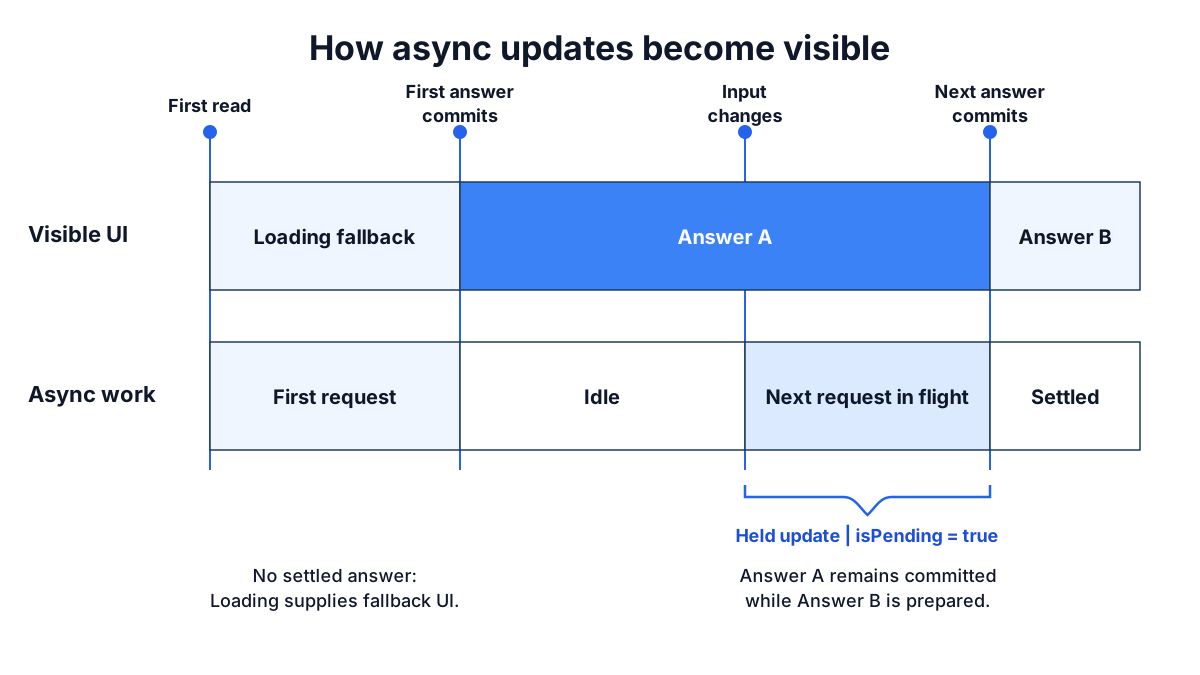
Before the first answer, there is nothing to show and the `Loading` boundary decides what renders.
After an answer, Solid holds the committed view while the next one is prepared.
Other writes in the same update wait with it, and everything commits together when the pending work settles, so the page never shows a mix of old and new.
This hold is automatic.
It does not need a `Loading` boundary and it has no API to opt in; if you have wrapped updates in a transition before, this is that behavior as the default.
The boundary controls what renders when no settled answer exists; it does not create the hold.
### What the hold means for a shared input
The hold is simple to reason about for one memo and one view.
It is worth seeing for several.
A dashboard has a period selector and three panels.
Each panel fetches its own data from the selected period, and the fetches take 200 milliseconds, one second, and ten seconds:
```tsx
function Dashboard() {
const [period, setPeriod] = createSignal("2026-Q2");
return (
<>
<PeriodSelect value={period()} onChange={setPeriod} />
<Loading fallback={<DashboardSkeleton />}>
<SummaryPanel period={period()} />
<TrendPanel period={period()} />
<AuditPanel period={period()} />
</Loading>
</>
);
}
function SummaryPanel(props: { period: string }) {
const summary = createMemo(() => fetchSummary(props.period));
return <p>{summary().total} orders</p>;
}
```
If each panel managed its own loading flag, changing the period would make the selector flip at once and each panel replace its content when its own request landed: the summary at 200 milliseconds, the audit log ten seconds later.
For those ten seconds the page shows the new period's summary beside the old period's audit log.
In Solid the write to `period` is held.
The selector keeps showing the old period, every panel keeps its old content, and at ten seconds the selector and all three panels change together.
Nothing on the page ever disagrees about which period it is showing.
The cost is that the fast panel waits for the slow one, and if nothing on the page reacts to the click, the page looks dead for ten seconds.
Neither behavior is right for every screen.
A detail page, a form, or a set of totals that must add up should change together.
A set of independent widgets should not have to.
The question to ask is about the update, not about any one request, and it is one your designer can answer:
**While this update is in flight, what should the user see?**
| The user should see… | Use |
| ---------------------------------------------------------------------- | --------------------------------------------------------------------------------------------- |
| Nothing change until everything that depends on the input is ready | The default. Add [`isPending`](#another-answer-is-coming-ispending) to acknowledge the click. |
| The control they touched reflect their input now, and the content wait | [`latest`](#show-the-input-now-latest) on the control, `isPending` to dim the content. |
| A placeholder in place of the content for the changed subject | [`<Loading on={key}>`](#show-a-placeholder-again-loading-on) around that content. |
The first two rows are the same screen: the tab highlight moves at once, the content stays and dims, the content swaps when it is ready.
That is the standard interaction for a held update, and the rest of this section shows the pieces.
The third row is for content that should not stay on screen when its subject changes, such as a panel for a different account.
The hold applies only to updates.
Each panel's first load still reaches the nearest `Loading` boundary, and nested boundaries let panels appear as their own first data arrives.
## Another answer is coming: `isPending`
Because the old answer stays visible, the UI needs a way to say that a new one is on the way.
[`isPending(fn)`](https://deploy-preview-1657--solid-docs-v2.netlify.app/reference/solid-js/reactivity/is-pending) answers that for one expression:
```tsx
import { For, createMemo, createSignal, isPending } from "solid-js";
function Search() {
const [query, setQuery] = createSignal("");
const results = createMemo(() => searchProducts(query()));
return (
<>
<input onInput={(event) => setQuery(event.currentTarget.value)} />
<ul class={{ stale: isPending(results) }}>
<For each={results()}>{(product) => <li>{product.name}</li>}</For>
</ul>
</>
);
}
```
Typing changes `query`, `results` starts a new request, and the previous results stay on screen with the `stale` class until the new ones land.
`isPending` is a question, not a piece of state.
It can be asked about the async source, about a memo derived from it, about a prop several components down, or about the signal whose write started the update:
```tsx
function App() {
const [selectedId, setSelectedId] = createSignal("mug");
return (
<>
<ProductList selectedId={selectedId()} onSelect={setSelectedId} />
<main class={{ pending: isPending(selectedId) }}>
<ProductPage id={selectedId()} />
</main>
</>
);
}
```
Here the fetch lives inside `ProductPage`.
`App` knows nothing about it, but `isPending(selectedId)` is `true` from the moment the write happens until everything downstream has settled, because the write is what is being held.
Notice that the list highlight does not move on click either.
`selectedId()` holds its old value like everything else, so the highlighted row always matches the content on screen.
When the design wants the highlight to move immediately, read the input with [`latest`](#show-the-input-now-latest), covered next.
A held update that nothing acknowledges looks like a dead click for as long as the request takes.
With attribution enabled, development builds report that case as `SILENT_HOLD` and name the interaction, the write, and the source it waited on; [Debugging reactivity](https://deploy-preview-1657--solid-docs-v2.netlify.app/guides/debugging-reactivity#the-screen-looks-dead-after-a-click) covers the report and the fixes, which are the primitives on this page.
If the expression has no settled answer yet, the read inside `isPending` still follows the surrounding `Loading` path; `isPending` reports on updates to a value that exists, not on the first load.
## Show the input now: `latest`
A held update keeps the input's old value visible along with the old content.
For the content that is the right choice.
For the control the user has touched, it usually is not: a tab that does not highlight when clicked reads as broken, even when the content below it is correctly waiting.
[`latest(fn)`](https://deploy-preview-1657--solid-docs-v2.netlify.app/reference/solid-js/reactivity/latest) reads the value an update is moving toward instead of the value it has committed:
```tsx
<ProductList selectedId={latest(selectedId)} onSelect={setSelectedId} />
<main class={{ pending: isPending(selectedId) }}>
<ProductPage id={selectedId()} />
</main>
```
If a new value is in flight, `latest(selectedId)` returns it before the held update commits it.
Otherwise it returns the committed value.
Before any value exists, the read still follows the normal `Loading` path.
Read the two sides together: `latest` on the control, the plain read on the content, `isPending` between them to dim the content.
The highlight moves at once, the old product stays visible and dims, and the new product replaces it when its data is ready.
This is the everyday shape of a held update, not a special case.
`latest` belongs on inputs.
Reading data through `latest` shows a result before the rest of the update has agreed on it, so a panel can show the new period's numbers while the selector still shows the old period.
When you want the control to lead, use `latest` on the control; when you want a panel to show a placeholder, use the next section.
## Show a placeholder again: `Loading on`
Once a `Loading` boundary has shown content, a later update does not bring the fallback back; the content stays and the update is held.
Some content should not stay.
An account panel showing account 1 while account 2 loads is worse than a skeleton, and the same is true for any content whose subject changed rather than whose data refreshed.
The `on` prop is a dependency list: the boundary tracks the expression, and a change to anything it reads makes the boundary stop waiting on its current content and show the fallback again while the new content loads.
```tsx
<Loading on={accountId()} fallback={<AccountSkeleton />}>
<AccountPanel id={accountId()} />
</Loading>
```
A `Loading` boundary is the update's chance to finish without waiting for that content: the region shows its fallback and waits on its own.
Normally the update takes that chance only on the region's first load.
`on` extends the offer to later updates: when `accountId()` changes and the new account is not ready, the boundary gives up its old content and takes the wait back from the update.
If the panel was the only thing waiting, the update finishes at once.
Controls outside the boundary see the new id, the panel shows its skeleton, and the content arrives when the account does.
Pending work caused by anything `on` does not read, such as a refresh of the same account, leaves the content in place as usual.
The fallback lands in the same frame as the change that caused it.
When nothing else is waiting on that change, that frame is immediate.
When other content is waiting on the same change, say two sibling panels reading the new account's orders and activity, the frame lands when they are ready, and this boundary shows its skeleton from that swap if its own content is still loading; the skeleton never appears beside a page the change has not reached.
When the very same data is also read outside the boundary, the frame waits on that read, which does not finish before the boundary's own content does, so the fallback can never appear:
```tsx
// account is createMemo(() => fetchAccount(accountId()))
// Avoid: the heading reads the same account outside the boundary
<h1>{account().name}</h1>
<Loading on={accountId()} fallback={<AccountSkeleton />}>
<AccountDetails account={account()} />
</Loading>
// Prefer: everything that reads the new account is inside the boundary
<Loading on={accountId()} fallback={<AccountSkeleton />}>
<h1>{account().name}</h1>
<AccountDetails account={account()} />
</Loading>
```
In the `Avoid` version, picking another account looks like nothing happened until the account loads, then the heading and the details change together; the `on` had no visible effect because the heading kept the frame waiting on the data the boundary was about to show a skeleton for.
Development reports this as `LOADING_ON_OUTSIDE_HOLD`, naming the source, and the fix is structural: move the outside read under the boundary so one hold owns the data.
The `Prefer` version is that fix.
So the rule for `on` is that the boundary encloses every reader of the data it waits on.
Other content waiting on the same input through its own data is fine; the skeleton arrives with the frame that content lands in.
That leaves a design choice rather than a rule about where boundaries go:
* One boundary with `on` around every reader of the subject.
The whole subject shows one skeleton and appears together.
* A boundary with `on` around each region.
Every region shows its own skeleton as soon as its frame lands, and each appears as its own data arrives.
When neither fits, because a breadcrumb, a title, or a sibling panel shows the same data and should stay, drop `on` and acknowledge the wait with `isPending` and `latest` instead.
`on` is tracked, so the expression has to read the signal: `on={accountId()}`, not `on={accountId}`.
Its value is irrelevant; several inputs go in as an array, `on={[accountId(), tab()]}`, and a change to any of them re-arms the boundary.
The same choice decides the dashboard above.
Give each panel its own boundary with `on={period()}` and the period write commits at once: the selector flips, every panel shows its skeleton, and each panel's content arrives as its own request lands.
Give `on` to one panel only and the other two, reading the shared input the normal way, still hold the write; the page swaps when both have answered, and the panel with `on` shows its skeleton from that swap until its own request lands, or shows nothing if it landed first.
[Boundaries](https://deploy-preview-1657--solid-docs-v2.netlify.app/concepts/boundaries) covers placement and how `Reveal` orders several boundaries.
:::deep-dive[A skeleton on every refetch: on=]
`on` reads a subject, so a refetch of the same subject leaves the content in place.
When a region should show its skeleton for every refetch as well, make the boundary depend on the data itself:
```tsx
<Loading on={account()} fallback={<AccountSkeleton />}>
<AccountDetails account={account()} />
</Loading>
```
A source going pending counts as a change to what `on` reads, so `refresh(account)` or a revalidation after an action brings the skeleton back, even when the same value lands.
The same-data rule applies: another reader of `account()` outside the boundary holds the frame on the data the boundary waits for, the skeleton never appears, and development warns.
This is a skeleton on every refresh; for most regions the default, old content with `isPending`, is the kinder treatment.
:::
:::deep-dive[A placeholder value instead of a fallback: loadingValue]
Most first loads should reach a `Loading` boundary.
When the placeholder renders through the same UI as the real data, such as an empty result list, the `loadingValue` option declares a value that answers for the source until the first result arrives:
```ts
const results = createMemo(() => searchProducts(query()), {
loadingValue: [] as Product[],
});
```
A source with a `loadingValue` never reaches `Loading` for its first flight, and `isPending` stays `false` until the first computed value lands.
Later updates follow the normal held behavior.
The store form is `seedLoadingValue: true` on `createStore(async () => ..., seed)`, which makes the seed the placeholder.
The [`createMemo`](https://deploy-preview-1657--solid-docs-v2.netlify.app/reference/solid-js/reactivity/create-memo) and [`createStore`](https://deploy-preview-1657--solid-docs-v2.netlify.app/reference/solid-js/stores/create-store) references list the option contracts.
:::
## Work rejects: `Errored`
If async work rejects, the error travels through the reactive graph like a value.
An [`Errored` boundary](https://deploy-preview-1657--solid-docs-v2.netlify.app/reference/solid-js/components-jsx/errored) turns an unhandled error into fallback UI:
```tsx
import { Errored, Loading } from "solid-js";
<Errored
fallback={(error, reset) => (
<section>
<p>{String(error())}</p>
<button onClick={reset}>Retry</button>
</section>
)}
>
<Loading fallback={<p>Loading product…</p>}>
<ProductDetail product={product()} />
</Loading>
</Errored>;
```
`Loading` and `Errored` handle separate states.
A loading boundary does not consume errors, and an error boundary does not replace loading UI.
An error is a status of that part of the graph, not a terminal state.
When the data underneath changes, because an input signal changed or a `refresh` landed, the boundary retries and the content returns.
`reset` retries the failed sources rather than showing the same error again.
[Boundaries](https://deploy-preview-1657--solid-docs-v2.netlify.app/concepts/boundaries) covers placement and recovery in detail.
## Read every input before the first `await`
Dependency tracking is synchronous.
An async computation registers the reactive reads it makes before its first `await`; a read after the `await` happens outside the tracking window, so a later change to that source cannot re-run the computation.
```ts
// Avoid: permissions() is read after the await and is never tracked
const profile = createMemo(async () => {
const user = await fetchUser(id());
return { user, canEdit: permissions().includes("edit") };
});
// Prefer: read every input first, then await
const profile = createMemo(async () => {
const userId = id();
const canEdit = permissions().includes("edit");
const user = await fetchUser(userId);
return { user, canEdit };
});
```
Run the `Avoid` version and change `permissions`: the memo does not recompute and the page keeps the old `canEdit`.
:::pitfall[A source first read after await cannot notify you]
The problem is worse when the late read is itself async and not ready yet.
No dependency edge exists, so the source cannot wake the computation when it settles, and the computation would stay pending with no retry.
Development builds turn that read into an error so it reaches `Errored` instead of hanging; production builds do not include the check.
Read every reactive input at the top of the function, before the first `await`.
:::
## Recap
* Return a promise from a memo and read the result as a plain value; the type is `Product`, not `Promise<Product>` or `Product | undefined`.
* Only the expression that reads an async value waits for it; passing it as a prop costs nothing.
* Create the async value high in the tree so the request starts early, and place `Loading` low so a small region shows the fallback.
* Requests are ordered by data dependency, not by component nesting; a waterfall exists only when one request needs another's response.
* After a value has settled, a change to its input is held: the current screen stays visible and everything commits together when the new value lands.
* Acknowledge a held update with `isPending` on the content and `latest` on the control the user touched.
* Put `on={key()}` on a `Loading` boundary whose subject changed and should show a placeholder instead of the old content; `on` is tracked, and the fallback never appears when the same data is also read outside the boundary.
* Read every reactive input before the first `await`.
## Next steps
* [Mutations](https://deploy-preview-1657--solid-docs-v2.netlify.app/concepts/mutations): writes that cross a round trip, with `action`, `createOptimisticStore`, and `refresh`, built up from the client-only cart.
* [Boundaries](https://deploy-preview-1657--solid-docs-v2.netlify.app/concepts/boundaries): where to place `Loading` and `Errored`, how `Reveal` orders sibling regions, and how an errored region recovers.
* [Data fetching patterns](https://deploy-preview-1657--solid-docs-v2.netlify.app/guides/data-fetching-patterns): search as you type, several requests per page, pagination, sharing a request, polling, and failures, each as working code.
* [Migrate data fetching from Solid 1](https://deploy-preview-1657--solid-docs-v2.netlify.app/migration/data-fetching-from-solid-1): what changes when `createResource` or an effect-and-flag pattern becomes an async memo, and how to keep the old feel where you want it.
* [Server functions](https://deploy-preview-1657--solid-docs-v2.netlify.app/building-apps/server-functions): a `"use server"` function returns a promise, so everything on this page applies to it unchanged; that page covers the transport, `GET` reads, and `live` streams.
---
# Boundaries
Source: https://deploy-preview-1657--solid-docs-v2.netlify.app/concepts/boundaries.md
A product page loads the product, its reviews, and a list of recommendations.
With one boundary around the whole page, the first request to fail takes everything down with it, and a slow recommendations query keeps the product itself behind a spinner.
With no boundary at all, an unhandled error halts the reactive system and nothing on the page updates again.
Boundaries decide how much of the page a pending or failed read affects.
[`Loading`](https://deploy-preview-1657--solid-docs-v2.netlify.app/reference/solid-js/components-jsx/loading) renders a fallback while async reads in its subtree have no value, [`Errored`](https://deploy-preview-1657--solid-docs-v2.netlify.app/reference/solid-js/components-jsx/errored) renders a fallback when its subtree throws, and [`Reveal`](https://deploy-preview-1657--solid-docs-v2.netlify.app/reference/solid-js/components-jsx/reveal) decides the order in which sibling regions appear.
Where you put each one is the design decision this page is about.
```tsx
import { Errored, Loading, createMemo, createSignal } from "solid-js";
type Product = { id: string; name: string; description: string };
async function fetchProduct(id: string): Promise<Product> {
const response = await fetch(`/api/products/${id}`);
if (!response.ok) throw new Error(`Could not load product ${id}`);
return response.json();
}
function ProductPanel() {
const [productId, setProductId] = createSignal("mug");
const product = createMemo(() => fetchProduct(productId()));
return (
<>
<ProductPicker value={productId()} onSelect={setProductId} />
<Errored
fallback={(error, reset) => (
<section>
<p>{String(error())}</p>
<button onClick={reset}>Retry</button>
</section>
)}
>
<Loading on={productId()} fallback={<p>Loading product…</p>}>
<h2>{product().name}</h2>
<p>{product().description}</p>
</Loading>
</Errored>
</>
);
}
```
On first render the panel shows "Loading product…" and the picker is usable.
When the request resolves the product appears; when it rejects, the error message and a **Retry** button appear in the same place.
Pick another product and the panel shows the loading text again while the picker keeps working.
Three rules explain that behavior.
A boundary handles status produced by reads in its own subtree, and the nearest matching boundary handles it.
Loading and error status are separate, so `Loading` does not hide an error and `Errored` does not replace loading UI; both can protect the same region.
Controls outside the boundary are outside its fallback, so the picker stays on screen in every state.
## Loading boundaries
`Loading` renders its `fallback` while an async value read in its subtree has not produced a first answer.
Once it has shown content, it keeps that content visible during later updates: as the [Async reactivity](https://deploy-preview-1657--solid-docs-v2.netlify.app/concepts/async-reactivity#settled-view-and-in-flight-work) page explains, a change to an input is held, the current screen stays, and the new content replaces it when ready.
Use `isPending` in the content when the user should see that a refresh is in progress.
Place a boundary around the smallest region its fallback should replace, and leave controls the user needs during the load outside it:
```tsx
// Avoid: one boundary around the page, so a slow query hides everything
<Loading fallback={<PageSkeleton />}>
<ProductPicker value={productId()} onSelect={setProductId} />
<ProductDetail id={productId()} />
<Recommendations id={productId()} />
</Loading>
// Prefer: one boundary per region that should have its own fallback
<ProductPicker value={productId()} onSelect={setProductId} />
<Loading fallback={<DetailSkeleton />}>
<ProductDetail id={productId()} />
</Loading>
<Loading fallback={<CardSkeleton />}>
<Recommendations id={productId()} />
</Loading>
```
Run the `Avoid` version and the picker is gone until the slowest of the two requests lands.
In the `Prefer` version the picker is always there, the detail pane appears when the product arrives, and the recommendations appear when they do.
The `on` prop is a dependency list: an expression the boundary tracks, whose reads say which changes should bring the fallback back.
Without it, choosing a new product keeps the old product on screen while the new one loads; with `on={productId()}`, a change to the id makes the boundary stop waiting on its current content and show the skeleton while the new product loads.
Its value does not matter, only what it reads, so several inputs go in as an array, `on={[productId(), variant()]}`.
Pending work caused by anything `on` does not read, such as a refresh of the same product, leaves the content in place.
The fallback appears with the same frame as the change that caused it.
When nothing else is waiting on that change, that is at once.
When other content outside the boundary is waiting on the same change, the page swaps when that content is ready, and the boundary shows its skeleton from that swap if its own content is still loading.
When the very same data is also read outside the boundary, the frame waits on it and the fallback can never appear; development warns `LOADING_ON_OUTSIDE_HOLD`, and the fix is structural: move the outside read under the boundary so one hold owns the data.
The [Async reactivity](https://deploy-preview-1657--solid-docs-v2.netlify.app/concepts/async-reactivity#show-a-placeholder-again-loading-on) page shows each case.
:::pitfall[Passing the accessor to on instead of reading it]
`on` is tracked, so the expression has to read the signal; an accessor that is never called reads nothing.
```tsx
// Avoid: nothing is read, so no change ever re-arms the boundary
<Loading on={productId} fallback={<DetailSkeleton />}>
// Prefer: read the value
<Loading on={productId()} fallback={<DetailSkeleton />}>
```
With the uncalled accessor, picking another product keeps the old product on screen for the whole load, which is the behavior `on` was meant to change.
:::
## Error boundaries
`Errored` catches an error thrown by a read or computation in its subtree, including a rejected async source, and renders its fallback in place of the content.
Content outside the boundary stays on screen.
Place it around the smallest region that can fail and recover as one unit.
For the product page, that is the detail pane and the recommendations separately: a failed recommendations query should not take the product with it.
The fallback can be an element or a function.
The function receives an accessor for the error and a `reset` function; calling `reset` re-runs the sources that failed so the branch can render again.
### Recovery
An errored region is not stuck until someone resets it.
The error is the current status of that part of the graph, the same way "not ready" is a status, and it clears when the graph produces a value again:
* An input of the failed computation changes.
In the example above, picking another product after a failed request runs the fetch for the new id, and the content returns if that request succeeds.
* A `refresh(source)` lands with a successful result.
* A `live` server function reconnects and yields a value.
`reset` covers the case where nothing upstream will change on its own, such as a network outage.
It re-runs the failed sources, so a retry that hits the same error shows the same fallback, and a retry that succeeds shows the content.
:::caution[An error in the fallback is outside the boundary]
An error thrown while rendering an `Errored` fallback is not caught by that boundary.
A parent `Errored` can catch it.
With no boundary above, an unhandled error halts the reactive system, which development reports as `[REACTIVITY_HALTED]`; [Debugging reactivity](https://deploy-preview-1657--solid-docs-v2.netlify.app/guides/debugging-reactivity#every-update-stopped-after-an-error) covers that report.
:::
## Reveal order
Independent loading regions appear in the order their data arrives.
On a product page with a detail pane, reviews, and recommendations, a fast recommendations query pops in below the detail skeleton and the layout shifts as each region lands.
Server rendering has the same problem in the HTML stream, where fragments arrive out of order.
`Reveal` coordinates the `Loading` boundaries created directly within it.
It does not fetch data, create loading state, or delay the network; content still arrives as soon as it is ready and `Reveal` controls when it is shown:
```tsx
import { Loading, Reveal } from "solid-js";
<Reveal collapsed>
<Loading fallback={<DetailSkeleton />}>
<ProductDetail id={productId()} />
</Loading>
<Loading fallback={<CardSkeleton />}>
<Reviews id={productId()} />
</Loading>
<Loading fallback={<CardSkeleton />}>
<Recommendations id={productId()} />
</Loading>
</Reveal>;
```
The recommendations can finish first and still wait their turn behind the detail pane and the reviews.
`collapsed` keeps the skeletons after the current one from stacking below it, so only one skeleton is visible at a time.
The three orders:
* `sequential`, the default, reveals slots in registration order; a later slot stays on its fallback until every earlier slot is ready.
* `together` holds every direct slot until all are ready, then releases them as a group.
* `natural` lets each slot reveal when its own data resolves.
At the top level this is the same as no `Reveal`; its purpose is nesting, where the natural group takes one position in an outer order.
```tsx
function ProductPage() {
return (
<Reveal>
<Loading fallback={<DetailSkeleton />}>
<ProductDetail id={productId()} />
</Loading>
<Reveal order="natural">
<Loading fallback={<CardSkeleton />}>
<Reviews id={productId()} />
</Loading>
<Loading fallback={<CardSkeleton />}>
<Recommendations id={productId()} />
</Loading>
</Reveal>
<Loading fallback={<FooterSkeleton />}>
<RelatedProducts id={productId()} />
</Loading>
</Reveal>
);
}
```
The detail pane appears first.
Then reviews and recommendations appear independently, in whichever order they land.
The related products wait until both of those are shown.
:::deep-dive[Which boundaries join a reveal group]
A `Loading` boundary joins the nearest `Reveal` present when the boundary is created.
A nested `Loading` or `Errored` starts a separate boundary scope for its subtree, so loading boundaries nested inside another `Loading` are not additional slots in the outer group, and a loading boundary wrapped by `Errored` does not delay an ancestor group.
A nested `Reveal` is different: it registers itself as one composite slot with the parent group.
An outer hold propagates through it, keeping its descendant loading boundaries on their fallbacks until the parent releases the slot, and the inner group then follows its own order.
Membership is structural.
Wrapping a descendant in another loading boundary does not let it escape an outer hold; move the region outside the outer `Reveal` when it must reveal on its own.
:::
## Primitive forms
The components above are built from three primitives, `createLoadingBoundary`, `createErrorBoundary`, and `createRevealOrder`.
They stay runtime exports of `solid-js`, but their types live in `solid-js/internal`, which carries no semver guarantee: they exist for renderer integrations, not for application code.
A custom boundary component composes `Loading`, `Errored`, and `Reveal` instead:
```tsx
import { Errored, Loading } from "solid-js";
import type { JSX } from "@solidjs/web";
function StatusBoundary(props: {
children: JSX.Element;
loading: JSX.Element;
}) {
return (
<Errored
fallback={(error, reset) => (
<section>
<p>{String(error())}</p>
<button onClick={reset}>Retry</button>
</section>
)}
>
<Loading fallback={props.loading}>{props.children}</Loading>
</Errored>
);
}
```
## Common problems
### The whole page shows a skeleton while one region loads
The `Loading` boundary is above the region that is slow.
Move the boundary down to the region whose fallback should show, and leave the rest of the page outside it.
The request can stay where it was; the [Async reactivity](https://deploy-preview-1657--solid-docs-v2.netlify.app/concepts/async-reactivity#fetch-high-block-low) page explains why the fetch and the boundary are placed independently.
### Choosing a new item keeps the old one on screen
That is the default: after a first answer, the boundary keeps its content and the update is held.
Add `on={id()}` to the boundary when a change of subject should show the fallback, and read the signal inside it rather than passing the accessor.
If `on` is already there and the old item still stays, check the console: `LOADING_ON_OUTSIDE_HOLD` means the same data is also read outside the boundary, such as a title showing the item's name, so the frame waits on that read and the fallback can never appear.
Move the outside read under the boundary.
Without the warning, the page is held by other content that reads the same input, such as a sibling boundary without `on`; the skeleton appears when that content is ready, or not at all if this item lands first.
Give the sibling its own `on`, or drop `on` and show the wait with `isPending`.
### Retry shows the same error
`reset` re-runs the failed sources with the same inputs.
If the cause has not changed, the same error comes back.
When the fix is a different input, change the input; the boundary recovers on its own.
### A region inside `Reveal` does not appear when its data is ready
The region is a slot in a `sequential` group and an earlier slot is not ready.
Give the group `order="natural"`, wrap the independent regions in a nested `<Reveal order="natural">`, or move the region outside the group.
## Recap
* Put `Loading` around the smallest region its fallback should replace, and keep the controls the user needs outside it.
* Put `Errored` around the smallest region that can fail and recover as a unit; both boundaries can wrap the same region.
* After a first answer, `Loading` keeps its content during updates; add `on={key()}` when a changed subject should show the fallback again.
`on` is tracked, so read the signal inside it; the fallback appears with the frame the change lands in, and never when the same data is also read outside the boundary.
* An errored region recovers when an input changes or a refresh succeeds; `reset` is for when nothing upstream will change.
* An error thrown by a fallback needs a boundary above it.
* Use `Reveal` to control the order sibling regions appear in; it changes timing, not what each boundary observes.
* Nest `<Reveal order="natural">` to let a group of regions take one position in an outer sequence.
## Next steps
* [Rendering and SSR](https://deploy-preview-1657--solid-docs-v2.netlify.app/concepts/rendering-and-ssr): how `Loading` boundaries decide what goes in the initial HTML shell and what streams later.
* [Mutations](https://deploy-preview-1657--solid-docs-v2.netlify.app/concepts/mutations): which errors an `action` should catch itself and which should reach `Errored`.
* [Server functions](https://deploy-preview-1657--solid-docs-v2.netlify.app/building-apps/server-functions): reads and live sources whose errors and reconnects these boundaries handle.
* [Solid Router](https://deploy-preview-1657--solid-docs-v2.netlify.app/routing/solid-router): where to put the `Loading` boundary around `props.children` so the first page load has a fallback, and why a later navigation keeps the current page without one.
---
# Mutations
Source: https://deploy-preview-1657--solid-docs-v2.netlify.app/concepts/mutations.md
The user clicks **Add to cart**.
The request takes 400 milliseconds.
In that time the cart must show the new line, and when the response arrives the cart must agree with the server; if the server refuses, the line must go away again.
Reads need no wrapper for any of this: change an input and the memo asks again, as the [Async reactivity](https://deploy-preview-1657--solid-docs-v2.netlify.app/concepts/async-reactivity) page showed.
Writes have a different shape, because a write happens before the round trip and must be reconciled after it.
This page takes the cart from the [Stores](https://deploy-preview-1657--solid-docs-v2.netlify.app/concepts/stores) page and moves its writes to a server one change at a time.
## A client-only cart
Start with the cart as a store and three named writes.
The UI reads `items` and calls the functions:
```ts
import { createStore } from "solid-js";
export type CartItem = { id: string; name: string; quantity: number };
export function createCart() {
const [items, setItems] = createStore<CartItem[]>([]);
const add = (item: CartItem) => {
setItems((list) => {
list.push(item);
});
};
const remove = (id: string) => {
setItems((list) => list.filter((item) => item.id !== id));
};
const setQuantity = (id: string, quantity: number) => {
setItems((list) => {
const item = list.find((item) => item.id === id);
if (item) item.quantity = quantity;
});
};
return [items, { add, remove, setQuantity }] as const;
}
```
Click **Add** and the row appears; there is nothing to wait for.
## Move the cart to the server
Now the list comes from an API and every write goes through it.
The UI should still respond on the click:
```ts
import { action, createOptimisticStore, refresh } from "solid-js";
import * as api from "./api";
export function createCart() {
const [items, setItems] = createOptimisticStore<CartItem[]>(
() => api.list(),
[]
);
const add = action(function* (item: CartItem) {
setItems((list) => {
list.push(item);
});
yield api.add(item);
refresh(items);
});
const remove = action(function* (id: string) {
setItems((list) => list.filter((item) => item.id !== id));
yield api.remove(id);
refresh(items);
});
const setQuantity = action(function* (id: string, quantity: number) {
setItems((list) => {
const item = list.find((item) => item.id === id);
if (item) item.quantity = quantity;
});
yield api.setQuantity(id, quantity);
refresh(items);
});
return [items, { add, remove, setQuantity }] as const;
}
```
Click **Add** and the row appears at once, as before.
When `api.add` resolves, the cart is re-read from the server and the row is replaced by the server's copy; if the two agree, nothing on screen changes.
If `api.add` rejects, the row disappears.
Compare the two versions.
The components that render the cart did not change.
The `setItems` calls did not change: the synchronous write already described the expected result, so it becomes the optimistic prediction.
Three things were added:
* [`createOptimisticStore(fn, seed)`](https://deploy-preview-1657--solid-docs-v2.netlify.app/reference/solid-js/stores/create-optimistic-store) derives its durable value from `fn` and accepts writes that show immediately but are tentative.
* [`action`](https://deploy-preview-1657--solid-docs-v2.netlify.app/reference/solid-js/lifecycle-actions/action) runs a generator as one transaction.
Each `yield` waits for its promise and then restores the transaction, so the write before the `yield` and the refresh after it belong to the same update.
* [`refresh(items)`](https://deploy-preview-1657--solid-docs-v2.netlify.app/reference/solid-js/lifecycle-actions/refresh) re-runs the derivation so the store reconciles against what the server has.
The optimistic write is an overlay on the durable store, not a second copy of the state.
Solid discards the overlay when the action settles, whether the action succeeded or failed.
If `api.add` throws, the overlay is dropped and the list is back where it started; there is no rollback code to write.
If the server agrees with the prediction, reconciliation finds no differences and nothing updates.
Because actions ride the same hold as reads, the list never shows half a mutation, and quick repeated clicks do not interleave into a corrupted list.
:::pitfall[An await inside an action leaves the transaction]
JavaScript has no way to keep the action's context across a plain `await`, which is why the body is a generator.
```ts
// Avoid: the write after the await is outside the transaction
const add = action(async function* (item: CartItem) {
await api.add(item);
setItems((list) => {
list.push(item);
});
});
// Prefer: yield the promise so the transaction resumes with the result
const add = action(function* (item: CartItem) {
setItems((list) => {
list.push(item);
});
yield api.add(item);
refresh(items);
});
```
In the `Avoid` version the write runs with no transaction to belong to, so the optimistic overlay is discarded at the end of that update: the row flashes in and vanishes, or never appears.
Use `yield promise` as the suspension point.
If you must `await`, place a bare `yield` before the next write so the transaction is restored.
:::
## Show that a row is saving
Immediate updates are the right default for a cart, but a user may want to know which rows the server has not confirmed yet.
Put the affordance in the data:
```ts
export type CartItem = {
id: string;
name: string;
quantity: number;
pending?: boolean;
};
const add = action(function* (item: CartItem) {
setItems((list) => {
list.push({ ...item, pending: true });
});
yield api.add(item);
refresh(items);
});
```
The optimistic row carries `pending: true`, and a row can render a spinner or a muted style from it.
When the action settles, the overlay goes away and the refreshed row from the server has no flag.
Only the row that read `pending` updates.
## Mark data as changing: `affects`
The `pending` flag describes the row.
Sometimes the question is about the data as a whole: "is the quantity of this item about to change?"
[`affects(target, key?)`](https://deploy-preview-1657--solid-docs-v2.netlify.app/reference/solid-js/lifecycle-actions/affects) marks a source, a store, or one store property as pending while the surrounding action is in flight, so readers of that data report it through `isPending`:
```ts
const setQuantity = action(function* (id: string, quantity: number) {
const item = items.find((item) => item.id === id);
if (item) affects(item, "quantity");
yield api.setQuantity(id, quantity);
refresh(items);
});
```
Here no optimistic write is made; the old quantity stays visible and `isPending(() => item.quantity)` is `true` until the refresh lands.
The two mechanisms are independent: an optimistic write supplies the expected value, `affects` supplies the pending status, and a mutation can use either or both.
A bare `refresh(source)` asks the same question again without changing the inputs, so nothing reports pending on its own.
Pair `affects(source)` with `refresh(source)` when the reload itself should show as pending.
## Wait for the server to echo the write: `until`
Some transports do not return the result: the request is fire-and-forget and the confirmation arrives later on a live source.
[`until(fn)`](https://deploy-preview-1657--solid-docs-v2.netlify.app/reference/solid-js/lifecycle-actions/until) holds the action open until a predicate over the confirmed data becomes true:
```ts
const send = action(function* (text: string) {
const clientId = crypto.randomUUID();
setMessages((list) => {
list.push({ clientId, text, pending: true });
});
yield socket.send({ clientId, text });
yield until(() => messages.some((message) => message.clientId === clientId), {
timeout: 10_000,
});
});
```
The predicate reads authoritative state, so the optimistic row pushed above cannot satisfy it; only the echo from the live source can.
A timeout or an abort rejects, which settles the action and drops the overlay.
## Layer state by lifetime
A production feature often combines state with different lifetimes: the durable data from the server, per-row UI state such as a recoverable error, and the optimistic overlay.
Apply them in that order and read the composed result.
Here each cart line has a gift-wrap toggle whose failure the row can recover from on its own:
```tsx
import {
Errored,
For,
Loading,
Show,
action,
createOptimisticStore,
refresh,
} from "solid-js";
import { api } from "./api";
type ServerItem = {
id: string;
name: string;
giftWrap: boolean;
};
type ItemError = {
giftWrap: boolean;
};
type CartItem = ServerItem & {
pending?: boolean;
error?: ItemError;
};
function createCart() {
const errors = new Map<string, ItemError>();
const [items, setItems] = createOptimisticStore<CartItem[]>(async () => {
const current: ServerItem[] = await api.list();
return current.map((item) => {
const error = errors.get(item.id);
return error ? { ...item, error } : item;
});
}, []);
const setGiftWrap = action(function* (id: string, giftWrap: boolean) {
setItems((draft) => {
const item = draft.find((item) => item.id === id);
if (!item) return;
item.giftWrap = giftWrap;
item.pending = true;
});
try {
yield api.setGiftWrap(id, giftWrap);
errors.delete(id);
} catch {
errors.set(id, { giftWrap });
} finally {
refresh(items);
}
});
return [items, { setGiftWrap }] as const;
}
function CartLines() {
const [items, { setGiftWrap }] = createCart();
return (
<Errored fallback={(error) => <p>{String(error())}</p>}>
<Loading fallback={<p>Loading cart...</p>}>
<ul>
<For each={items}>
{(item) => (
<li
class={{
pending: !!item.pending,
errored: !!item.error,
}}
>
<label>
<input
type="checkbox"
checked={item.giftWrap}
onInput={(event) =>
void setGiftWrap(item.id, event.currentTarget.checked)
}
/>
Gift wrap {item.name}
</label>
<Show when={item.error}>
{(error) => (
<button
type="button"
onClick={() =>
void setGiftWrap(item.id, error().giftWrap)
}
>
Retry
</button>
)}
</Show>
</li>
)}
</For>
</ul>
</Loading>
</Errored>
);
}
```
Toggle gift wrap on a line and the checkbox moves at once with the `pending` style.
If the request fails, the checkbox returns to the server's value and a **Retry** button appears on that line; the rest of the cart is untouched.
`createCart()` creates all three layers under the component owner and returns one composed store with its actions, which keeps reactive state out of module scope and out of shared server memory.
The projection reads the durable items and folds in the `errors` map.
The map is not reactive by itself; `refresh(items)` re-runs the projection after each mutation and makes its current entries visible.
The action catches the expected failure because the row can recover locally.
An error the action does not catch, or an error thrown by the projection or the render, still reaches `Errored`.
## Common problems
### After the request succeeds, the row snaps back to the old value
The action settled and Solid removed the optimistic overlay, but nothing re-read the server, so the store still holds the value from before the mutation.
Call `refresh(items)` after the `yield` so the store reconciles with what the server now has.
### The optimistic value flashes and disappears, or never appears
The write ran with no transaction: either outside any action, or inside an action after a plain `await`.
An optimistic overlay with no transaction to wait on is discarded at the end of the current update.
Make the tentative write inside the `action` that sends the request, and suspend with `yield promise` rather than `await`.
### The tentative write stayed after the action failed
The store is a plain `createStore`, whose writes are durable even inside an action.
Use `createOptimisticStore` for state that should revert when the request settles.
### `flush()` inside an action throws `[FLUSH_IN_ACTION]`
An action's writes are held in its transaction until the action settles, so there is nothing for `flush()` to show.
Remove the call and assert after the action's promise resolves.
[Debugging reactivity](https://deploy-preview-1657--solid-docs-v2.netlify.app/guides/debugging-reactivity#the-test-sees-the-old-dom) explains the diagnostic.
## Recap
* Keep the synchronous store write; inside an `action` on a `createOptimisticStore`, it becomes the optimistic prediction.
* Write the body as a generator and `yield` each promise so the writes before and after it share one transaction.
* Call `refresh(source)` after the request so the store reconciles with the server.
* The overlay is discarded when the action settles, on success and on failure; there is no rollback code.
* Put a `pending` flag in the optimistic row when the UI should show what is unconfirmed.
* Use `affects(target, key)` to report pending on data without predicting its value.
* Use `until(predicate)` when the confirmation arrives on a live source rather than in the response.
* Create durable data, per-row UI state, and the optimistic overlay under one owner and return one composed store.
## Next steps
* [Forms](https://deploy-preview-1657--solid-docs-v2.netlify.app/guides/forms): the same actions behind a `<form>`, with progressive enhancement, validation, and errors returned from the server.
* [Mutations and responses](https://deploy-preview-1657--solid-docs-v2.netlify.app/building-apps/server-functions/mutations-and-responses): writing `api.add` as a `"use server"` function and returning redirects, statuses, and safe errors.
* [Boundaries](https://deploy-preview-1657--solid-docs-v2.netlify.app/concepts/boundaries): where `Errored` catches the errors an action does not, and how an errored region recovers.
* [Data loading and mutations](https://deploy-preview-1657--solid-docs-v2.netlify.app/routing/solid-router/data): Solid Router's `action` and `query` add submissions, caching, and revalidation on top of these primitives.
* [State management](https://deploy-preview-1657--solid-docs-v2.netlify.app/guides/state-management): where the cart, the user, and the filter live, and why `createCart()` runs inside a provider.
---
# Rendering and SSR
Source: https://deploy-preview-1657--solid-docs-v2.netlify.app/concepts/rendering-and-ssr.md
You add `ssr: true` to `vite.config.ts`, reload, and the terminal prints:
```text
ReferenceError: window is not defined
```
The stack points at a module that read `localStorage` when it was imported.
Nothing about the component was wrong in the browser; it is now also running in Node, where there is no `window`, and the same source has to be correct in both places.
Solid uses one component source for client rendering and server-side rendering (SSR).
The JSX build target selects DOM operations for the browser or HTML-producing operations for the server.
This page covers what that asks of your code and which rendering function fits which situation.
Most applications need two things from this page: the [server and client boundaries](#server-and-client-boundaries) rules for browser-only code, and the rule in [streaming rendering](#streaming-rendering) about where `Loading` boundaries go.
In a project made by the CLI, the generated entries already call `render`, `hydrate`, and `renderToStream`; the sections on those functions are for code that calls the renderer directly.
## Server and client boundaries
Code that touches `window`, `document`, `localStorage`, or a browser-only library must not run while the server renders.
Three places are safe: an effect function, an `onSettled` callback, or a subtree that only renders in the browser.
```tsx
// Avoid: runs on import, on the server too
const saved = localStorage.getItem("cart");
const [cart, setCart] = createStore(saved ? JSON.parse(saved) : { items: [] });
// Prefer: read the browser API after hydration, which happens only in the browser
const [cart, setCart] = createStore({ items: [] as CartItem[] });
onSettled(() => {
const saved = localStorage.getItem("cart");
if (saved) {
setCart((draft) => {
draft.items = JSON.parse(saved).items;
});
}
});
```
The `Avoid` version crashes the server render with `ReferenceError: localStorage is not defined`.
In the `Prefer` version the server renders an empty cart, the browser hydrates it, and the `onSettled` callback fills it in from storage.
The effect function of `createEffect` and the callback of `onSettled` do not run during server rendering; their compute functions may.
For a check inside shared code, [`isServer`](https://deploy-preview-1657--solid-docs-v2.netlify.app/reference/solid-web/rendering-ssr/is-server) is a build-time constant: the browser build exports `false` and the server build exports `true`, so a bundler can remove the unreachable side.
```tsx
import { isServer } from "@solidjs/web";
if (!isServer) {
window.addEventListener("online", reportOnline);
}
```
For a whole component that cannot run on the server, such as a map or a rich text editor, use [`clientOnly`](https://deploy-preview-1657--solid-docs-v2.netlify.app/reference/solid-web/rendering-ssr/client-only).
The server renders its fallback and does not start the import; the browser hydrates the fallback, waits for the module and for hydration to settle, and then swaps in the component:
```tsx
import { clientOnly } from "@solidjs/web";
const Map = clientOnly(() => import("./Map"));
export function StoreLocator() {
return <Map fallback={<div class="map-placeholder" />} />;
}
```
By default `clientOnly` starts loading when its declaration runs.
Pass `{ lazy: true }` to defer the import until the component's first render.
:::caution[Module-scope state is shared by every request]
On the server one module instance serves every request, so a signal or store at module scope leaks one user's state into another user's response.
Create state inside a component or a context provider, which runs once per app in the browser and once per request on the server.
[State management](https://deploy-preview-1657--solid-docs-v2.netlify.app/guides/state-management#module-level-state-and-the-server) shows the pattern and what the server does with the module-scope version.
:::
## Client rendering
[`render`](https://deploy-preview-1657--solid-docs-v2.netlify.app/reference/solid-web/rendering-ssr/render) mounts a tree into a DOM container and returns a disposer that tears down the tree and its reactive scopes:
```tsx
import { render } from "@solidjs/web";
import { App } from "./App";
const root = document.getElementById("app");
if (!root) {
throw new Error("Missing #app");
}
const dispose = render(() => <App />, root);
// Call dispose() when this root must be unmounted.
```
Pass a function so Solid creates the root before it evaluates the component tree.
The root owns the delegated event listeners for its container, and disposal removes them.
When the initial render has no unresolved async read, `render` flushes that work before returning; if an async read is pending, the mount attaches after it settles.
## Hydrating server HTML
[`hydrate`](https://deploy-preview-1657--solid-docs-v2.netlify.app/reference/solid-web/rendering-ssr/hydrate) is `render` for a container that already holds HTML from `renderToString` or `renderToStream`.
It claims the existing nodes and attaches event handlers and reactive bindings without recreating them:
```tsx
import { hydrate } from "@solidjs/web";
import { App } from "./App";
const root = document.getElementById("app");
if (!root) {
throw new Error("Missing #app");
}
hydrate(() => <App />, root);
```
The server and client must render the same initial structure in each hydrated region.
Solid assigns hydration keys during SSR so the client build can claim the matching nodes; when the structures differ, the client cannot find the node it expects.
```tsx
// Avoid: a different element on each side
{
isServer ? (
<p>Rendered on the server</p>
) : (
<time>Rendered at {Date.now()}</time>
);
}
// Prefer: the same structure, with the browser-only value filled in after hydration
const [renderedAt, setRenderedAt] = createSignal<number>();
onSettled(() => setRenderedAt(Date.now()));
<p>
{renderedAt() ? `Rendered at ${renderedAt()}` : "Rendered on the server"}
</p>;
```
The `Avoid` version logs, in development, a warning such as `Hydration tag mismatch for key "...": expected <time> but found` followed by the `<p>` it found instead, and the client's bindings for that region attach to the wrong node.
The `Prefer` version hydrates cleanly and updates the text once the browser has taken over.
A value that differs only in its text, such as `<p>{Date.now()}</p>`, produces no warning: hydration adopts the server's text node as it is, so the page keeps showing the server's value until a reactive update replaces it.
[SSR-safe code](https://deploy-preview-1657--solid-docs-v2.netlify.app/guides/ssr-safe-code#values-that-differ-on-every-run) goes through these cases and how to read each warning.
When the application owns the full document, include `HydrationScript` once before the application markup.
It initializes hydration support and records delegated events that fire before the client bundle has hydrated, so a click during the load is not lost.
For several roots on one page, give each server render a distinct `renderId` and pass the same value to its `hydrate` call:
```tsx
// Server
const accountHtml = renderToString(() => <Account />, { renderId: "account" });
// Client
hydrate(() => <Account />, accountRoot, { renderId: "account" });
```
## Synchronous string rendering
[`renderToString`](https://deploy-preview-1657--solid-docs-v2.netlify.app/reference/solid-web/rendering-ssr/render-to-string) runs a component tree synchronously and returns an HTML string.
Use it when the tree can complete synchronously, or when the pending parts are inside a `Loading` boundary whose fallback is acceptable in the response:
```tsx
import { Loading } from "solid-js";
import { renderToString } from "@solidjs/web";
import { App } from "./App";
const html = renderToString(() => (
<Loading fallback={<main>Loading…</main>}>
<App />
</Loading>
));
```
When a read is pending inside `Loading`, the string contains that boundary's fallback and nothing arrives later.
Use streaming when the client should receive the real content once the async work settles.
## Streaming rendering
[`renderToStream`](https://deploy-preview-1657--solid-docs-v2.netlify.app/reference/solid-web/rendering-ssr/render-to-stream) emits the synchronous shell first, then a fragment for each `Loading` boundary as its content settles:
```tsx
import { renderToStream } from "@solidjs/web";
import { App } from "./App";
export function handleRequest(): Response {
const stream = renderToStream(() => <App />);
return new Response(stream.readable, {
headers: { "content-type": "text/html; charset=utf-8" },
});
}
```
The returned object can pipe to a Node writable, pipe to a Web `WritableStream`, expose a `ReadableStream<Uint8Array>`, or be awaited for the fully settled HTML.
Choose one output form per render.
An async read with no `Loading` boundary above it blocks the shell until it settles.
Inside a boundary, the shell carries the fallback and a later fragment replaces it.
That makes `Loading` placement a server decision as well as a client one: a boundary around the product detail lets the header, navigation, and footer reach the browser while the product query is still running.
[Boundaries](https://deploy-preview-1657--solid-docs-v2.netlify.app/concepts/boundaries) covers placement and how `Reveal` orders the fragments.
## Who owns the document
A server render can produce a complete document or a fragment embedded in a document another host owns.
The choice decides how head content and render assets reach the page.
When the rendered output includes a closing `</head>`, the renderer inserts registered head content and assets into that document:
```tsx
import { HydrationScript, renderToString } from "@solidjs/web";
import { App } from "./App";
const html = renderToString(() => (
<html lang="en">
<head>
<meta charset="utf-8" />
<HydrationScript />
</head>
<body>
<div id="app">
<App />
</div>
</body>
</html>
));
```
When another host owns the document, render the application fragment and use `onHead` to receive the head HTML.
For `renderToString`, `onHead` runs synchronously before the function returns; for `renderToStream`, it runs before the shell is emitted:
```tsx
let head = "";
const body = renderToString(() => <App />, {
onHead(value) {
head = value;
},
});
const documentHtml = `<!doctype html>
<html>
<head>${head}</head>
<body><div id="app">${body}</div></body>
</html>`;
```
The renderer handles HTML generation and head delivery.
Server adapters, routing, response creation, and deployment belong to the application layer; [App structure](https://deploy-preview-1657--solid-docs-v2.netlify.app/building-apps/app-structure) shows how the CLI templates wire them.
## Controlling hydration
These controls divide hydration ownership between the server and the client.
Use them only when the two intentionally manage different parts of the document, such as a server-rendered marketing page with one interactive island.
[`NoHydration`](https://deploy-preview-1657--solid-docs-v2.netlify.app/reference/solid-js/advanced/manual-hydration/no-hydration) renders its children on the server without hydration keys or serialized state.
During client hydration, Solid skips that subtree and leaves its DOM untouched:
```tsx
import { NoHydration } from "solid-js";
<NoHydration>
<aside>This server-rendered content is not hydrated.</aside>
</NoHydration>;
```
[`Hydration`](https://deploy-preview-1657--solid-docs-v2.netlify.app/reference/solid-js/advanced/manual-hydration/hydration) re-enables hydration inside a `NoHydration` region and starts a new hydration id namespace on the server.
Pass the same id as the `renderId` of the client root that hydrates it:
```tsx
import { Hydration, NoHydration } from "solid-js";
<NoHydration>
<div id="account">
<Hydration id="account">
<Account />
</Hydration>
</div>
</NoHydration>;
```
```tsx
import { hydrate } from "@solidjs/web";
const accountRoot = document.getElementById("account")!;
hydrate(() => <Account />, accountRoot, { renderId: "account" });
```
Two functions answer questions about the hydration in progress.
[`isHydrating()`](https://deploy-preview-1657--solid-docs-v2.netlify.app/reference/solid-js/advanced/manual-hydration/is-hydrating) is `true` while the running code is claiming server-rendered DOM, during the root pass of `hydrate()` or while a streamed boundary resumes, and `false` on the server, in client-only renders, and afterwards; a component reads it to seed a browser-measured value with what the server rendered only when the server rendered anything, as [SSR-safe code](https://deploy-preview-1657--solid-docs-v2.netlify.app/guides/ssr-safe-code#browser-apis) shows.
[`isHydratable()`](https://deploy-preview-1657--solid-docs-v2.netlify.app/reference/solid-js/advanced/manual-hydration/is-hydratable) is `true` when the calling owner sits where hydration applies, so `false` under `NoHydration` and `true` again inside a nested `Hydration`.
Those two, with [`getHydrationWriter`](https://deploy-preview-1657--solid-docs-v2.netlify.app/reference/solid-web/rendering-ssr/get-hydration-writer) and [`takeHydrationValue`](https://deploy-preview-1657--solid-docs-v2.netlify.app/reference/solid-web/rendering-ssr/take-hydration-value) from `@solidjs/web`, are the surface a data library uses to carry its own values from the server render to the hydrating client: the server side writes a value under a namespaced key when `isHydratable()` allows it, and the client side takes it back by key, as a resolved value, a rejection, or a promise still streaming in.
Application code does not need them; Solid moves its own state this way already.
## Common problems
### `window is not defined` or `document is not defined`
A module or component body reads a browser API while the server renders.
Move the read into an effect function or an `onSettled` callback, guard it with `isServer`, or wrap the component in `clientOnly`.
See [Server and client boundaries](#server-and-client-boundaries).
### `Hydration tag mismatch`, `Hydration structure mismatch`, or `Hydration key miss` in the console
The server and the client rendered different elements for the same region: a conditional on `isServer` that picks a different tag reports a tag mismatch; a `Show` whose condition depends on `Math.random()`, or data that differs between the request and the browser, reports a structure mismatch inside the template.
Render the same structure on both sides and fill in browser-only values after hydration; [Reading the hydration warnings](https://deploy-preview-1657--solid-docs-v2.netlify.app/guides/ssr-safe-code#reading-the-hydration-warnings) explains what each message checks.
A key miss whose message mentions namespaces means a subtree was hydrated with a different `renderId` than the server used; see [Controlling hydration](#controlling-hydration).
### The page renders but the first clicks do nothing
Clicks that fire before the client bundle has hydrated are lost unless `HydrationScript` is in the document head.
Include it once, before the application markup.
### The shell waits for every request before anything is sent
An async read outside any `Loading` boundary blocks the stream's shell.
Put a boundary around the region that depends on the read, so the shell carries a fallback and the content streams later.
## Recap
* One component source runs in the browser and on the server; code that needs `window` runs in an effect, an `onSettled` callback, behind `isServer`, or inside `clientOnly`.
* Create state inside components or providers, never at module scope, so requests do not share it.
* Render the same initial structure on both sides; fill in browser-only values after hydration.
* Include `HydrationScript` once when the application owns the document.
* `renderToString` returns the shell with fallbacks; `renderToStream` sends the shell and streams each boundary's content as it settles.
* A `Loading` boundary decides what is in the shell and what streams later, so its placement is a server decision too.
* Reach for `NoHydration`, `Hydration`, and `renderId` only when the server and client intentionally own different parts of the page.
## Next steps
* [Choose a rendering mode](https://deploy-preview-1657--solid-docs-v2.netlify.app/guides/choose-a-rendering-mode): which of these APIs a start-mode project uses, and how to pick between a static shell, streaming SSR, and prerendering.
* [App structure](https://deploy-preview-1657--solid-docs-v2.netlify.app/building-apps/app-structure): the generated entries that call `render`, `hydrate`, and `renderToStream` for you.
* [Boundaries](https://deploy-preview-1657--solid-docs-v2.netlify.app/concepts/boundaries): how `Loading` placement decides what streams in the shell and what arrives later.
* [Head and metadata](https://deploy-preview-1657--solid-docs-v2.netlify.app/building-apps/head-and-metadata): how titles and meta tags declared in components reach the document head on both sides.
* [SSR-safe code](https://deploy-preview-1657--solid-docs-v2.netlify.app/guides/ssr-safe-code): the checklist for code that runs in both places, and how to read each hydration warning.
---
# App structure
Source: https://deploy-preview-1657--solid-docs-v2.netlify.app/building-apps/app-structure.md
Open the project the [Quick start](https://deploy-preview-1657--solid-docs-v2.netlify.app/getting-started/quick-start) created and two things are missing that every Vite template has: there is no `index.html`, and no file calls `render()` or `hydrate()`.
What is there is `src/App.tsx`, `src/Document.tsx`, and a `vite.config.ts` with `start: true`.
Those two components are the whole application surface.
`App` is the component every page renders inside; `Document` is the HTML shell around it.
The plugin's start mode generates the rest: the server entry that renders `<Document><App /></Document>`, the client entry that mounts or hydrates it, and the request handler that serves both.
Most apps need only `App.tsx` and `Document.tsx`, and the first two sections below are about those files.
The sections on generated entries and `start.setup` are for projects that need to change the defaults, such as an authored server entry or a router that must load before the render starts.
## Three rendering modes, one layout
Start mode is turned on by `start: true` (or `start: {}` to pass options), and `ssr` decides how the generated entries behave:
```ts
// vite.config.ts
import { defineConfig } from "vite";
import solid from "@solidjs/vite-plugin";
export default defineConfig({
plugins: [solid({ start: true, ssr: true })],
});
```
The three modes the [Choose a rendering mode](https://deploy-preview-1657--solid-docs-v2.netlify.app/guides/choose-a-rendering-mode) guide compares all use the same `App` and `Document` files:
* A static shell rendered in the browser, the default without `ssr`.
The build writes `Document` without the app into `dist/client/index.html`, and the generated client entry calls `render()` to mount `App` into `document.body`.
Without server functions the build removes `dist/server`, so `dist/client` deploys to any static host.
* Streaming server rendering, with `ssr: true`.
Each request renders `<Document><App /></Document>` on the server and streams it; the generated client entry calls `hydrate()` on the same tree.
The build emits `dist/client` and a request handler in `dist/server`.
* Prerendered at build time.
The `prerender-crawler` plugin, added next to `solid()`, runs the server build once per reachable page and writes HTML into `dist/client`.
It is a plugin, not a start-mode setting, and it renders the same two files.
Flipping `ssr` changes what the build produces and what the host runs.
It does not change `App.tsx`, `Document.tsx`, or the routes, which is why the [project shapes](https://deploy-preview-1657--solid-docs-v2.netlify.app/getting-started/project-shapes) are the same layout with different options.
:::note[Server functions keep the server handler]
With `serverFunctions` on and `ssr` off, pages are still static files, but the `/_server` endpoint that answers server-function calls lives in `dist/server`, so the build keeps that directory and the host has to run it.
[Choose a rendering mode](https://deploy-preview-1657--solid-docs-v2.netlify.app/guides/choose-a-rendering-mode#what-the-host-runs) weighs that against prerendering.
:::
## The app component
`src/App.tsx` default-exports the root component.
In the `bare` template that is the whole app; in `basic` and `fullstack` it mounts the router and holds the site-wide layout:
```tsx
// src/App.tsx
import { createSignal } from "solid-js";
import logo from "./logo.svg";
import "./App.css";
export default function App() {
const [count, setCount] = createSignal(0);
return (
<header class="header">
<img src={logo} class="logo" alt="Solid logo" />
<button onClick={() => setCount(count() + 1)}>Clicks: {count()}</button>
</header>
);
}
```
Start the dev server, and the page shows the header with the counter.
Nothing in this file knows which mode it runs in: with `ssr: true` the same component renders once on the server and once in the browser.
Anything that should appear on every page belongs here: the router, navigation, a default `<Title>`, a `Loading` boundary around the routed content.
Anything that belongs to one page belongs in that page's route module.
The plugin looks for `src/App` with `.tsx`, `.jsx`, `.ts`, then `.js`, and falls back to lowercase `src/app` with the same extensions when no uppercase stem matches.
Set `start.app` to point at a different module inside the Vite root.
## The document component
`src/Document.tsx` default-exports the full HTML document.
It receives the app as `props.children`, and it is where site-wide head tags such as the charset, viewport, and favicon go:
```tsx
// src/Document.tsx
import type { ParentProps } from "solid-js";
import { HydrationScript } from "@solidjs/web";
export default function Document(props: ParentProps) {
return (
<html lang="en">
<head>
<meta charset="utf-8" />
<meta name="viewport" content="width=device-width, initial-scale=1" />
<link rel="icon" href="/favicon.ico" />
<title>Solid App
{props.children}